
이미지AI
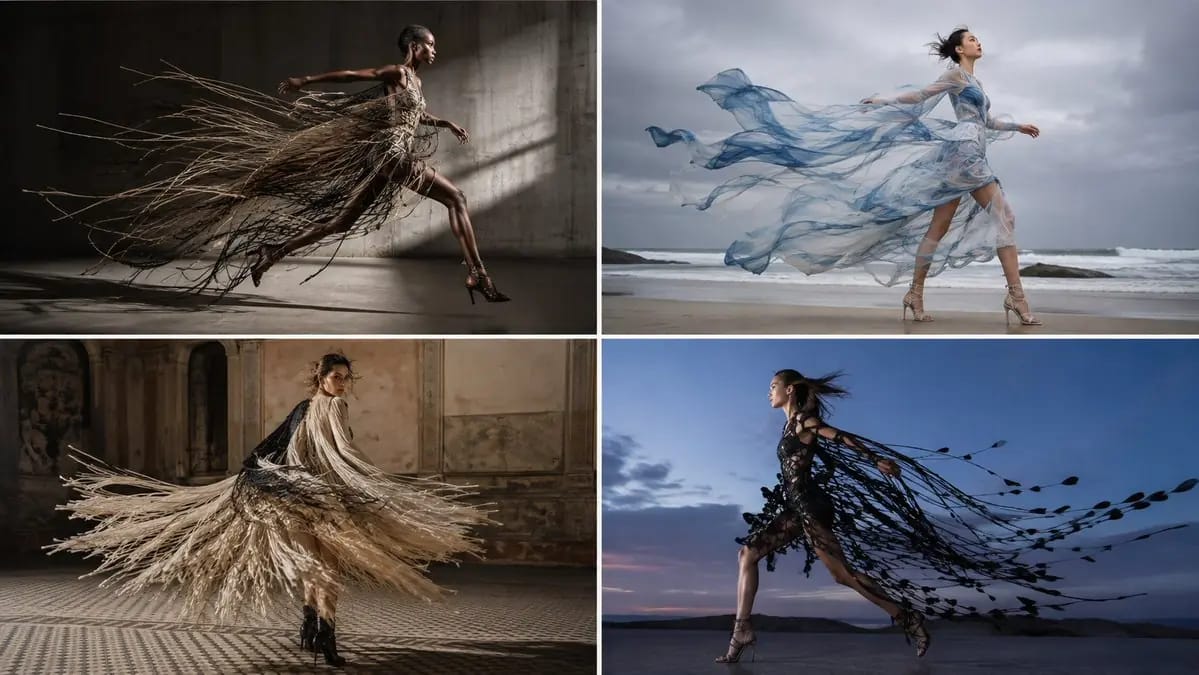
2x2 그리드, 16:9
2x2 grid, 16:9, ai picks subjects input = [ [Theme] / [Model] / [Setting Context] / [Capture Medium] / [Motion Behavior] ] run theme_kinetic_motion_design: design_derivation := climb the ladder from theme to a behavior — how the theme...
프롬프트
2x2 그리드, 16:9, ai가 주제를 선택함 입력 = [ [테마] / [모델] / [설정 컨텍스트] / [촬영 매체] / [모션 동작] ] theme_kinetic_motion_design 실행: design_derivation := 테마에서 동작으로 사다리를 오른다 — 테마가 어떻게 움직이고, 축적되고, 흩어지고, 붕괴하거나 전파되는지 — 그리고 몸이 움직일 때 그렇게 동작하는 의상을 만든다 motion_behavior := 의상이 무엇을 하는지 추론한다 — 끌림, 흔들림, 들어올림, 잔물결, 가닥으로 분리됨, 풀무처럼 열리고 닫힘, 벗겨짐, 부풀어 오름, 펼쳐짐; 움직임이 디자인이고 정지된 의상은 그것 없이는 불완전하다 kinetic_law := 요소들은 실제 지연을 두고 자신의 질량에 의해 움직인다 — 가벼운 소재는 빠르게 가속되고 빨리 안정되며, 무거운 소재는 느린 진자처럼 지연되고 흔들린다; 끌리는 요소는 몸이 이미 지나간 경로를 따르지 현재 위치를 따르지 않는다; 프린지는 시트처럼 움직이는 대신 각기 다른 각도로 개별 가닥으로 분리된다; 무게가 다른 레이어는 서로 다른 속도로 분리된다; 공기 저항은 가벼운 소재를 중력에 반하여 위로 들어 올린다 the_reveal := 움직임은 정지가 감추는 것을 드러낸다 — 언더레이어, 슬릿, 대비되는 안감, 프린트된 내부, 몸 자체; 의상은 움직임에 따라 다른 대상이 된다 subject_dna := 진정으로 움직이는 한 모델 — 걸음 중간, 회전 중간, 머리카락이 흩날리고, 체중이 실리고, 포즈가 아닌 노력의 표정 context_dna := 움직일 공간이 있는 설정을 추론하고, 테마가 요구하면 바람의 근원을 추가한다 moment_state := 동작 중간 + 인과적 단서 (방금 끝난 회전, 도착하는 돌풍, 착지하는 보폭) capture_dna := 셔터를 결정하고 확정한다 — 빠른 스트로브가 모든 가닥을 뚜렷하게 얼리거나, 느린 드래그가 움직이는 요소들을 연속적인 선으로 번지게 하면서 몸은 선명하게 유지한다; 둘의 혼합은 절대 금지 focal_anchor := 몸은 선명하게, 움직이는 요소들은 선택한 셔터에 따라 표현된다 light_logic := 스트로브로 얼린 하드 라이트와 실제 분리, 또는 연속광과 방향성 스미어; 얇고 반투명한 소재가 빛나도록 역광 사용 imperfection := 엉키거나 무언가에 걸린 요소, 얼굴 위의 머리카락, 영웅적이지 않은 동작 중간 자세, 약간 늦은 프레임 depth & frame := 끌리는 요소들을 위한 이동 방향의 공간; 16:9 mood := 살아있음, 일시적임, 운동성 render: 서로 다른 질량에 걸친 실제 모션 물리가 이미지를 만드는 정직한 한 순간. 금지 — 대상: 테마의 문자적 묘사, 의상에 부착될 수 없는 요소 금지 — 룩: 움직이는 몸 위의 정적 의상, 무게와 무관하게 모든 요소가 완벽하게 동기화되어 움직임, 프린지가 단단한 시트로 움직임, 이동 방향에 대해 잘못된 방향을 가리키는 끌리는 소재, 암시된 벡터 없이 얼어붙은 모션, 한 프레임에서 일부 요소는 번지고 다른 요소는 얼어붙음
이 프롬프트 사용 방법
- 1프롬프트를 그대로 복사한 뒤 원하는 모델이나 Ideart 프로젝트에 붙여넣으세요.
- 2제품, 주제, 대상, 스타일 세부사항을 자신의 컨텍스트로 교체하세요.
- 3먼저 기준 결과를 생성한 뒤 가장 강한 방향을 캠페인, 이미지 세트 또는 비디오 콘셉트로 리믹스하세요.
이 프롬프트로 제작
이미지 프롬프트를 완성된 크리에이티브 프로젝트로 바꾸세요.
프롬프트를 저장하고 참조 이미지나 노트를 추가한 뒤 Ideart가 같은 창작 스레드에서 다음 제작 단계를 만들게 하세요.