
이미지AI
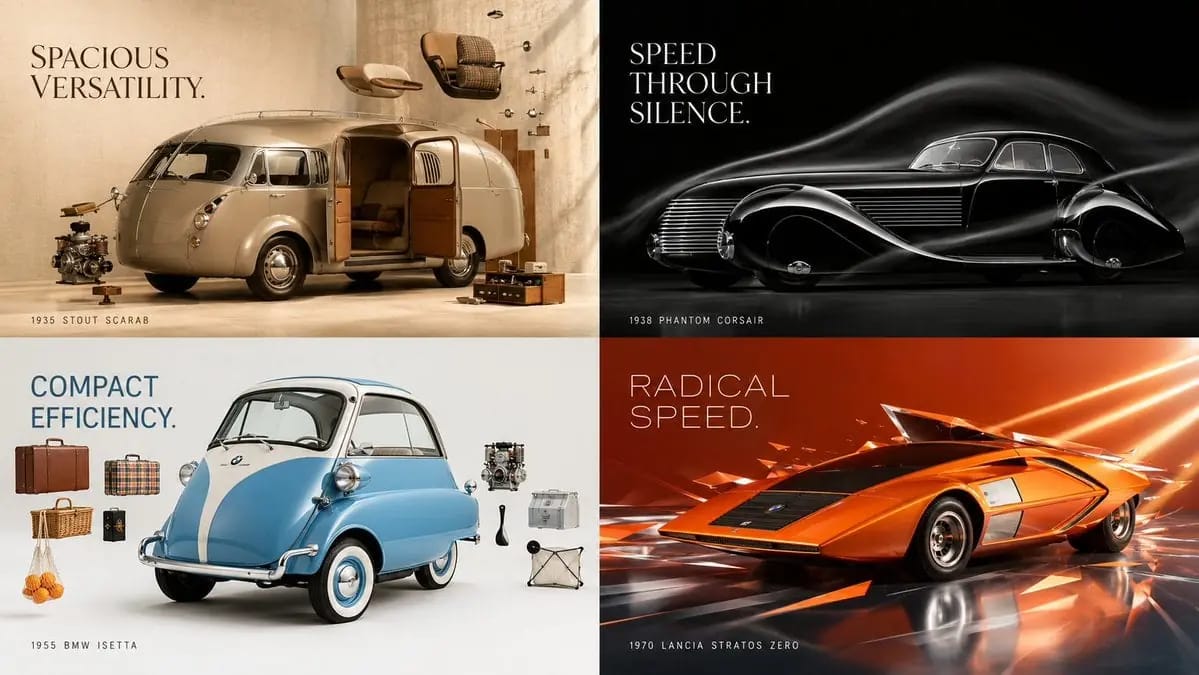
2x2 grid, 16:9, do this for unusual classic cars
2x2 grid, 16:9, do this for unusual classic cars that existed: input ::= [Product] step_1 :: infer product physics - weight, rigidity, transparency, reflectivity - how it opens, pours, wears, clicks, or resists - signature silhouette...
프롬프트
2x2 grid, 16:9, do this for unusual classic cars that existed: input ::= [Product] step_1 :: infer product physics - weight, rigidity, transparency, reflectivity - how it opens, pours, wears, clicks, or resists - signature silhouette recognisable from twenty feet - the one detail that earns a macro insert step_2 :: infer the single claim - one benefit only: cold, fast, clean, loud, quiet, lasting - the physical metaphor that proves it - what should defy gravity, split, freeze, shatter, or bloom step_3 :: infer world temperature - luxury → negative space, monochrome, deep falloff, stillness - energy → saturation, tilt, motion blur, splash - craft → linen, wood, daylight, hands entering frame - clinical → white cyc, hard edges, zero props step_4 :: infer supporting cast - raw ingredients or components suspended mid-air - surface: wet stone, brushed steel, raw silk, seamless paper - a human element only if it sells the single claim step_5 :: render spec - 100mm, f/8, product sharp front to back - large softbox key plus hard accent for edge definition - flawless surface, controlled reflections, no fingerprints - deliberate empty quadrant reserved for headline copy example_input :: [a matte black espresso tin]
이 프롬프트 사용 방법
- 1프롬프트를 그대로 복사한 뒤 원하는 모델이나 Ideart 프로젝트에 붙여넣으세요.
- 2제품, 주제, 대상, 스타일 세부사항을 자신의 컨텍스트로 교체하세요.
- 3먼저 기준 결과를 생성한 뒤 가장 강한 방향을 캠페인, 이미지 세트 또는 비디오 콘셉트로 리믹스하세요.
이 프롬프트로 제작
이미지 프롬프트를 완성된 크리에이티브 프로젝트로 바꾸세요.
프롬프트를 저장하고 참조 이미지나 노트를 추가한 뒤 Ideart가 같은 창작 스레드에서 다음 제작 단계를 만들게 하세요.