
이미지AI
A surreal high-fashion editorial photograph of a stylish
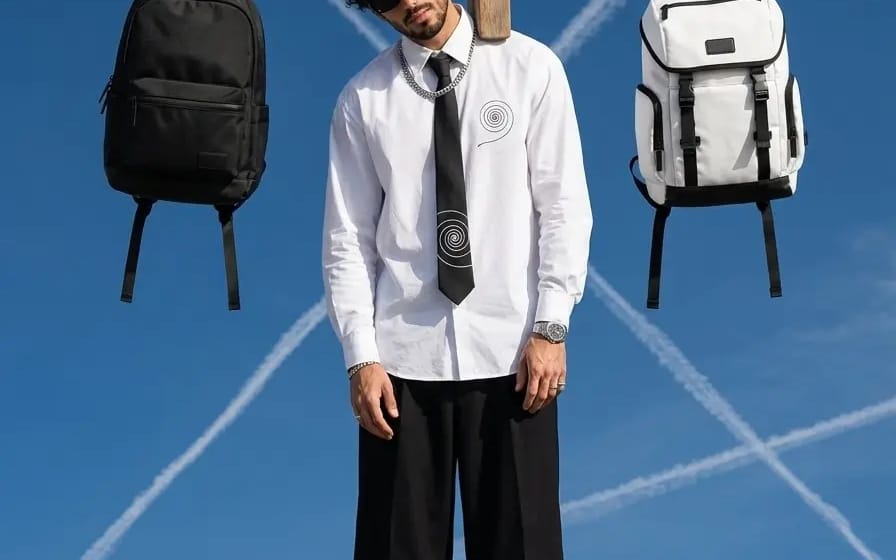
A surreal high-fashion editorial photograph of a stylish young man suspended mid-air from a giant wooden clothespin, as if hanging from a clothesline. He wears a crisp oversized white button-up shirt with subtle spiral graphic details,...
프롬프트
A surreal high-fashion editorial photograph of a stylish young man suspended mid-air from a giant wooden clothespin, as if hanging from a clothesline. He wears a crisp oversized white button-up shirt with subtle spiral graphic details, a black necktie with matching spiral motifs, cropped wide-leg black trousers, white crew socks, and polished black-and-white leather dress shoes. He has curly dark hair, light stubble, black sunglasses, a silver chain necklace, wristwatch, and rings.

On either side of him, two backpacks hang from the same clothesline—one sleek matte black backpack on the left and one structured white backpack with black straps and detailing on the right. The central wooden clothespin is oversized and positioned directly above his head, gripping the rope.

The background is an expansive deep cobalt-blue sky filled with intersecting white airplane contrails, creating graphic diagonal lines and a surreal geometric composition. Bright midday sunlight, crisp shadows, clean natural skin texture, subtle film grain, premium fashion campaign aesthetic, playful surrealism, minimalist composition.

Camera: low-angle full-body shot, centered symmetrical framing, wide-angle perspective, sharp subject separation, high detail.
Lighting: bright natural sunlight, hard directional shadows, vivid blue sky.
Style: luxury streetwear editorial, contemporary fashion photography, surreal advertising campaign, cinematic realism, slightly whimsical.
Aspect ratio: 4:5 vertical, ultra-detailed, photorealistic, high resolution.
이 프롬프트 사용 방법
- 1프롬프트를 그대로 복사한 뒤 원하는 모델이나 Ideart 프로젝트에 붙여넣으세요.
- 2제품, 주제, 대상, 스타일 세부사항을 자신의 컨텍스트로 교체하세요.
- 3먼저 기준 결과를 생성한 뒤 가장 강한 방향을 캠페인, 이미지 세트 또는 비디오 콘셉트로 리믹스하세요.
이 프롬프트로 제작
이미지 프롬프트를 완성된 크리에이티브 프로젝트로 바꾸세요.
프롬프트를 저장하고 참조 이미지나 노트를 추가한 뒤 Ideart가 같은 창작 스레드에서 다음 제작 단계를 만들게 하세요.