
이미지GPT Image
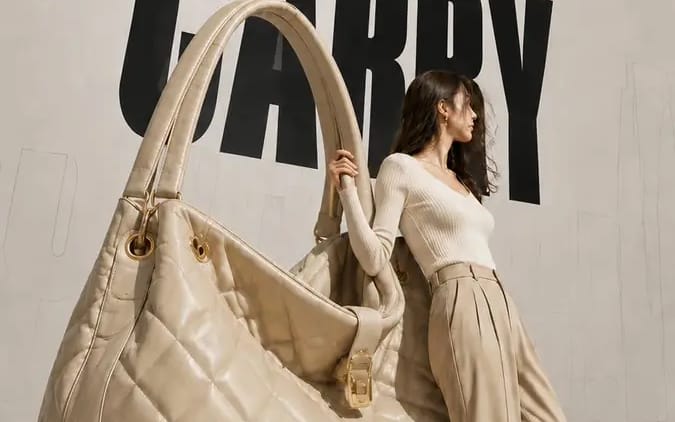
Create a 9:16 high-fashion editorial poster
Brand name: [Brand Name] Main title: [Main Title] Subtitle: [Subtitle] Collection label: [Collection Label] Product type: [Product Type] Product material and key details: [Product Material And Key Details] Main color palette: [Main...
프롬프트
브랜드 이름: [Brand Name]
메인 제목: [Main Title]
부제: [Subtitle]
컬렉션 라벨: [Collection Label]
제품 유형: [Product Type]
제품 소재 및 주요 디테일: [Product Material And Key Details]
메인 컬러 팔레트: [Main Color Palette]
모델 스타일링: [Model Styling]
모델 상호작용: [Model Interaction]

오버사이즈 [Product Type]이 거대한 착용 가능한 오브제 설치물로 변모한 9:16 하이패션 에디토리얼 포스터를 만들어 주세요.

제품의 대부분을 선명하게 보여 주고, 전체 실루엣을 알아볼 수 있게 유지하세요. 현실적인 소재 질감, 스티칭, 매끄럽게 마감된 가장자리, 금속 하드웨어, 구조적 접합부, 반사, 표면 마감, 그리고 제품 특유의 기타 디테일을 포함해 프리미엄 제품의 장인 정신을 유지하세요. 건축적 규모로 확대된 실제 럭셔리 제품처럼 보여야 하며, 거친 소품이나 단순화된 3D 오브젝트처럼 보이면 안 됩니다.

비대칭 구도를 사용하세요: 한쪽에는 오버사이즈 제품을, 다른 쪽에는 사실적인 전신 성인 여성 모델을 배치하세요. 모델은 물체에 기대거나, 잡거나, 밀거나, 균형을 잡기 위해 사용하는 등 물리적으로 상호작용해야 합니다. 포즈는 일반적인 패션 포즈가 아니라, 설득력 있는 무게감, 접촉, 신체 긴장감을 보여 주어야 합니다.

미묘한 원근선, 건축적 윤곽선, 부드러운 방향성 조명이 있는 깨끗하고 중립적인 스튜디오 배경을 사용하세요. 피사체 뒤에 크고 검은색의 콘덴스드 헤드라인을 추가하고, 모델과 제품이 부분적으로 겹치게 하세요. 깊이감을 만들기 위해 더 먼 배경에 희미한 오버사이즈 아웃라인 타이포그래피 또는 낮은 불투명도의 원근 텍스트를 배치하세요.
이 프롬프트 사용 방법
- 1프롬프트를 그대로 복사한 뒤 원하는 모델이나 Ideart 프로젝트에 붙여넣으세요.
- 2제품, 주제, 대상, 스타일 세부사항을 자신의 컨텍스트로 교체하세요.
- 3먼저 기준 결과를 생성한 뒤 가장 강한 방향을 캠페인, 이미지 세트 또는 비디오 콘셉트로 리믹스하세요.
이 프롬프트로 제작
이미지 프롬프트를 완성된 크리에이티브 프로젝트로 바꾸세요.
프롬프트를 저장하고 참조 이미지나 노트를 추가한 뒤 Ideart가 같은 창작 스레드에서 다음 제작 단계를 만들게 하세요.