
이미지AI
Class EditorialManifestoPoster: def init(self, topic= TOPIC
class EditorialManifestoPoster: def __init__(self, topic="[TOPIC]", subject="[SUBJECT]"): self.format = "vertical campaign poster / cover art / billboard" self. camera = "low-angle street fashion photography" self.environment =...
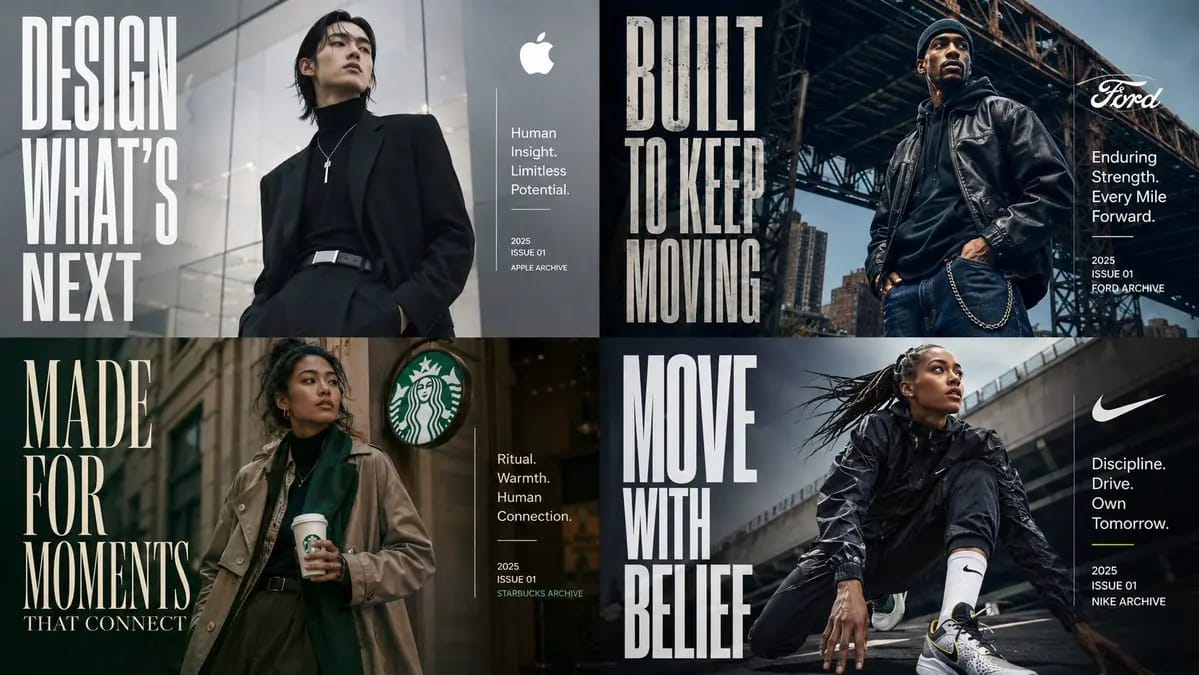
프롬프트
class EditorialManifestoPoster: def __init__(self, topic="[TOPIC]", subject="[SUBJECT]"): self.format = "vertical campaign poster / cover art / billboard" self. camera = "low-angle street fashion photography" self.environment = AI_INFER("an urban setting, architectural backdrop, or contextual environment that fits TOPIC") self.mood = AI_INFER("cinematic, aspirational, future-facing, premium, culturally relevant") def infer_brand_language(self): return { "headline_phrase": AI_INFER("2-5 word manifesto phrase derived from TOPIC"), "subheadline": AI_INFER("short category descriptor or positioning line"), "microcopy": AI_INFER("small supporting descriptors, capabilities, themes, or taglines"), "year_or_drop": AI_INFER("launch year, issue number, season, edition, or archive mark") } def build_visual_hierarchy(self): return """ Place one confident hero subject at center or slightly off-center. Use giant condensed typography as a structural visual element, not just a label. The headline should occupy a large vertical block on one side of the composition. Add a smaller clean info block on the opposite side for title, descriptor, micro-copy, and date. The environment should support the subject and typography without overwhelming them. """ # EXECUTE: # Render TOPIC as a premium editorial poster where the subject physically embodies the brand message. # No hard-coded text, styling, or fashion details unless supplied.이 프롬프트 사용 방법
- 1프롬프트를 그대로 복사한 뒤 원하는 모델이나 Ideart 프로젝트에 붙여넣으세요.
- 2제품, 주제, 대상, 스타일 세부사항을 자신의 컨텍스트로 교체하세요.
- 3먼저 기준 결과를 생성한 뒤 가장 강한 방향을 캠페인, 이미지 세트 또는 비디오 콘셉트로 리믹스하세요.
이 프롬프트로 제작
이미지 프롬프트를 완성된 크리에이티브 프로젝트로 바꾸세요.
프롬프트를 저장하고 참조 이미지나 노트를 추가한 뒤 Ideart가 같은 창작 스레드에서 다음 제작 단계를 만들게 하세요.