
이미지GPT Image
Create a 9:16 editorial portrait poster combining realistic
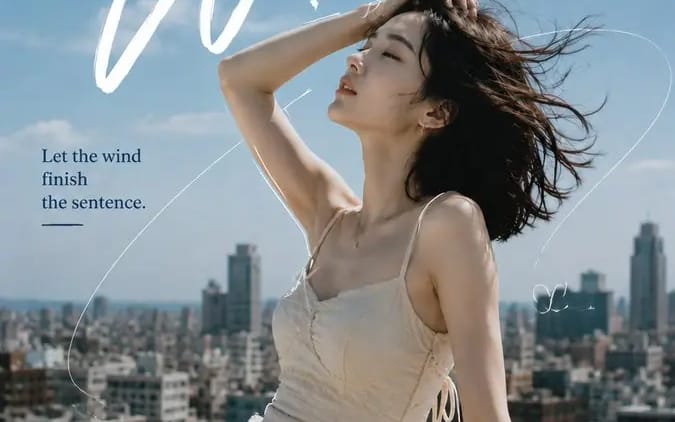
Create a 9:16 editorial portrait poster combining realistic photography, expressive typography, and minimal hand-drawn linework. Subject: [Person Outfit Pose] Scene: [Location] Mood: [Mood] Main title: [Headline] Secondary text: [Short...
프롬프트
Create a 9:16 editorial portrait poster combining realistic photography, expressive typography, and minimal hand-drawn linework.

Subject: [Person Outfit Pose]
Scene: [Location]
Mood: [Mood]
Main title: [Headline]
Secondary text: [Short Phrase]
Palette: [Colors]

Use a realistic portrait as the main visual, with natural skin texture, expressive eyes, and believable lighting.

Let the typography respond to the subject’s pose, body direction, hair movement, and negative space instead of using a fixed layout.

Add 1 strong headline, 1 secondary handwritten element, and 1 short supporting sentence.

Use only a few hand-drawn lines:
1 main flowing line connecting the composition
1–2 short lines partially following the subject’s silhouette
a few minimal doodles or symbols

Do not fully outline the person. Keep plenty of clean breathing space.

The drawn lines should feel connected to the scene:
wind trails, city routes, circular motion, light paths, etc.

Keep the overall balance around 70% photography / 30% graphic design.

Style: fashion editorial, independent magazine, cinematic portrait photography, refined typography, subtle film texture, clean composition, no dates, numbers, page codes, or excessive decorative text.
이 프롬프트 사용 방법
- 1프롬프트를 그대로 복사한 뒤 원하는 모델이나 Ideart 프로젝트에 붙여넣으세요.
- 2제품, 주제, 대상, 스타일 세부사항을 자신의 컨텍스트로 교체하세요.
- 3먼저 기준 결과를 생성한 뒤 가장 강한 방향을 캠페인, 이미지 세트 또는 비디오 콘셉트로 리믹스하세요.
이 프롬프트로 제작
이미지 프롬프트를 완성된 크리에이티브 프로젝트로 바꾸세요.
프롬프트를 저장하고 참조 이미지나 노트를 추가한 뒤 Ideart가 같은 창작 스레드에서 다음 제작 단계를 만들게 하세요.