
이미지GPT Image
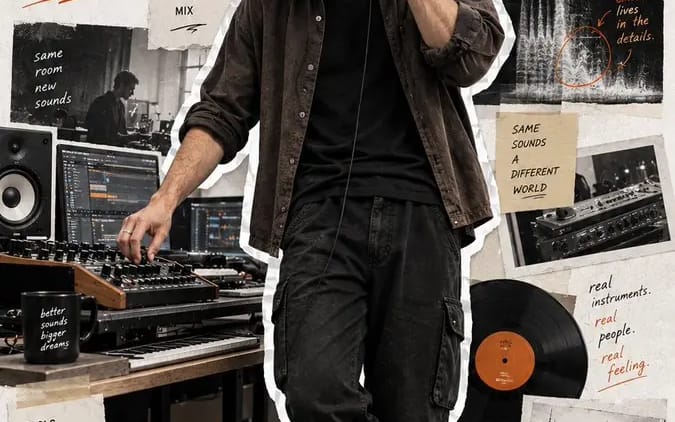
Create a 9:16 full-body editorial portrait poster
Create a 9:16 full-body editorial portrait poster for a modern [Profession]. Subject: [Subject] Outfit: [Outfit] Working action: [Working Action] Workflow: [Workflow] Tools: [Tools] Final output: [Final Output] Headline: [Headline]...
프롬프트
현대적인 [Profession]을 위한 9:16 전신 에디토리얼 인물 포스터를 만들어 주세요.

주제: [Subject]
의상: [Outfit]
작업 동작: [Working Action]
워크플로: [Workflow]
도구: [Tools]
최종 결과물: [Final Output]
헤드라인: [Headline]
강조 색상: [Accent Color]

사실적인 전신 인물 사진을 포스터 높이의 75–85%를 차지하는 지배적인 시각 요소로 만들어 주세요. 자연스러운 신체 비율, 사실적인 피부와 머리카락, 진짜 같은 의상 소재, 믿을 수 있는 직장 조명을 사용하세요. 주제가 포즈를 취하거나 카메라를 바라보지 않고 자연스럽게 작업하는 모습을 보여 주세요.

전체 인물을 윤곽이 뚜렷하고 약간 불규칙한 흰 종이/스티커 테두리로 오려내세요.

깨끗한 미색 질감 종이 배경을 사용하고, 주제 주변을 다음을 보여 주는 절제된 에디토리얼 콜라주 요소로 둘러싸세요:
1. 그들의 워크플로,
2. 도구와 과정,
3. 완성된 결과.

찢어진 종이 사진, 테이프, 스케치, UI 조각, 다이어그램, 손글씨 메모, 화살표, 짧은 과정 문구를 사용하세요. 모든 보조 요소는 해당 직업과 관련성을 유지하고 인물 사진보다 시각적으로 부차적이어야 합니다.

큰 헤드라인 “[Headline]”을 추가하고 타이포그래피와 작은 그래픽 주석에 [Accent Color]를 사용하세요.

전체 결과물은 창작자 인물 사진, 워크플로 스토리, 에디토리얼 스크랩북 포스터를 하나로 합친 것처럼 현대적이고 사실적이며 스타일리시하고 인간적으로 유지하세요.

번호 매기기, 페이지 번호, 아카이브 번호, 노란 빈티지 필터, 사이버펑크 효과, 딱딱한 기업식 포즈, CGI 피부, 잘린 신발, 왜곡된 손, 과도하게 crowded한 콜라주는 넣지 마세요.
이 프롬프트 사용 방법
- 1프롬프트를 그대로 복사한 뒤 원하는 모델이나 Ideart 프로젝트에 붙여넣으세요.
- 2제품, 주제, 대상, 스타일 세부사항을 자신의 컨텍스트로 교체하세요.
- 3먼저 기준 결과를 생성한 뒤 가장 강한 방향을 캠페인, 이미지 세트 또는 비디오 콘셉트로 리믹스하세요.
이 프롬프트로 제작
이미지 프롬프트를 완성된 크리에이티브 프로젝트로 바꾸세요.
프롬프트를 저장하고 참조 이미지나 노트를 추가한 뒤 Ideart가 같은 창작 스레드에서 다음 제작 단계를 만들게 하세요.