
이미지GPT Image
프리미엄 바이럴 시네마틱 애니메이션 에디토리얼 포스터를
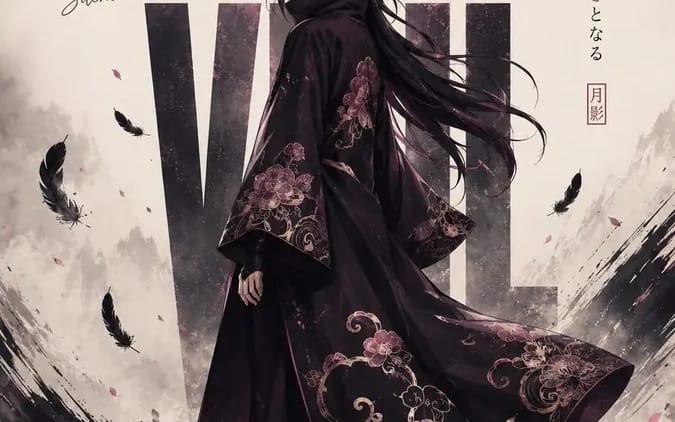
Create a premium viral cinematic anime editorial poster featuring a mysterious [Gender] shinobi standing alone in a glossy reflective minimalist landscape, body slightly turned away while looking back toward the viewer, long dark hair...
프롬프트
프리미엄 바이럴 시네마틱 애니메이션 에디토리얼 포스터를 제작하세요. 신비로운 [Gender] 닌자가 광택이 나는 반사적인 미니멀리스트 풍경 속에 홀로 서 있으며, 몸은 살짝 돌린 채 시청자를 향해 뒤돌아보고 있습니다. 긴 검은 머리는 바람에 흩날리고, 차분하면서도 강력한 표정을 지니고 있으며, 우아하게 흘러내리는 검은 망토에는 정교한 [Cloak Motifs]가 장식되어 있습니다. 캐릭터 뒤에는 “[Main Title]”이라는 크고 굵은 콘덴스드 타이포그래피가 배치되어 구도에 통합되며 캐릭터 뒤에 부분적으로 가려집니다. 왼쪽에는 세련된 손글씨 문구 “[Short Tagline]”을 추가하고, 오른쪽에는 미묘한 수직 일본풍 타이포그래피를 배치합니다. 캐릭터 주변에는 떠다니는 검은 깃털, 미세한 파티클, 극적인 일본 먹물 붓 터치, 대기 안개, 그리고 젖은 바닥에 강한 거울 반사를 표현합니다. [Main Color] + [Secondary Color] + 검정 + 부드러운 메탈릭 악센트로 구성된 시선을 사로잡는 프리미엄 컬러 팔레트를 사용하며, 깔끔한 크림/스모키 배경 위에 배치합니다. 하이엔드 일본 패션 에디토리얼과 시네마틱 애니메이션 키 아트의 만남, 극적인 네거티브 스페이스, 럭셔리 포스터 디자인, 초세부 캐릭터, 사실적으로 흘러내리는 천, 선명한 얼굴 디테일, 시네마틱 조명, 미세한 필름 그레인, 세련된 타이포그래피, 시각적으로 중독성 있는 소셜 미디어 미학, 상징적인 구도, 9:16 세로, 초고품질, 워터마크 없음, 기기 없음, 노트북 없음, 휴대폰 없음, 독립형 포스터만.
이 프롬프트 사용 방법
- 1프롬프트를 그대로 복사한 뒤 원하는 모델이나 Ideart 프로젝트에 붙여넣으세요.
- 2제품, 주제, 대상, 스타일 세부사항을 자신의 컨텍스트로 교체하세요.
- 3먼저 기준 결과를 생성한 뒤 가장 강한 방향을 캠페인, 이미지 세트 또는 비디오 콘셉트로 리믹스하세요.
이 프롬프트로 제작
이미지 프롬프트를 완성된 크리에이티브 프로젝트로 바꾸세요.
프롬프트를 저장하고 참조 이미지나 노트를 추가한 뒤 Ideart가 같은 창작 스레드에서 다음 제작 단계를 만들게 하세요.