
이미지GPT Image
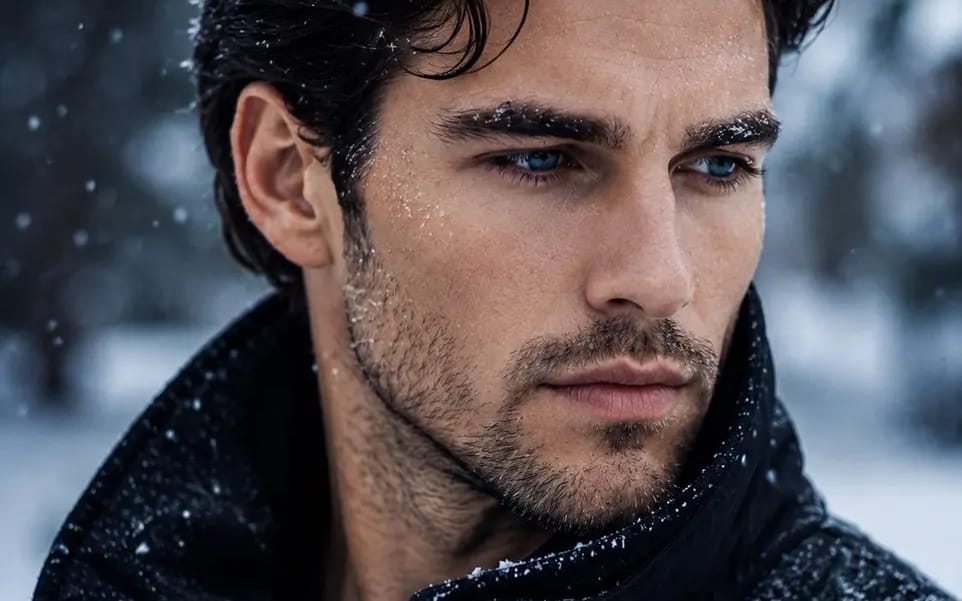
Create an ultra-realistic 8K cinematic winter portrait
Create an ultra-realistic 8K cinematic winter portrait using my uploaded face as the exact facial reference. Preserve my identity with maximum accuracy, including my face shape, hairstyle, beard, eyebrows, skin tone, lips, jawline, and...
프롬프트
Create an ultra-realistic 8K cinematic winter portrait using my uploaded face as the exact facial reference. Preserve my identity with maximum accuracy, including my face shape, hairstyle, beard, eyebrows, skin tone, lips, jawline, and every unique facial feature. Do not change my age or recognizable appearance. Show a close-up side profile with my eyes looking slightly downward, wearing a serious, calm, introspective expression. Light snow is falling, with realistic snowflakes resting on my hair, eyebrows, eyelashes, beard, and jacket. Tiny droplets of melted snow and cold moisture are visible on my skin, creating a natural frosty texture. Dress me in a premium matte black winter jacket with a high collar. Use soft overcast winter lighting with subtle cool blue tones, shallow depth of field, creamy cinematic bokeh, and a blurred snowy forest background. Hyper-detailed skin pores, natural facial hair, realistic eye reflections, volumetric atmosphere, HDR, photorealistic color grading, crisp focus on the face, premium editorial photography, shot on a full-frame camera with an 85mm lens at f/1.4, IMAX-quality realism, no text, no watermark, no logo, no extra people, no distortions.
이 프롬프트 사용 방법
- 1프롬프트를 그대로 복사한 뒤 원하는 모델이나 Ideart 프로젝트에 붙여넣으세요.
- 2제품, 주제, 대상, 스타일 세부사항을 자신의 컨텍스트로 교체하세요.
- 3먼저 기준 결과를 생성한 뒤 가장 강한 방향을 캠페인, 이미지 세트 또는 비디오 콘셉트로 리믹스하세요.
이 프롬프트로 제작
이미지 프롬프트를 완성된 크리에이티브 프로젝트로 바꾸세요.
프롬프트를 저장하고 참조 이미지나 노트를 추가한 뒤 Ideart가 같은 창작 스레드에서 다음 제작 단계를 만들게 하세요.