
이미지GPT Image 2
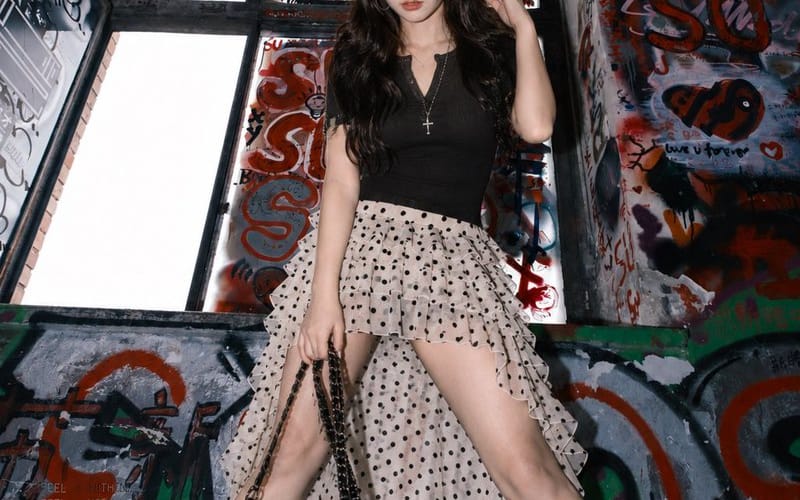
Graffiti Stairwell Sweet-Goth Fashion Portrait
A vertical editorial fashion portrait prompt for creating a sweet-cool East Asian woman in a black top and polka-dot ruffle skirt inside a gritty graffiti-covered stairwell.
프롬프트
Create a high-fashion editorial full-body portrait of {argument name="character description" default="a young East Asian woman with long voluminous dark brown wavy hair, sweet-cool mature aura, pale skin, and soft but intense eye contact"} standing in an abandoned concrete stairwell or underpass covered with dense graffiti. She poses confidently with legs spread wide, one hand lifting a lock of hair near her ear and the other holding a glossy black chain shoulder bag low at her side. Outfit has exactly 7 visible fashion pieces/accessories: 1) fitted black V-neck short-sleeve knit top, 2) cream-white chiffon high-low irregular ruffle skirt with black polka dots and sheer layered hem, 3) white mid-calf ribbed socks, 4) chunky black platform derby shoes, 5) glossy black chain bag with long dangling chain strap, 6) silver hoop earrings, 7) silver cross pendant necklace. The location should feel gritty, urban, and claustrophobic, with tall window panels behind her covered in black, red, and blue tags, cracked gray concrete walls, peeling paint, and a waist-high graffiti barrier in the foreground. Use a low-angle fashion-photography composition, vertical 2:3 frame, centered subject, dramatic flash lighting, cool desaturated tones, sharp details, slight wide-angle distortion, glossy highlights on the shoes and bag, and realistic skin texture. Add subtle cyberpunk interface-like overlay text in small pale gray type around the edges, including fragments such as {argument name="overlay text" default="ERROR_404, UNKNOWN, DIGITAL_DECAY, DISCONNECT, FEEL NOTHING"}, but keep it faint and secondary. Overall mood: rebellious, sweet-goth, street-style lookbook, cinematic realism, no extra people, no watermark.이 프롬프트 사용 방법
- 1프롬프트를 그대로 복사한 뒤 원하는 모델이나 Ideart 프로젝트에 붙여넣으세요.
- 2제품, 주제, 대상, 스타일 세부사항을 자신의 컨텍스트로 교체하세요.
- 3먼저 기준 결과를 생성한 뒤 가장 강한 방향을 캠페인, 이미지 세트 또는 비디오 콘셉트로 리믹스하세요.
이 프롬프트로 제작
이미지 프롬프트를 완성된 크리에이티브 프로젝트로 바꾸세요.
프롬프트를 저장하고 참조 이미지나 노트를 추가한 뒤 Ideart가 같은 창작 스레드에서 다음 제작 단계를 만들게 하세요.