
이미지GPT Image 2
Layered Paper-Cut Illustration Poster
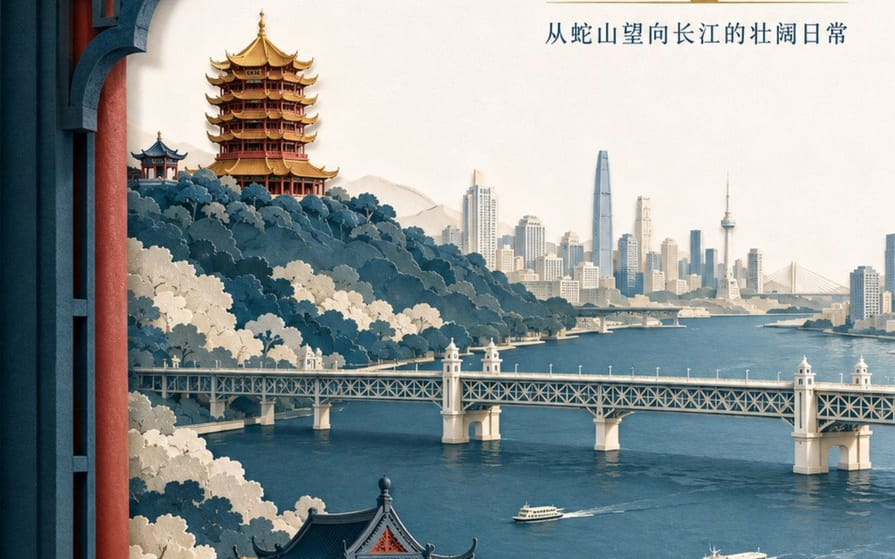
A detailed prompt for creating a sophisticated layered paper-cut illustration poster featuring Wuhan landmarks like the Yellow Crane Tower and the Yangtze River.
프롬프트
레이어드 종이 컷 일러스트 포스터

관광 브랜드 "{argument name="brand name" default="He Wang Wuhan"}"를 위한 고급 레이어드 종이 컷 일러스트 포스터를 제작하세요. 주제는 "{argument name="theme" default="탑에서 강을 바라보며, 한눈에 보는 우한의 경관 뼈대"}"입니다. 3:4 세로 형식으로 제작합니다. 구도는 전경 창틀을 사용하며, 두꺼운 질감의 종이로 이루어진 5~7개의 레이어가 뱀산, 황학루, 양쯔강, 우한 양쯔강 다리, 그리고 맞은편 강변의 도시 스카이라인을 형성합니다. 황학루는 배경의 능선에 위치하며, 레이어드 처마, 금빛 유약 타일, 그리고 주홍색 기둥 간의 정확한 관계를 보여줍니다. 양쯔강 다리는 중간 배경에서 수평으로 뻗어 있으며, 강 위에 두 개의 작은 페리 보트가 비율에 맞게 배치되어 있습니다. 종이 가장자리는 날카롭고, 왼쪽 상단에서 균일한 부드러운 조명이 비추며 레이어 사이에 사실적인 그림자가 드리워집니다. 색상은 인디고, 따뜻한 오프 화이트, 주홍색, 그리고 시각적 초점을 위한 소량의 금박으로 구성됩니다. 주요 제목 "{argument name="main title" default="탑에서 강 도시를 바라보다"}"는 오른쪽 상단의 넓은 흰 공간에 두 줄로 현대 송체로 배치됩니다. 브랜드 이름 "He Wang Wuhan"은 왼쪽 하단에 종이 봉인 형식으로 배치되어 현대적인 느낌을 유지하며 고전적인 모방이 아닙니다.이 프롬프트 사용 방법
- 1프롬프트를 그대로 복사한 뒤 원하는 모델이나 Ideart 프로젝트에 붙여넣으세요.
- 2제품, 주제, 대상, 스타일 세부사항을 자신의 컨텍스트로 교체하세요.
- 3먼저 기준 결과를 생성한 뒤 가장 강한 방향을 캠페인, 이미지 세트 또는 비디오 콘셉트로 리믹스하세요.
이 프롬프트로 제작
이미지 프롬프트를 완성된 크리에이티브 프로젝트로 바꾸세요.
프롬프트를 저장하고 참조 이미지나 노트를 추가한 뒤 Ideart가 같은 창작 스레드에서 다음 제작 단계를 만들게 하세요.