
이미지GPT Image
MAIN PROMPT
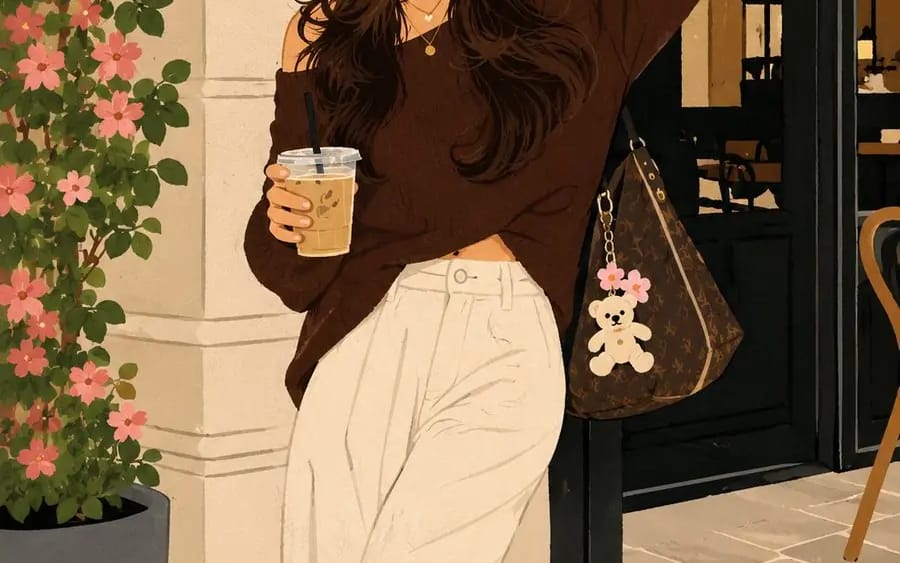
MAIN PROMPT Transform the uploaded image into a premium contemporary naïve illustration while preserving the exact facial identity, facial structure, hairstyle, expression, body proportions, pose, clothing silhouette, composition, and...
프롬프트
MAIN PROMPT
업로드된 이미지를 프리미엄 현대적 나이브 일러스트레이션으로 변환하되, 참조 이미지의 정확한 얼굴 정체성, 얼굴 구조, 헤어스타일, 표정, 신체 비율, 포즈, 의상 실루엣, 구도 및 전체 장면을 유지하세요.
FORMAT LOCK
수직 3:4 구도. 원본 프레이밍, 카메라 앵글, 원근법, 피사체 배치 및 전체 구도를 유지하세요. 프리미엄 포스터 미학을 갖춘 깔끔하고 중앙 정렬된 레이아웃.
IDENTITY LOCK
정확한 얼굴 특징, 헤어스타일, 표정, 신체 비율, 의상 실루엣 및 알아볼 수 있는 정체성을 유지하세요. 인물의 외모를 바꾸지 않으면서 일러스트레이션을 단순화하세요.
ILLUSTRATION STYLE
미니멀한 손그림 미학을 지닌 현대적 작가적 나이브 일러스트레이션을 만드세요. 장난스러운 비율, 약간 불규칙한 손그림 윤곽선, 표현력 있는 장식적 선 작업, 의도적으로 불완전한 장인 정신을 사용하세요. 피사체를 즉시 알아볼 수 있게 유지하면서 형태를 단순화하세요.
COLOR SYSTEM
세련된 현대적 팔레트를 사용한 평면적 고대비 색상 블록을 사용하세요. 그라데이션 없음. 그림자 없음. 사실적 조명 없음. 3D 효과 없음. 대담한 시각적 균형을 갖춘 깔끔한 그래픽 형태.
STYLE
프리미엄 디자이너 포스터. 편집 일러스트레이션. 현대 나이브 아트. 핸드메이드 그래픽 일러스트레이션. 박물관 품질의 프린트 디자인. 미니멀리스트 구도. 현대 예술 서적 미학. 표현력 있는 수공예 캐릭터. 매우 깔끔한 프리미엄 아트워크.
NEGATIVE PROMPT
포토리얼리즘, 그라데이션, 그림자, 3D 효과, CGI 같은 외관, 디지털 페인팅, 과도한 디테일, 지저분한 선 작업, 흐릿한 가장자리, 왜곡된 해부학, 추가 팔다리, 텍스트, 로고, 워터마크 또는 저품질 렌더링을 피하세요.
이 프롬프트 사용 방법
- 1프롬프트를 그대로 복사한 뒤 원하는 모델이나 Ideart 프로젝트에 붙여넣으세요.
- 2제품, 주제, 대상, 스타일 세부사항을 자신의 컨텍스트로 교체하세요.
- 3먼저 기준 결과를 생성한 뒤 가장 강한 방향을 캠페인, 이미지 세트 또는 비디오 콘셉트로 리믹스하세요.
이 프롬프트로 제작
이미지 프롬프트를 완성된 크리에이티브 프로젝트로 바꾸세요.
프롬프트를 저장하고 참조 이미지나 노트를 추가한 뒤 Ideart가 같은 창작 스레드에서 다음 제작 단계를 만들게 하세요.