
이미지GPT Image 2
Ink-Twin Doodle Stylization
A structured JSON-based prompt for stylizing an image with an 'ink-twin' doodle character mimicking the main subject's pose.
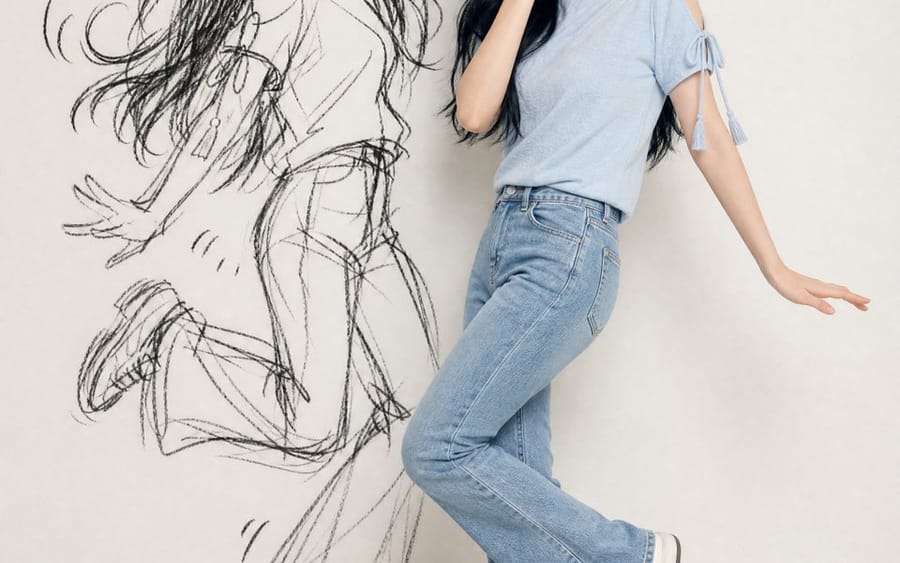
프롬프트
{
  "identity_ref": {
    "source": "uploaded photo",
    "lock": ["face", "eyes/nose/mouth", "skin tone", "hair (length/texture/color)", "accessories", "exact outfit"],
    "rule": "no invented details"
  },
  "composition": {"format": "vertical 4:5/9:16", "figures": ["real subject", "ink-twin doodle"], "layout": "side by side, poses fully visible"},
  "real_subject": {"style": "photoreal, full-body", "outfit": "match reference exactly", "expression": "playful, embarrassed, caught-out charm", "pose": "natural, toned-down version"},
  "ink_twin": {
    "style": "rough black sketch/charcoal doodle on wall",
    "recognizability": "silhouette only (hair/outfit/pose shape)",
    "avoid": ["realistic 2nd person", "flat shadow", "color cartoon"],
    "energy": "amplified, chaotic vs real subject",
    "extras": "optional sparse comic marks (motion lines/star/heart)"
  },
  "pose_rule": {
    "instruction": "new playful/mischievous shared pose each time",
    "avoid": ["pointing", "finger-guns", "mirrored/repeated poses"],
    "relationship": "subject = subtle version; twin = amplified cartoon version, same beat"
  },
  "setting": {"background": "clean minimal wall (white/cream/gray)", "lighting": "soft, even, daylight-style, face visible"},
  "mood": "playful, stylish, chaotic-fun, shareable",
  "negative_prompt": [
    "invented appearance", "outfit changes", "twin as real 2nd person",
    "flat/creepy shadow", "color cartoon twin", "weak resemblance",
    "clutter", "repeated/stiff/mirrored poses", "text", "watermark",
    "extra limbs", "bad hands"
  ]
}이 프롬프트 사용 방법
- 1프롬프트를 그대로 복사한 뒤 원하는 모델이나 Ideart 프로젝트에 붙여넣으세요.
- 2제품, 주제, 대상, 스타일 세부사항을 자신의 컨텍스트로 교체하세요.
- 3먼저 기준 결과를 생성한 뒤 가장 강한 방향을 캠페인, 이미지 세트 또는 비디오 콘셉트로 리믹스하세요.
이 프롬프트로 제작
이미지 프롬프트를 완성된 크리에이티브 프로젝트로 바꾸세요.
프롬프트를 저장하고 참조 이미지나 노트를 추가한 뒤 Ideart가 같은 창작 스레드에서 다음 제작 단계를 만들게 하세요.