
이미지GPT Image 2
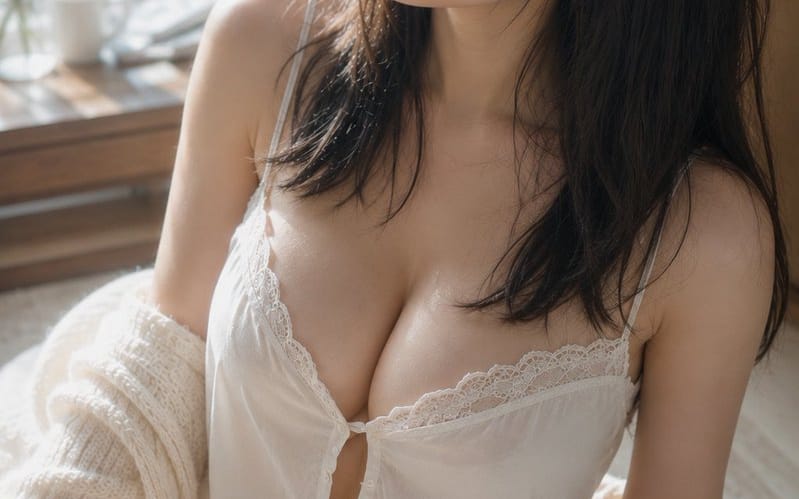
아침 햇살 실내복 초상화
부드럽고 사실적인 조명과 질감을 지닌 햇살이 비치는 창가에서 실내복을 입은 여성의 평화로운 아침 장면을 포착한 상세한 시네마틱 초상화 프롬프트입니다.
프롬프트
주제: {argument name="theme" default="Morning light on damp hair"}

주제: 밝은 창가 양탄자에 앉아 있는 {argument name="person" default="adult woman in white roomwear"}의 세로 초상화. 피사체는 화면 중앙에서 오른쪽으로 크게 배치되며, 머리 꼭대기에서 허벅지까지 보입니다. 상체가 화면의 약 2/3를 차지하며, 부드러운 배경 여백과 왼쪽에 창문이 있습니다.

캐릭터/표정: 자연스러운 검은색 세미 롱 헤어. 목욕 후처럼 약간 젖은 가느다란 머리카락이 뺨과 목을 따라 흐르고, 이마에 얇은 앞머리가 내려옵니다. 머리는 화면 왼쪽 위로 약간 기울어져 있으며, 조용한 시선이 창밖을 향합니다. 편안한 눈, 약간 벌어진 입술, 약간의 졸음이 남아 있는 차분한 표정. 옅은 베이지와 핑크를 중심으로 한 최소한의 메이크업, 모공과 잔털이 보이는 자연스러운 피부.

의상/포즈: 얇은 어깨 끈과 섬세한 레이스가 있는 흰색 나시, 그리고 매칭 반바지. 가슴 부분의 작은 단추와 부드러운 주름, 천이 중력에 따라 자연스럽게 떨어짐. 크림색의 굵게 짠 가디건이 어깨에서 흘러내려 팔꿈치와 팔뚝에 느슨하게 걸쳐짐. 몸은 왼쪽으로 약간 비틀려 있으며, 한쪽 다리를 앞으로 구부린 자연스러운 자세로 어깨 높이가 약간 다름.

배경/조명: 왼쪽에 큰 창문. 창밖에는 아침 햇살을 받은 녹색 나뭇잎이 부드러운 보케로 펼쳐짐. 창가 나무 탁자 위에 흰색 컵, 작은 유리 꽃병, 얇은 가지가 드문드문 놓여 있음. 주 조명은 왼쪽 위 창문에서 들어오는 따뜻한 자연광. 뺨, 코 옆구리, 쇄골, 어깨, 팔, 허벅지에 부드러운 하이라이트를 만들고, 머리 오른쪽과 방 뒤편은 부드러운 그림자에 잠김. 흰 천과 바닥에서 옅은 반사광이 되돌아옴.

구도/카메라: 세로 2:3. 약간 높은 위치에서 내려다보는 클로즈업 샷. 얼굴이 상단 중앙, 가슴이 중앙, 구부린 다리가 왼쪽 하단에 있는 삼각형 구도. 창문 쪽 여백은 시선 방향을 강조하며, 배경은 크게 흐려짐. 50mm 상당, 거의 개방에 가까운 얕은 심도. 초점은 눈과 얼굴에 맞춰지고, 전경의 다리와 배경의 창문은 부드럽게 흐려짐.

질감/스타일: 자연광만으로 촬영한 포토리얼리스틱 실내 초상화. 밝은 아이보리와 옅은 나뭇결을 베이스로 하여 건강한 피부 톤과 창밖의 녹색을 미묘한 악센트 컬러로 사용. 지나치게 매끄럽지 않으면서 피부 질감, 잔털, 젖은 머리카락의 뭉친 느낌, 레이스와 니트의 섬유를 정밀하게 묘사. 우아한 필름 사진처럼 낮은 대비와 부드러운 그라데이션.

부정: 미성년자처럼 보이는 인물, 부자연스러운 얼굴, 부자연스러운 시선, 비대칭 눈, 여분의 손가락, 빠진 손가락, 사지의 융합, 무너진 어깨나 관절, 피부를 파고드는 옷, 천의 부자연스러운 투명도, 중력을 거스르는 머리카락이나 옷, 광원과 일치하지 않는 그림자, 과도한 피부 보정, 플라스틱 같은 피부, 텍스트, 로고, 워터마크.이 프롬프트 사용 방법
- 1프롬프트를 그대로 복사한 뒤 원하는 모델이나 Ideart 프로젝트에 붙여넣으세요.
- 2제품, 주제, 대상, 스타일 세부사항을 자신의 컨텍스트로 교체하세요.
- 3먼저 기준 결과를 생성한 뒤 가장 강한 방향을 캠페인, 이미지 세트 또는 비디오 콘셉트로 리믹스하세요.
이 프롬프트로 제작
이미지 프롬프트를 완성된 크리에이티브 프로젝트로 바꾸세요.
프롬프트를 저장하고 참조 이미지나 노트를 추가한 뒤 Ideart가 같은 창작 스레드에서 다음 제작 단계를 만들게 하세요.