
실사 디오라마 아이소메트릭 맵 프롬프트
도시의 매우 상세하고 사실적인 미니어처 디오라마 스타일 등각 투영 지도를 생성하기 위한 구조화된 프롬프트입니다. 틸트 시프트 효과와 함께 45도 탑다운 앵글을 지정하며, 거대한 랜드마크, 세밀한 미니어처 건축물, 그리고 빈티지 질감의 종이 지도 베이스 위에 배치하는 것을 강조합니다.
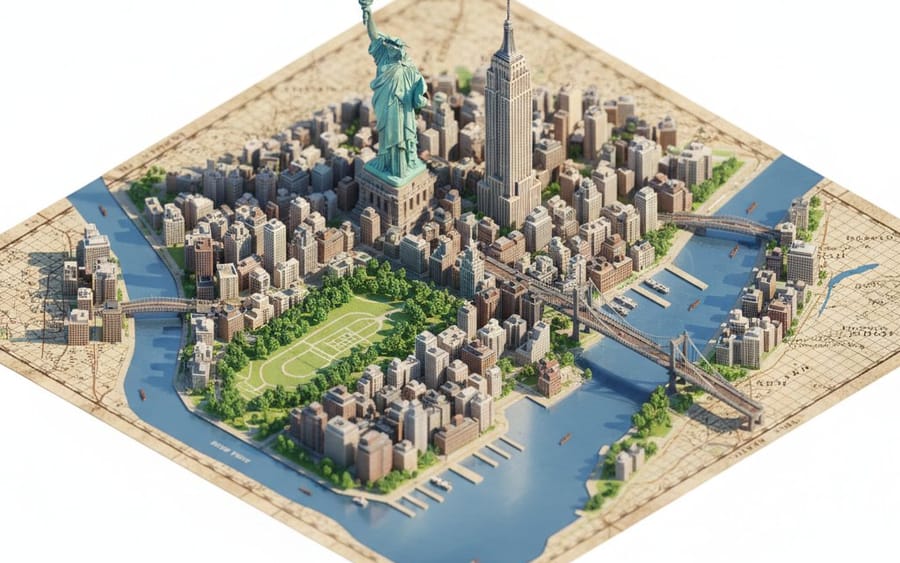
프롬프트
```json
{
  "description": "빈티지 질감의 종이 지도 위에 놓인 {argument name=\"city location\" default=\"CITY/LOCATION\"}의 매우 섬세하고 사실적인 미니어처 디오라마 스타일 등각 투영 지도를 만듭니다.",
  "perspective": {
    "type": "isometric",
    "angle": "45 degree top down",
    "look": "tilt-shift miniature effect가 적용된 매크로 사진"
  },
  "geography": {
    "shape": "{argument name=\"city location\" default=\"CITY/LOCATION\"}의 실제 지리적 형태를 따름",
    "landmarks": {
      "oversized": true,
      "dominant": true,
      "primary_focus": "기념물",
      "secondary_elements": "더 작고 단순화됨"
    },
    "architecture": "초고도로 섬세한 미니어처",
    "roads": "선별적",
    "greenery": true,
    "water_bodies": true,
    "terrain": true,
    "materials": ["stone", "wood", "concrete", "glass", "foliage"]
  },
  "lighting": {
    "type": "부드러운 시네마틱 주광",
    "effects": ["자연스러운 그림자", "따뜻한 하이라이트", "미묘한 대기 깊이"]
  },
  "water": {
    "rivers": true,
    "coastlines": true,
    "depth_gradients": "부드러움",
    "reflections": "은은함"
  },
  "map_base": {
    "type": "고지도 스타일 종이",
    "features": ["눈에 보이는 격자선", "종이 결", "인쇄된 지명"]
  },
  "focus": {
    "sharp_on_landmarks": true,
    "edge_falloff": "부드러움"
  },
  "quality": {
    "museum_quality": true,
    "handcrafted_diorama_realism": true,
    "ultra_high_resolution": true
  },
  "background": {
    "color": "깨끗한 순백색",
    "restrictions": ["떠다니는 텍스트 없음", "로고 없음", "워터마크 없음", "미래 지향적이거나 만화 같은 요소 없음"]
  },
  "aspect_ratio": "4:5"
}
```이 프롬프트 사용 방법
- 1프롬프트를 그대로 복사한 뒤 원하는 모델이나 Ideart 프로젝트에 붙여넣으세요.
- 2제품, 주제, 대상, 스타일 세부사항을 자신의 컨텍스트로 교체하세요.
- 3먼저 기준 결과를 생성한 뒤 가장 강한 방향을 캠페인, 이미지 세트 또는 비디오 콘셉트로 리믹스하세요.
이 프롬프트로 제작
이미지 프롬프트를 완성된 크리에이티브 프로젝트로 바꾸세요.
프롬프트를 저장하고 참조 이미지나 노트를 추가한 뒤 Ideart가 같은 창작 스레드에서 다음 제작 단계를 만들게 하세요.