
이미지GPT Image
Subject
Profession or hobby: [Profession Or Hobby] Subject: [Subject] Outfit: [Outfit] Natural action or pose: [Natural Action Or Pose] Related tools, products, or objects: [Related Tools Products Or Objects] Supporting collage images:...
프롬프트
Profession or hobby: [Profession Or Hobby]
Subject: [Subject]
Outfit: [Outfit]
Natural action or pose: [Natural Action Or Pose]
Related tools, products, or objects: [Related Tools Products Or Objects]
Supporting collage images: [Supporting Collage Images]
Main headline: [Main Headline]
Secondary title: [Secondary Title]
Brand / editorial information: [Brand Editorial Information]
Accent color: [Accent Color]
Aspect ratio: [Aspect Ratio]

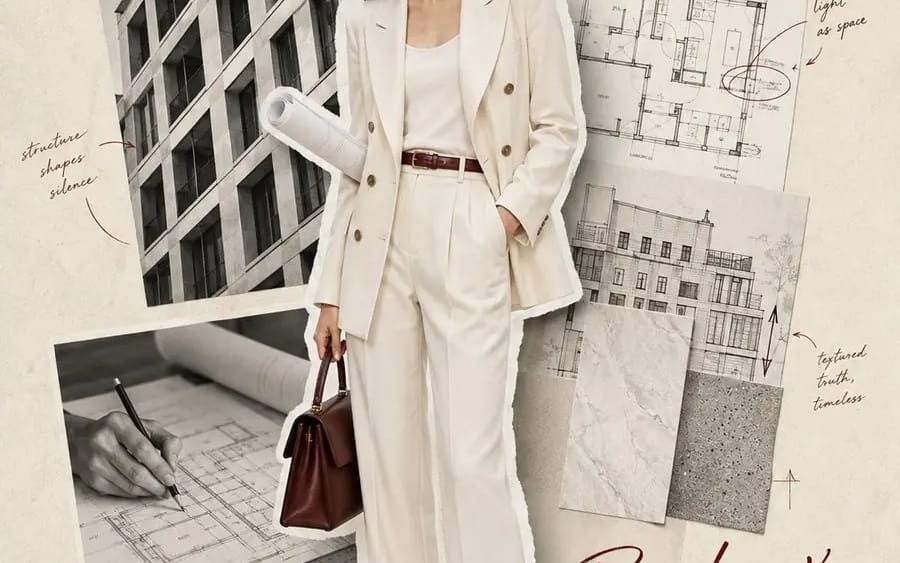
Create a vertical scrapbook-style editorial portrait poster based on the subject’s profession or hobby.

Use a warm ivory textured-paper background with subtle fibers, print grain, and a lightly aged fashion-magazine feel. Place one realistic full-body subject as the dominant cutout, occupying around 60–68% of the composition. Keep the entire body and shoes visible. Add slightly irregular white paper edges and a soft natural paper shadow.

The subject should be performing a small, natural action connected to their profession or hobby rather than standing in a stiff model pose. Use realistic skin texture, natural facial features, expressive eyes, authentic hair, and clearly rendered clothing materials.

Build three supporting collage modules around the subject:

1. One larger environmental or contextual photograph
2. One black-and-white action or detail photograph
3. One smaller collage featuring relevant tools, products, materials, or personal objects

Every supporting image must relate directly to the subject’s identity. Use torn-paper edges, slight rotation, controlled overlap, and subtle shadows. Keep the main subject in natural color while most supporting photographs remain monochrome or softly desaturated.

Add the large handwritten headline “[Main Headline]” across the upper section in [Accent Color]. Add “[Secondary Title]” in a smaller handwritten style near the lower area. Include a few clean serif or sans-serif editorial labels using the supplied brand, profession, location, date, product, or material information.

Add restrained hand-drawn arrows, circles, underlines, short notes, measurements, or numbers that help explain the subject’s story. Keep all annotations meaningful and visually controlled.

Maintain 25–30% negative space, one clear visual focus, and a balanced reading path from the headline to the face, outfit, supporting images, and secondary title. The final result should feel like a distinctive personal portrait, fashion editorial, and visual identity profile combined into one poster.
이 프롬프트 사용 방법
- 1프롬프트를 그대로 복사한 뒤 원하는 모델이나 Ideart 프로젝트에 붙여넣으세요.
- 2제품, 주제, 대상, 스타일 세부사항을 자신의 컨텍스트로 교체하세요.
- 3먼저 기준 결과를 생성한 뒤 가장 강한 방향을 캠페인, 이미지 세트 또는 비디오 콘셉트로 리믹스하세요.
이 프롬프트로 제작
이미지 프롬프트를 완성된 크리에이티브 프로젝트로 바꾸세요.
프롬프트를 저장하고 참조 이미지나 노트를 추가한 뒤 Ideart가 같은 창작 스레드에서 다음 제작 단계를 만들게 하세요.