
이미지GPT Image
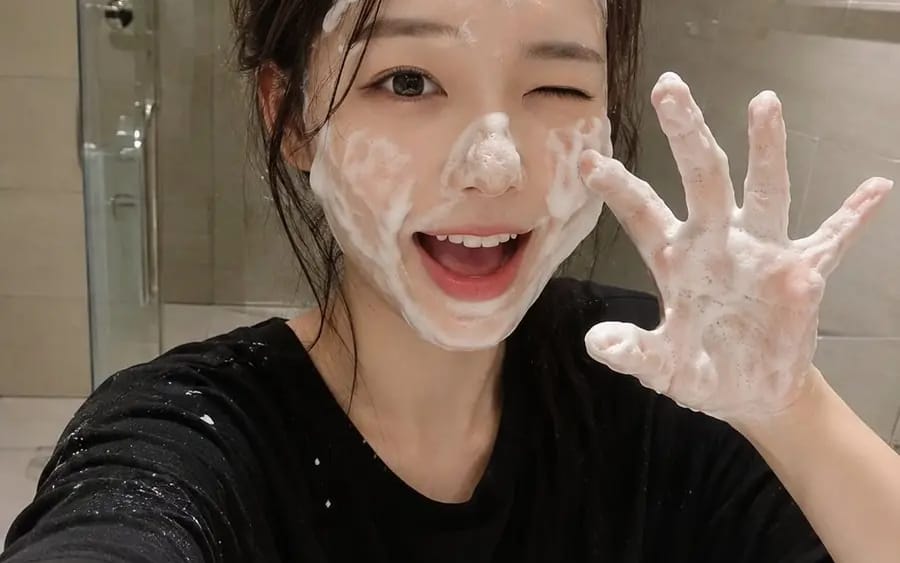
A RAW ultra-realistic smartphone photo of a cute young
{ "prompt": "A RAW ultra-realistic smartphone photo of a cute young Japanese woman in a modern bathroom during her skincare routine. She has fair porcelain skin, large expressive dark brown eyes, naturally soft pink lips, and long...
프롬프트
{
  "prompt": "A RAW ultra-realistic smartphone photo of a cute young Japanese woman in a modern bathroom during her skincare routine. She has fair porcelain skin, large expressive dark brown eyes, naturally soft pink lips, and long chestnut-brown hair that is slightly damp and tousled. She is playfully winking with one eye while smiling with her mouth open, both hands raised in a cute claw pose completely covered in rich white facial cleansing foam. Thick soap bubbles are spread naturally across her forehead, cheeks, nose, chin, hairline, and fingers. She wears a loose oversized black T-shirt with a few soap splashes on it. The background features a clean minimalist bathroom with beige ceramic wall tiles, a frameless glass shower door, a chrome towel bar, and a white sink. The image is captured as a casual selfie using a modern smartphone held at arm's length, creating an authentic everyday social media aesthetic. Warm indoor bathroom lighting, realistic skin pores, subtle smartphone HDR, natural shadows, tiny sensor noise, automatic white balance, slight handheld framing, 26mm smartphone lens, realistic exposure, no studio lighting, no beauty filters, no AI-generated appearance, ultra-photorealistic, indistinguishable from a real iPhone photo, RAW mobile camera quality, 8K.",
  "negative_prompt": "anime, illustration, painting, CGI, 3D render, plastic skin, overprocessed face, heavy beauty filter, blurry, low resolution, watermark, logo, text, extra fingers, deformed hands, bad anatomy, duplicate limbs, oversaturated colors, unrealistic lighting, artifacts",
  "width": 768,
  "height": 1024,
  "steps": 30,
  "cfg_scale": 7,
  "sampler": "DPM++ 2M Karras",
  "seed": -1
}이 프롬프트 사용 방법
- 1프롬프트를 그대로 복사한 뒤 원하는 모델이나 Ideart 프로젝트에 붙여넣으세요.
- 2제품, 주제, 대상, 스타일 세부사항을 자신의 컨텍스트로 교체하세요.
- 3먼저 기준 결과를 생성한 뒤 가장 강한 방향을 캠페인, 이미지 세트 또는 비디오 콘셉트로 리믹스하세요.
이 프롬프트로 제작
이미지 프롬프트를 완성된 크리에이티브 프로젝트로 바꾸세요.
프롬프트를 저장하고 참조 이미지나 노트를 추가한 뒤 Ideart가 같은 창작 스레드에서 다음 제작 단계를 만들게 하세요.