
이미지GPT Image
Create a high-end editorial fashion poster inspired
{ "REFERENCE_IMAGE": "[Reference Image]", "MAIN_HEADLINE": "[Main Headline]", "LEFT_TEXT": "[Left Text]", "RIGHT_TEXT": "[Right Text]", "FOOTER_TEXT": "[Footer Text]", "BACKGROUND_COLOR": "[Background Color]", "prompt": "Create a...
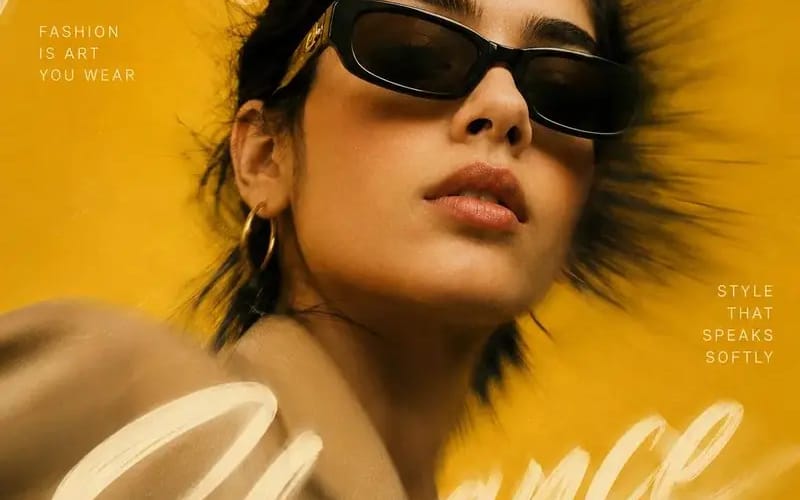
프롬프트
{
  "REFERENCE_IMAGE": "[Reference Image]",
  "MAIN_HEADLINE": "[Main Headline]",
  "LEFT_TEXT": "[Left Text]",
  "RIGHT_TEXT": "[Right Text]",
  "FOOTER_TEXT": "[Footer Text]",
  "BACKGROUND_COLOR": "[Background Color]",

  "prompt": "Create a high-end editorial fashion poster inspired by luxury magazine covers and premium advertising campaigns. Preserve the identity of the subject from the [Reference Image] while matching the overall artistic style.

  Use a dramatic close-up portrait composition with the subject positioned slightly off-center. Capture the subject from a subtle low angle to create a powerful, confident appearance.

  Add a strong radial motion blur effect extending outward from the center of the image while keeping the subject's face sharp and highly detailed.

  Place [Main Headline] as one continuous handwritten brushstroke phrase flowing organically across the entire composition. Allow some portions of the lettering to appear behind the subject while other portions overlap the foreground.

  Add [Left Text] and [Right Text] as small uppercase editorial typography blocks with generous spacing.

  Place [Footer Text] subtly in one corner.

  Style details:
  - Oversized fashion sunglasses
  - Minimal jewelry
  - Natural skin texture
  - Wind-swept hair
  - Luxury fashion styling
  - Elegant pose
  - Cinematic color grading
  - Fine film grain
  - Soft highlights and deep shadows
  - Premium studio photography quality

  Background:
  - Clean monochromatic backdrop
  - Use [Background Color] as the dominant color
  - Dynamic zoom-blur effect
  - Soft glow and light bloom

  Visual style:
  - Vogue-inspired editorial design
  - Luxury advertising aesthetic
  - Photorealistic rendering
  - Premium typography composition
  - High-fashion magazine cover design

  Negative prompt:
  - watermark
  - logo
  - blurry face
  - distorted anatomy
  - duplicated accessories
  - plastic skin
  - excessive sharpening
  - oversaturated colors
  - low quality output",

  "aspect_ratio": "4:5"
}이 프롬프트 사용 방법
- 1프롬프트를 그대로 복사한 뒤 원하는 모델이나 Ideart 프로젝트에 붙여넣으세요.
- 2제품, 주제, 대상, 스타일 세부사항을 자신의 컨텍스트로 교체하세요.
- 3먼저 기준 결과를 생성한 뒤 가장 강한 방향을 캠페인, 이미지 세트 또는 비디오 콘셉트로 리믹스하세요.
이 프롬프트로 제작
이미지 프롬프트를 완성된 크리에이티브 프로젝트로 바꾸세요.
프롬프트를 저장하고 참조 이미지나 노트를 추가한 뒤 Ideart가 같은 창작 스레드에서 다음 제작 단계를 만들게 하세요.