
이미지AI
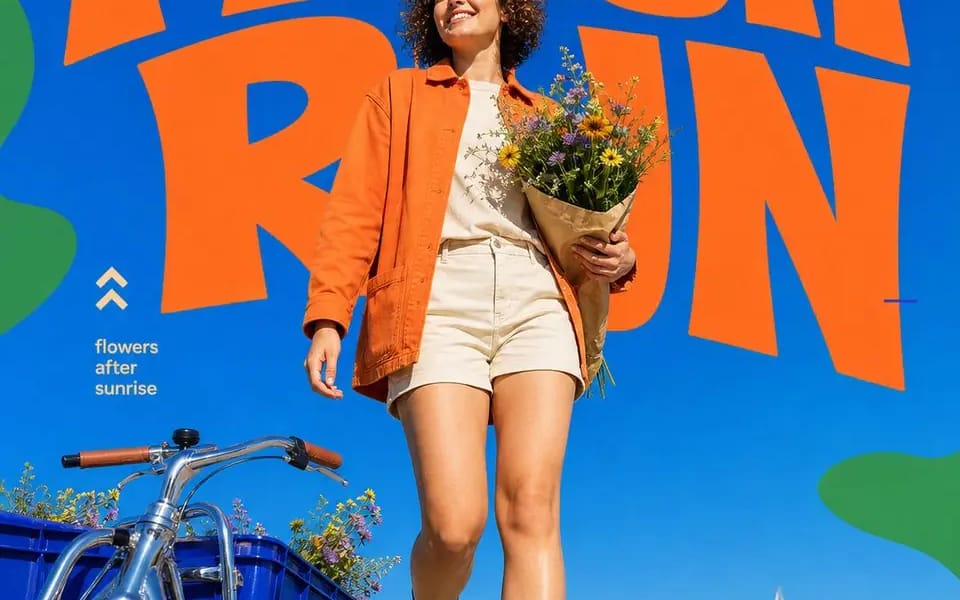
Ground Up
{ "style_name": "Ground Up", "style_slug": "cobalt-sky-blend-chunky-orange", "canvas": "4:5 portrait, flat cobalt field #0B4FD0 that blends seamlessly into the photographed sky", "color": { "field": "cobalt / ultramarine #0B4FD0",...
프롬프트
{

  "style_name": "Ground Up",

  "style_slug": "cobalt-sky-blend-chunky-orange",

  "canvas": "4:5 portrait, flat cobalt field #0B4FD0 that blends seamlessly into the photographed sky",

  "color": {

    "field": "cobalt / ultramarine #0B4FD0",

    "display": "warm orange #F2652A",

    "shapes": "leaf green #52B04E",

    "text": "cream #F7F0DC",

    "rule": "four colors, no fifth — and the flat blue must match the photographed sky exactly so the horizon between graphic and sky is invisible"

  },

  "typography": {

    "headline": "two-word imperative, ALL CAPS, chunky rounded display with soft wobbly terminals and slightly irregular baselines — hand-cut feel, not a clean geometric; orange, top of frame, 1–2 lines, letters nearly touching",

    "occlusion": "the subject or their prop overlaps the headline from below, breaking one or two letters",

    "caption": "2–3 short lines of small cream lowercase sans, left side at mid-height, sentence fragments separated by a slash",

    "marks": "small blue or light-blue tick dashes scattered around the headline like registration marks",

    "glyph": "one hand-drawn mark near the caption — double chevron / diagonal arrow / curved arrow / four-point sparkle / crescent moon"

  },

  "graphic_shapes": "soft organic green blobs and ribbon squiggles bleeding in from the left and right edges, always cropped by the frame, never floating in the middle",

  "photography": {

    "angle": "camera low to the ground, tilted up — the subject towers and the horizon sits in the bottom quarter",

    "light": "direct midday sun, hard shadows, high saturation, clear blue sky",

    "subject": "one person mid-motion — walking, reaching, lifting, leaning in — looking up or off-camera, relaxed and pleased, never posing at the lens",

    "wardrobe": "styled ONLY from the four-color palette; the outfit is part of the color system",

    "casting": "vary the age hard across the set — teens through seventies",

    "prop": "one real object that names the activity: flowers, a record, a vase, a telescope"

  },

  "design_rules": [

    "the seam between flat blue and real sky must be undetectable — this is the whole trick",

    "green shapes only ever touch the edges",

    "headline is an instruction, two words, present tense",

    "no drop shadows on the type; it sits flat on the blue like screen print"

  ],

  "swap_variables": {

    "subject": "flower buyer / rooftop DJ / potter / young astronomer",

    "headline": "FRESH RUN / SPIN ON / SHAPE IT / LOOK UP",

    "caption": "flowers after sunrise / sound travels · city frequency / hands make the future / small worlds · wide skies",

    "glyph": "chevrons / arrow / sparkle / moon",

    "prop": "wildflower bouquet / vinyl + suitcase turntable / raw vase / refractor telescope"

  }

}이 프롬프트 사용 방법
- 1프롬프트를 그대로 복사한 뒤 원하는 모델이나 Ideart 프로젝트에 붙여넣으세요.
- 2제품, 주제, 대상, 스타일 세부사항을 자신의 컨텍스트로 교체하세요.
- 3먼저 기준 결과를 생성한 뒤 가장 강한 방향을 캠페인, 이미지 세트 또는 비디오 콘셉트로 리믹스하세요.
이 프롬프트로 제작
이미지 프롬프트를 완성된 크리에이티브 프로젝트로 바꾸세요.
프롬프트를 저장하고 참조 이미지나 노트를 추가한 뒤 Ideart가 같은 창작 스레드에서 다음 제작 단계를 만들게 하세요.