
이미지GPT Image
Two-dimensional alternative character illustration
Two-dimensional alternative character illustration of [Character Name], occupying approximately seventy-five percent of the frame in [Pose], with [Hair Style] and [Expression]. Oversized rounded cranium, a short flattened lower face, a...
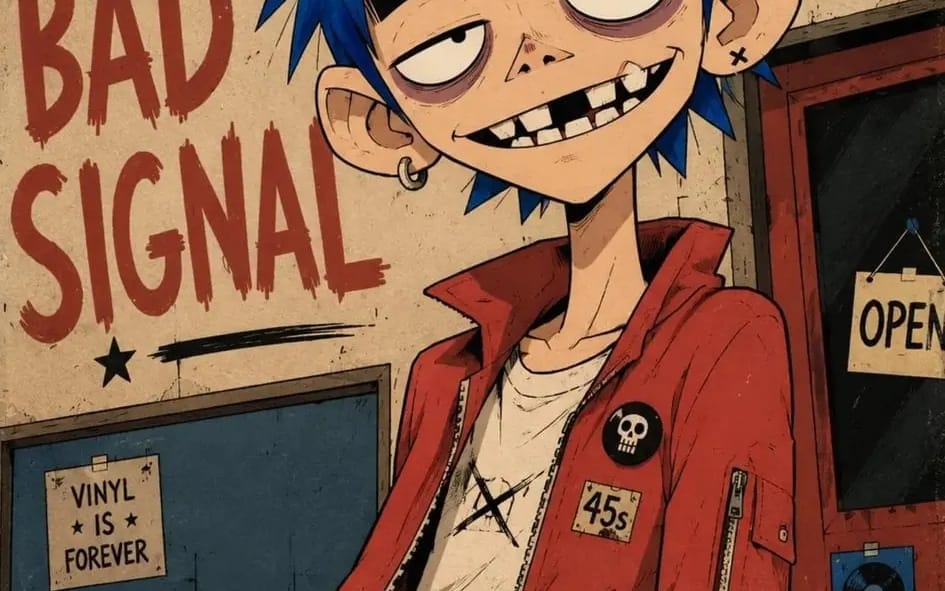
프롬프트
Two-dimensional alternative character illustration of [Character Name], occupying approximately seventy-five percent of the frame in [Pose], with [Hair Style] and [Expression]. Oversized rounded cranium, a short flattened lower face, a narrow jaw, a long thin neck, slightly oversized ears, huge pale oval eyes with tiny off-center pupils, extremely thick horizontal black eyebrows, heavy black upper eyelids, muted mauve under-eye rings, a tiny broad triangular nose, and a wide asymmetrical grin showing individually drawn irregular rectangular teeth, one clearly missing upper tooth, one chipped tooth and deep black gaps. Dress the character in [Clothing], simplified into broad graphic shapes with chunky seams, minimal folds and small hand-drawn accessories. Confident black ink contours using thick outer silhouettes, medium-weight facial lines, thin angular hair strands and only a few short scratch marks around the eyes, hair and clothing seams; use flat opaque color fields, one hard-edged cel-shadow shape per form, sparse pencil hatching, subtle ink wobble, slight color misregistration and restrained worn-paper texture. Controlled [Color Palette] palette, keeping every color clearly separated and moderately saturated. Place the character against [Background], reduced to large flat shapes, a few loosely drawn environmental details and oversized rough hand-painted lettering reading “[Text]”; use an off-center waist-up composition, a slight camera tilt, cropped background typography, loose poster margins and lightly weathered printed edges. 4:5 AR.
이 프롬프트 사용 방법
- 1프롬프트를 그대로 복사한 뒤 원하는 모델이나 Ideart 프로젝트에 붙여넣으세요.
- 2제품, 주제, 대상, 스타일 세부사항을 자신의 컨텍스트로 교체하세요.
- 3먼저 기준 결과를 생성한 뒤 가장 강한 방향을 캠페인, 이미지 세트 또는 비디오 콘셉트로 리믹스하세요.
이 프롬프트로 제작
이미지 프롬프트를 완성된 크리에이티브 프로젝트로 바꾸세요.
프롬프트를 저장하고 참조 이미지나 노트를 추가한 뒤 Ideart가 같은 창작 스레드에서 다음 제작 단계를 만들게 하세요.