
이미지GPT Image
Use the exact product reference
Use the exact product reference. Use the uploaded image as the sole and exact reference for the product. Preserve the product 1:1, including its official packaging, logo, typography, text, colors, proportions, shape, materials,...
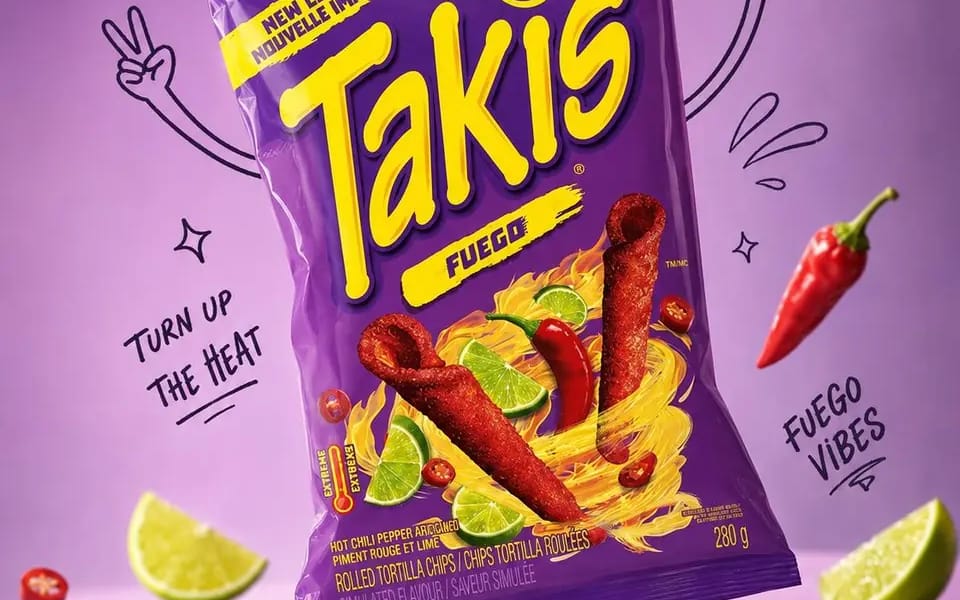
프롬프트
Use the exact product reference. Use the uploaded image as the sole and exact reference for the product. Preserve the product 1:1, including its official packaging, logo, typography, text, colors, proportions, shape, materials, textures, reflections, label details, and complete brand identity. Do not redesign, recolor, replace, distort, or modify any part of the packaging.
Create an ultra-realistic premium commercial advertisement with the product as the hero. Analyze its category, flavor, purpose, ingredients, target audience, packaging style, and brand personality to develop a unique, award-worthy advertising concept. Position the product in a natural, dynamic tilted pose.
Place it in a premium pastel studio environment inspired by the packaging colors, leaving clean negative space for advertising copy. Surround the product with expressive black marker doodles, including arms, legs, shoes, motion lines, sparkles, stars, bubbles, splashes, leaves, ribbons, icons, and concept-related props. The doodles must enhance the composition without covering the packaging, logo, or text.
Luxury editorial product photography, three-quarter angle, shallow depth of field, razor-sharp focus, soft diffused studio lighting, realistic reflections, floating shadows, premium color grading, and ultra-realistic materials.
Mood: Premium, playful, modern, sophisticated, energetic, memorable, brand-forward, scroll-stopping.
Output: 4:5 portrait, 2160×2700 (or equivalent), 8K quality.
Negative Prompt: Low quality, blur, incorrect branding, altered packaging, modified logo, text errors, recolored product, distorted proportions, unrealistic materials, excessive doodles, clutter, noise, oversaturation, AI artifacts, poor lighting, cropped product.
이 프롬프트 사용 방법
- 1프롬프트를 그대로 복사한 뒤 원하는 모델이나 Ideart 프로젝트에 붙여넣으세요.
- 2제품, 주제, 대상, 스타일 세부사항을 자신의 컨텍스트로 교체하세요.
- 3먼저 기준 결과를 생성한 뒤 가장 강한 방향을 캠페인, 이미지 세트 또는 비디오 콘셉트로 리믹스하세요.
이 프롬프트로 제작
이미지 프롬프트를 완성된 크리에이티브 프로젝트로 바꾸세요.
프롬프트를 저장하고 참조 이미지나 노트를 추가한 뒤 Ideart가 같은 창작 스레드에서 다음 제작 단계를 만들게 하세요.