
이미지GPT Image
Use the uploaded product image as the single source of truth
Use the uploaded product image as the single source of truth. Silently analyze the product’s category, function, audience, silhouette, proportions, materials, surface finish, signature geometry, colors, packaging, typography, logo...
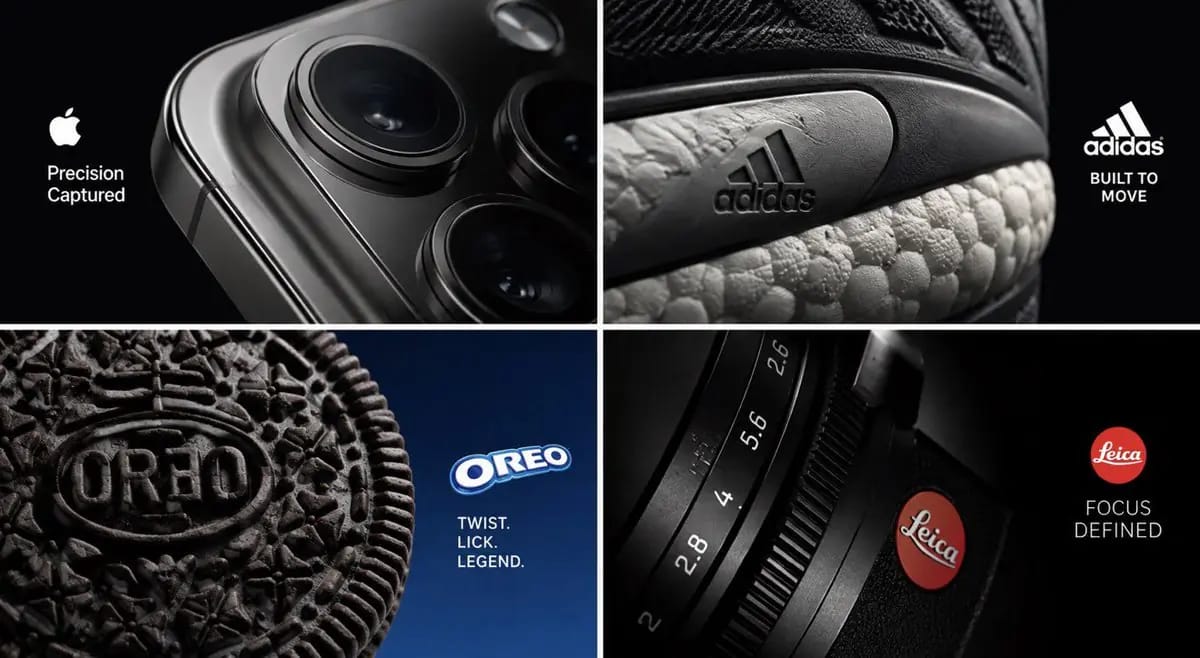
프롬프트
Use the uploaded product image as the single source of truth.

Silently analyze the product’s category, function, audience, silhouette, proportions, materials, surface finish, signature geometry, colors, packaging, typography, logo behavior, and most instantly recognizable physical detail.

CORE CONCEPT — CROP TRAP:

Create one premium campaign image using an extreme, intentional crop of the real product.

Do not rely on showing the entire product.

Instead, identify one highly ownable detail and frame it so strongly that it becomes the entire visual idea.

The viewer should first see a striking abstract composition, then realize they are looking at a familiar product.

Possible hero details:

— a camera module becoming the dominant geometry of a technology ad
— a sneaker sole edge, stitching system, air unit, or material transition filling the frame
— an embossed cookie pattern becoming a graphic composition through extreme macro photography
— a camera shutter, lens ring, dial, or engraved marking dominating the image
— a perfume cap, glass edge, jewelry clasp, bottle shoulder, watch crown, keyboard key, grille pattern, zipper, stitching, or packaging seam

Do not transform the detail into another object.

The visual impact must come purely from framing, scale inside the frame, camera position, lighting, depth, material realism, and composition.

CROP LOGIC:

Choose one recognizable detail only.

Place the product partially outside the frame when useful.

The crop should feel deliberate, bold, and premium—not accidental or simply zoomed in.

Use edges, curves, diagonals, openings, reflections, and negative space to build a strong visual hierarchy.

At least one section of the composition should provide refined negative space for brand communication.

The visible product detail must remain perfectly identifiable and physically believable at macro scale.

PRODUCT DNA LOCK:

Preserve every visible part of the uploaded product exactly: geometry, proportions, construction, logo, label, typography, colors, materials, textures, finishes, seams, reflections, engravings, buttons, openings, and micro-details.

Do not redesign, recolor, relabel, distort, simplify, duplicate, open, damage, morph, or invent features.

If the product extends beyond the frame, preserve the implied continuation of its real structure.

CREATIVE LOOP:

Silently identify the five strongest crop opportunities within the uploaded product.

Generate five radically different compositions using only real product details.

Score each for:

— instant visual impact
— brand recognition
— crop intelligence
— composition strength
— negative space
— material realism
— originality
— commercial usefulness
— premium art direction

Reject anything that looks like an ordinary product close-up, ecommerce photography, random zoom, confusing abstraction, or below 9/10.

Produce only the strongest final concept.

BRAND COMMUNICATION:

Integrate the authentic brand logo naturally inside the negative space.

Create one original headline of two words maximum inspired by the selected product detail or benefit.

Do not reuse “Crop Trap.”

Match the brand’s authentic typography, spacing, scale, weight, placement, colors, and visual tone.

COMPOSITION:

One real hero product, one dominant cropped detail, asymmetric editorial framing, refined negative space, cinematic commercial lighting, realistic macro depth of field, accurate reflections, tactile micro-detail, premium material rendering, strong geometry, and clean hierarchy.

16:9. One standalone campaign image.

No grid, no collage, no split screen, no miniature world, no duplicated products, no object transformation, no environmental takeover, no cross-section, no floating typography, no infographic icons, no arrows, no unrelated props, no mockup presentation, and no random text.
이 프롬프트 사용 방법
- 1프롬프트를 그대로 복사한 뒤 원하는 모델이나 Ideart 프로젝트에 붙여넣으세요.
- 2제품, 주제, 대상, 스타일 세부사항을 자신의 컨텍스트로 교체하세요.
- 3먼저 기준 결과를 생성한 뒤 가장 강한 방향을 캠페인, 이미지 세트 또는 비디오 콘셉트로 리믹스하세요.
이 프롬프트로 제작
이미지 프롬프트를 완성된 크리에이티브 프로젝트로 바꾸세요.
프롬프트를 저장하고 참조 이미지나 노트를 추가한 뒤 Ideart가 같은 창작 스레드에서 다음 제작 단계를 만들게 하세요.