
환상의 숲에서 펼쳐지는 베이퍼웨이브 피트니스 촬영
최소한의 수영복과 반바지를 입은 젊은 여성이 커다란 아치형 거울이 있는 마법에 걸린 숲속 공터에 서 있는 전신 와이드 앵글 샷을 생성하기 위한 매우 상세하고 구조화된 프롬프트입니다. 이 프롬프트는 높은 대비 조명(링 라이트/직사광선), 베이퍼웨이브 핑크 및 블루 팔레트, 빈티지 폴라로이드 카메라를 시뮬레이션하는 기술 설정을 지정합니다.
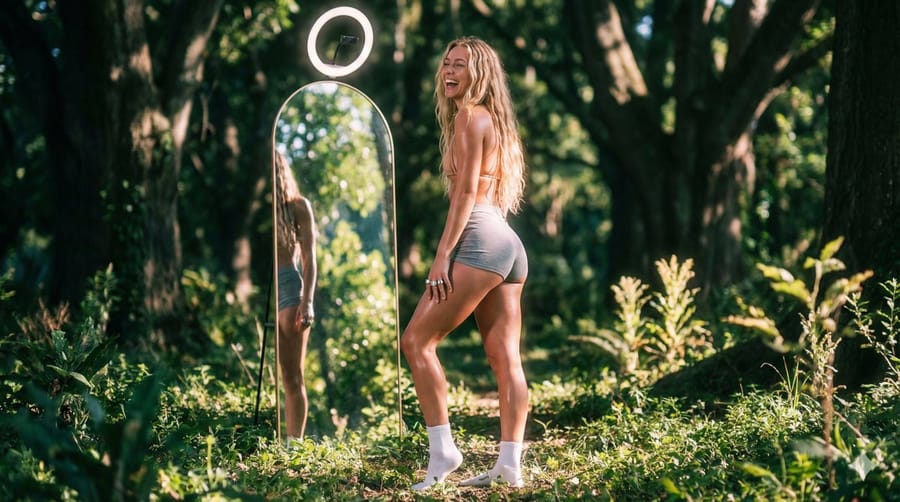
프롬프트
```json
{
  "lighting": {
    "source": "ring_light_vlog_style",
    "quality": "",
    "direction": "overhead_lighting",
    "shadows": "strong_defined_shadows",
    "highlights": "sweaty_skin_sheen"
  },
  "subject_analysis": {
    "subject_type": "young_woman",
    "hair": "long_blonde_wavy",
    "pose": "standing_side_profile",
    "facial_expression": "joyful_laughing",
    "details": "sunlight_highlighting_leg_muscle",
    "attire": {
      "top": "minimal_swimwear",
      "bottom": "grey_high_waisted_shorts",
      "footwear": "white_ankle_socks"
    },
    "accessories": {
      "phone": "no_phone",
      "jewelry": "chunky_silver_rings"
    }
  },
  "generation_parameters": {
    "steps": 30,
    "cfg_scale": 7.5,
    "model_version": "v1.5",
    "prompt": "",
    "negative_prompt": "",
    "seed": "123456789"
  },
  "background": {
    "setting": "enchanted_forest_clearing",
    "clutter": "minimalist_clean",
    "elements": [
      "large_arched_mirror"
    ],
    "view_outside_window": "sunlit_greenery"
  },
  "artistic_elements": {
    "mood": "relaxed_confident",
    "style": "lifestyle_fitness_aesthetic",
    "vibe": "editorial_fashion_shoot",
    "texture": "glossy_plastic",
    "contrast": "high_contrast_direct_sun"
  },
  "color_profile": {
    "palette": "vaporwave_pink_and_blue"
  },
  "composition": {
    "type": "wide_angle_landscape",
    "framing": "full_body_shot",
    "focus": "subject_and_reflection",
    "perspective": "eye_level",
    "depth_of_field": "shallow_depth_of_field_(bokeh)",
    "balance": "asymmetrical"
  },
  "technical_specs": {
    "camera_type": "vintage_polaroid_sx-70",
    "lens_type": "portrait_85mm_f1.2",
    "aspect_ratio": "16:9_(cinematic)",
    "file_format": "fujifilm_velvia_50"
  }
}
```이 프롬프트 사용 방법
- 1프롬프트를 그대로 복사한 뒤 원하는 모델이나 Ideart 프로젝트에 붙여넣으세요.
- 2제품, 주제, 대상, 스타일 세부사항을 자신의 컨텍스트로 교체하세요.
- 3먼저 기준 결과를 생성한 뒤 가장 강한 방향을 캠페인, 이미지 세트 또는 비디오 콘셉트로 리믹스하세요.
이 프롬프트로 제작
이미지 프롬프트를 완성된 크리에이티브 프로젝트로 바꾸세요.
프롬프트를 저장하고 참조 이미지나 노트를 추가한 뒤 Ideart가 같은 창작 스레드에서 다음 제작 단계를 만들게 하세요.