
이미지GPT Image 2
YouTube 다크 모드 데스크톱 UI 목업
YouTube 데스크톱 홈페이지의 다크 모드 목업을 매우 상세하고 정확하게 생성합니다. 채워진 사이드바, 필터 칩, 그리고 인지도가 높은 교육 및 엔터테인먼트 채널 썸네일이 포함된 12개의 비디오 그리드를 완벽하게 구현합니다.
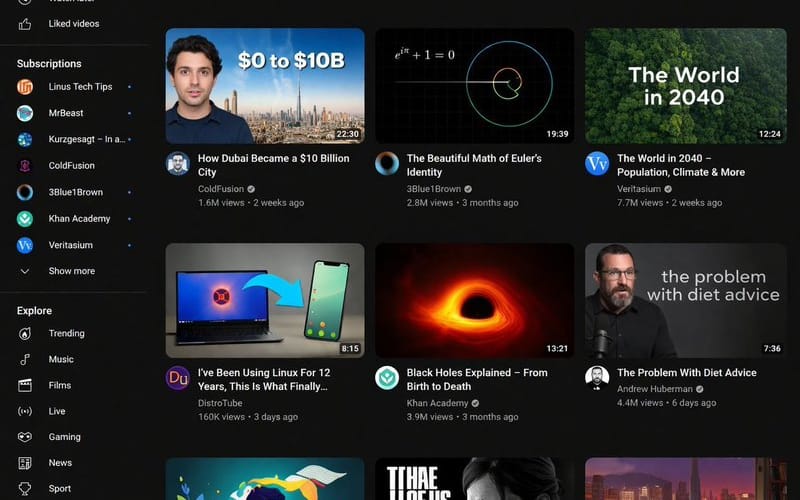
프롬프트
{
  "type": "데스크톱 UI 목업",
  "application": "YouTube 홈페이지",
  "theme": "{argument name=\"theme\" default=\"다크 모드\"}",
  "browser_window": {
    "url_bar": "{argument name=\"browser URL\" default=\"youtube.com\"}",
    "tabs": 1,
    "elements": ["뒤로/앞으로 버튼", "새로고침", "확장 프로그램", "프로필 아바타"]
  },
  "layout": {
    "sidebar": {
      "position": "왼쪽",
      "sections": [
        { "title": "메인", "count": 3, "items": ["홈", "Shorts", "구독"] },
        { "title": "나", "count": 6, "items": ["내 채널", "기록", "재생목록", "내 동영상", "나중에 볼 동영상", "좋아요 표시한 동영상"] },
        { "title": "구독", "count": 8, "items": ["Linus Tech Tips", "MrBeast", "Kurzgesagt - In a...", "ColdFusion", "3Blue1Brown", "Khan Academy", "Veritasium", "더보기"] },
        { "title": "탐색", "count": 7, "items": ["인기 급상승", "음악", "영화", "실시간", "게임", "뉴스", "스포츠"] },
        { "title": "YouTube 더보기", "count": 3, "items": ["YouTube Premium", "YouTube Music", "YouTube Kids"] }
      ]
    },
    "top_filter_bar": {
      "count": 11,
      "labels": ["전체", "게임", "음악", "실시간", "팟캐스트", "믹스", "과학", "Lo-fi", "스릴러", "최근에 업로드된 동영상", "시청한 동영상"]
    },
    "video_grid": {
      "layout": "4행 3열",
      "count": 12,
      "videos": [
        { "title": "Why Build Your Own GPU is Almost Impossible", "channel": "Linus Tech Tips", "thumbnail": "빨간색 화살표가 있는 GPU 칩" },
        { "title": "Survive 100 Days In Circle, Win $500,000", "channel": "MrBeast", "thumbnail": "배경에 참가자들이 있는 웃고 있는 MrBeast" },
        { "title": "What If We Nuke an Asteroid?", "channel": "Kurzgesagt - In a Nutshell", "thumbnail": "우주에서 소행성으로 접근하는 미사일" },
        { "title": "How Dubai Became a $10 Billion City", "channel": "ColdFusion", "thumbnail": "'$0 TO $10B' 텍스트와 두바이 스카이라인 옆의 남성" },
        { "title": "The Beautiful Math of Euler's Identity", "channel": "3Blue1Brown", "thumbnail": "검은색 배경의 수학 방정식과 나선형 그래프" },
        { "title": "The World in 2040 - Population, Climate & More", "channel": "Veritasium", "thumbnail": "'The World in 2040' 텍스트가 있는 울창한 숲" },
        { "title": "I've Been Using Linux For 12 Years, This Is What Finally...", "channel": "DistroTube", "thumbnail": "파란색 화살표로 연결된 노트북과 스마트폰" },
        { "title": "Black Holes Explained - From Birth to Death", "channel": "Khan Academy", "thumbnail": "빛나는 주황색 블랙홀 강착 원반" },
        { "title": "The Problem With Diet Advice", "channel": "Andrew Huberman", "thumbnail": "'the problem with diet advice' 텍스트가 있는 검은 셔츠를 입은 남성" },
        { "title": "How to Learn Anything (Evidence-Based)", "channel": "Ali Abdaal", "thumbnail": "알록달록한 잎사귀에 둘러싸여 책을 읽는 남성의 플랫 일러스트" },
        { "title": "The Last of Us Part 2 is a Masterpiece", "channel": "Naughty Dog", "thumbnail": "게임 로고와 함께 있는 Ellie의 거친 초상화" },
        { "title": "lofi hip hop radio - beats to relax/study to", "channel": "Lofi Girl", "thumbnail": "해 질 녘 도시 풍경을 배경으로 책상에서 공부하는 애니메이션 소녀" }
      ]
    }
  },
  "os_environment": {
    "os": "{argument name=\"operating system\" default=\"Windows 10\"}",
    "taskbar_position": "하단",
    "visible_icons": ["시작", "검색창", "작업 보기", "파일 탐색기", "Edge", "Spotify"],
    "system_tray": ["네트워크", "볼륨", "배터리", "08:34 2024년 4월 3일로 표시된 시계"]
  }
}이 프롬프트 사용 방법
- 1프롬프트를 그대로 복사한 뒤 원하는 모델이나 Ideart 프로젝트에 붙여넣으세요.
- 2제품, 주제, 대상, 스타일 세부사항을 자신의 컨텍스트로 교체하세요.
- 3먼저 기준 결과를 생성한 뒤 가장 강한 방향을 캠페인, 이미지 세트 또는 비디오 콘셉트로 리믹스하세요.
이 프롬프트로 제작
이미지 프롬프트를 완성된 크리에이티브 프로젝트로 바꾸세요.
프롬프트를 저장하고 참조 이미지나 노트를 추가한 뒤 Ideart가 같은 창작 스레드에서 다음 제작 단계를 만들게 하세요.