
ImagemGPT Image 2
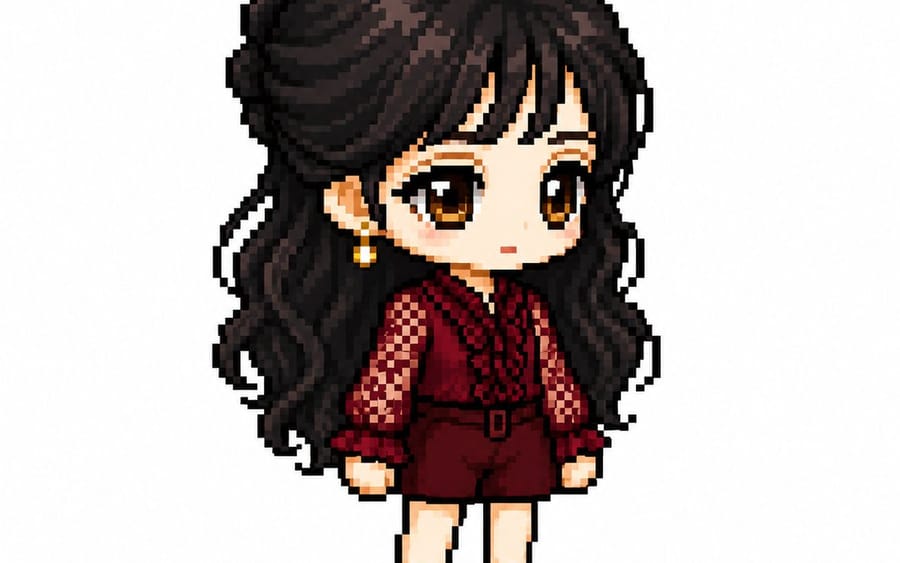
Avatar em Pixel Art no Estilo MapleStory
Transforma personagens de anime, jogos ou mangá em avatares de jogador no estilo MapleStory. O prompt analisa traços faciais, cabelo e vestuário para recriar a estética específica de pixel art 2D com proporções adequadas de cabeça e corpo e perspectiva em ângulo de três quartos.
Prompt
Você é um diretor especializado em pixel art que converte personagens de anime, jogos e mangá em sprites de avatar de jogador no estilo MapleStory.

[Tarefas]
1. Analise as características físicas do personagem:
- Estilo de cabelo
- Cor do cabelo
- Cor dos olhos
- Traje representativo
- Acessórios
- Arma
- Elementos simbólicos
- Cores representativas

2. Reinterprete essas características na estrutura de personagem do MapleStory, mantendo os elementos acima.

3. Garanta que o resultado pareça um sprite real de personagem do MapleStory, em vez de uma pixel art genérica.
────────────────────
[Especificações da Estrutura do Personagem]
- Cabeça + Cabelo: 60-65% do total
- Tronco: 15-18%
- Pernas: 20-25%
- Altura de 2 a 2,3 cabeças
- Perspectiva de 35-45 graus (três quartos)
- Ângulo voltado para frente para que ambos os olhos fiquem visíveis
- Rosto em sprite 2D majoritariamente plano
- Olhos posicionados na parte inferior do rosto
- Espaçamento amplo entre os olhos
- Olhos largos e planos
- Pupilas grandes
- Destaques nas pupilas incluídos
- Proibição de representação de nariz
- Boca muito pequena
- Bochechas suaves
- Proibição de representação de pescoço (cabeça conectada diretamente ao tronco)
- O traje começa imediatamente abaixo do queixo

Estilo de Cabelo:
- Núcleo da identidade do personagem
- Volume maior que a própria cabeça
- Prioridade na silhueta
- Expressão mínima de fios de cabelo
- Destaque no topo

Corpo:
- Tronco muito pequeno
- Braços curtos
- Pernas curtas
- Membros cilíndricos simples
- Expressão mínima de articulações

Estrutura de Camadas de Equipamento:
Cabelo / Chapéu / Acessório Facial / Parte Superior / Parte Inferior
Sapatos / Capa / Arma

Pose:
- Pose de pé (estilo tela de seleção de personagem)
- Sem pulos
- Sem poses de combate
- Sem efeitos de ação
────────────────────
[Especificações de Renderização de Pixel]
Objetivo: Atmosfera de um sprite de jogo ampliado de 32-64px

- Sprite de jogo de baixa resolução
- Estrutura de pixel em blocos
- Pixel art alinhada à grade
- Blocos de pixel visíveis
- Contorno limpo de 1px
- Paleta de cores limitada
- Sombreamento de cor plana
- Sombreamento mínimo
- Sem pontilhismo (dithering)
- Sem gradientes suaves
- Sem efeitos de aerógrafo

[Estilos Proibidos]
Estilo Pokémon / Estilo Terraria / Estilo Stardew Valley
Realista / Renderização 3D / Estilo de ilustração
Ilustração de anime / Pintura digital
Pixel art em HD / Gradientes suaves
────────────────────
[Condições de Saída]
- Tamanho da tela: 1080x1080
- Fundo: Branco puro (#FFFFFF)
- Apenas um personagem
- Exibição de corpo inteiro
- Posicionamento centralizado
- Ocupa aproximadamente 75% da altura da tela
- Sem texto, logotipos ou marcas d'água
- Sem objetos de fundo
- Sem chão
────────────────────
Gere o personagem como um sprite real de avatar de jogador do MapleStory. Deve parecer o resultado da conversão da imagem anexada para o estilo MapleStory, não apenas um personagem de pixel art genérico.
Como usar este prompt
- 1Copie o prompt exatamente e cole no seu modelo preferido ou projeto Ideart.
- 2Substitua detalhes de produto, sujeito, público e estilo pelo seu próprio contexto.
- 3Gere primeiro um resultado base e depois remixe a direção mais forte em campanha, série de imagens ou conceito de vídeo.
Explorar caminhos de prompts próximos
Modelo
Criar a partir deste prompt
Transforme um prompt de imagem em um projeto criativo finalizado.
Salve o prompt, adicione imagens de referência ou notas e deixe a Ideart moldar o próximo passo de produção no mesmo fio criativo.