
ImagemGPT Image 2
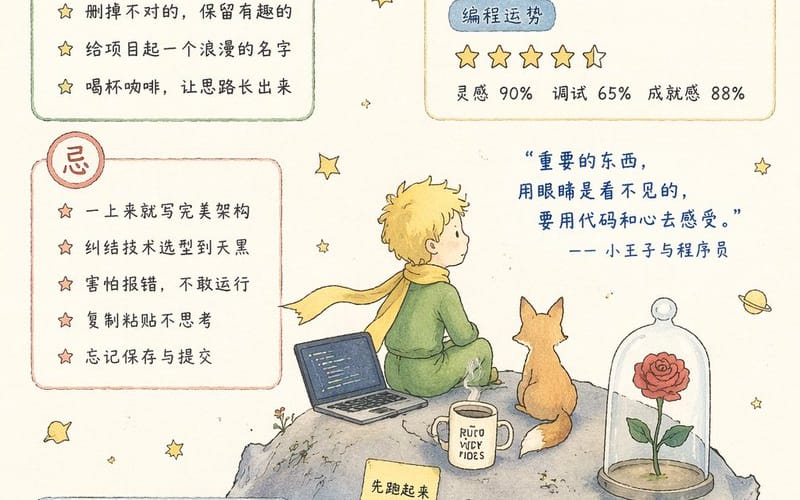
Infográfico do Almanaque do Programador Criativo
Gera um almanaque diário em estilo aquarela para programadores com o tema O Pequeno Príncipe, completo com listas de tarefas, comandos da sorte e citações inspiradoras.
Prompt
{
  "type": "almanaque infográfico em aquarela",
  "style": "desenhado à mão, tema O Pequeno Príncipe, fundo creme, estrelas espalhadas",
  "header": {
    "date": "{argument name=\"date\" default=\"18 de abril de 2026\"}",
    "title": "{argument name=\"main title\" default=\"Almanaque do Vibe Coding\"}",
    "subtitle": "Sábado, 18 de abril"
  },
  "layout": {
    "sections": [
      {
        "title": "Pode",
        "position": "top-left",
        "count": 5,
        "labels": [
          "{argument name=\"first do item\" default=\"Programar seguindo a intuição\"}",
          "Conversar com a IA antes de começar",
          "Apagar o que não serve, manter o que é interessante",
          "Dar um nome romântico ao projeto",
          "Tomar um café e deixar as ideias fluírem"
        ]
      },
      {
        "title": "Astros & Sorte na Programação",
        "position": "top-right",
        "count": 4,
        "labels": [
          "Lua em Gêmeos",
          "Inspiração em fluxo, ideal para diálogo e criação.",
          "5 estrelas",
          "Inspiração 90% Depuração 65% Realização 88%"
        ]
      },
      {
        "title": "Evite",
        "position": "mid-left",
        "count": 5,
        "labels": [
          "{argument name=\"first dont item\" default=\"Tentar criar a arquitetura perfeita de cara\"}",
          "Ficar preso na escolha da tecnologia até escurecer",
          "Ter medo de erros e não rodar o código",
          "Copiar e colar sem pensar",
          "Esquecer de salvar e fazer o commit"
        ]
      },
      {
        "title": "Horários de Sorte",
        "position": "bottom-left",
        "count": 2,
        "labels": [
          "09:30 - 11:30 Inspiração em alta",
          "14:00 - 16:00 Criando surpresas"
        ]
      },
      {
        "title": "Comandos da Sorte",
        "position": "bottom-left",
        "count": 4,
        "labels": [
          "git add .",
          "git commit -m \"follow the vibe\"",
          "git push",
          "# O universo vai compilar para você"
        ]
      },
      {
        "title": "Pensamento do Dia",
        "position": "bottom-right",
        "count": 1,
        "labels": [
          "Você não precisa ser o melhor programador, apenas o criador mais sensível. Deixe o sentimento guiar o caminho e o código florescer."
        ]
      }
    ],
    "illustration": {
      "position": "center-right",
      "subject": "O Pequeno Príncipe no asteroide com um laptop, a raposa, a rosa na redoma de vidro, uma caneca",
      "quote": "{argument name=\"quote\" default=\"O essencial é invisível aos olhos, deve-se sentir com o código e com o coração.\"} —— O Pequeno Príncipe e o Programador",
      "sticky_notes": {
        "count": 3,
        "labels": [
          "Faça rodar primeiro.",
          "Deixe a IA explorar com você.",
          "Bugs também são presentes."
        ]
      }
    }
  }
}Como usar este prompt
- 1Copie o prompt exatamente e cole no seu modelo preferido ou projeto Ideart.
- 2Substitua detalhes de produto, sujeito, público e estilo pelo seu próprio contexto.
- 3Gere primeiro um resultado base e depois remixe a direção mais forte em campanha, série de imagens ou conceito de vídeo.
Explorar caminhos de prompts próximos
Modelo
Categorias
Criar a partir deste prompt
Transforme um prompt de imagem em um projeto criativo finalizado.
Salve o prompt, adicione imagens de referência ou notas e deixe a Ideart moldar o próximo passo de produção no mesmo fio criativo.