
ImagemNano Banana Pro
Prompt de Fotografia com Flash Cinematográfico de Wong Kar-wai
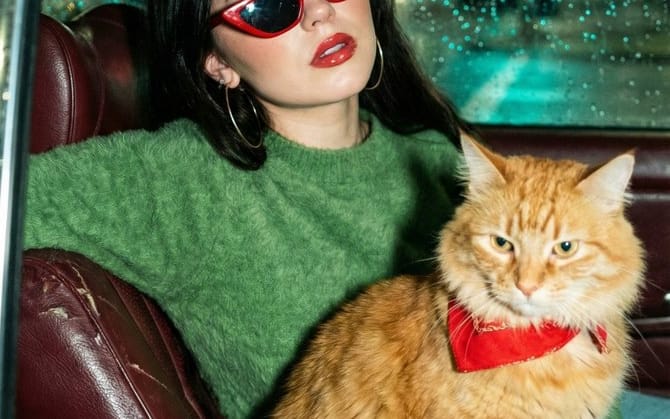
Um prompt estruturado para gerar uma foto cinematográfica com flash, vista através da janela de um carro molhada pela chuva à noite. Apresenta uma mulher asiática elegante e um gato tigrado laranja fofo em um carro vintage, especificando uma estética de Wong Kar-wai, iluminação de alto contraste e uma vibe de moda retrô dos anos 90 com granulação de filme e efeitos bokeh.
Prompt
"Uma foto cinematográfica com flash, vista através de uma janela de carro molhada pela chuva à noite. Dentro de um carro preto vintage, uma mulher asiática elegante com longos cabelos escuros usa óculos de sol estilo gatinho vermelho brilhante, brincos de argola grandes e um suéter verde felpudo. Ela tem batom vermelho brilhante e está posando com frieza. Sentado ao lado dela no banco de couro marrom-avermelhado está um gato grande e fofo, um tabby laranja usando uma bandana vermelha. O fundo apresenta luzes da cidade borradas e bokeh em tons de verde e azul-petróleo. Iluminação de alto contraste, {argument name="aesthetic style" default="Wong Kar-wai aesthetic"}, vibe de moda retrô dos anos 90, textura realista, granulação de filme, fotografia 35mm.",
  "elements": {
    "subject": {
      "human": "Jovem mulher asiática, moderna, óculos de sol estilo gatinho vermelho, suéter verde felpudo, brincos de argola, lábios vermelhos brilhantes",
      "animal": "Gato tabby laranja fofo, mistura de Maine Coon, bandana vermelha, expressão calma"
    },
    "environment": "Dentro de carro vintage, noite, rua da cidade, chuva no vidro, luzes da rua",
    "lighting": "Flash direto, iluminação atmosférica da rua, fundo bokeh, sombras de alto contraste",
    "style": "Cinematográfico, retrô anos 90, estilo cinema de Hong Kong, fotografia de filme, estética lo-fi, espontâneo"
  },
  "negative_prompt": "borrado, baixa resolução, desenho animado, ilustração, renderização 3D, desenho, características distorcidas, anatomia ruim, membros faltando, texto, marca d'água, luz do dia, sol forte",
  "technical_settings": {
    "aspect_ratio": "9:16",
    "film_stock": "{argument name="film stock" default="Kodak Portra 800"}",
    "camera_angle": "Nível dos olhos, fotografado através do vidro"
  }
}Como usar este prompt
- 1Copie o prompt exatamente e cole no seu modelo preferido ou projeto Ideart.
- 2Substitua detalhes de produto, sujeito, público e estilo pelo seu próprio contexto.
- 3Gere primeiro um resultado base e depois remixe a direção mais forte em campanha, série de imagens ou conceito de vídeo.
Explorar caminhos de prompts próximos
Modelo
Categorias
Criar a partir deste prompt
Transforme um prompt de imagem em um projeto criativo finalizado.
Salve o prompt, adicione imagens de referência ou notas e deixe a Ideart moldar o próximo passo de produção no mesmo fio criativo.