
ImagemGPT Image 2
AI Model Routing Comparison Infographic
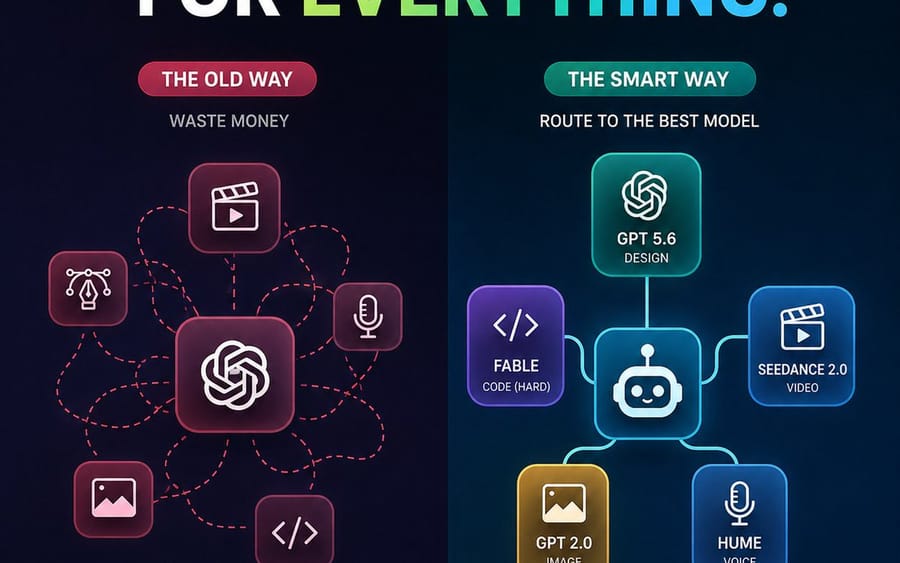
A square social media infographic comparing chaotic all-GPT usage with smart task-based AI model routing.
Prompt
Cria um infográfico tecnológico futurista e escuro, quadrado 1:1, para redes sociais, comparando duas abordagens de fluxo de trabalho com IA. Tela: 768x768 ou semelhante, fundo azul-marinho profundo a preto com textura subtil de grelha pontilhada e uma divisão vertical ao centro. No topo, coloca um título enorme, a negrito, em maiúsculas: “STOP USING GPT FOR {argument name="headline word" default="EVERYTHING"}.” As palavras “STOP USING GPT FOR” são brancas, e a palavra final tem um gradiente da esquerda para a direita de verde-lima a azul-ciano, com um ponto final ciano. Usa um tipo de letra sans-serif pesado e limpo, alto contraste, renderização nítida tipo vetor.

Disposição: duas colunas lado a lado. A coluna esquerda está rotulada como o fluxo de trabalho mau, a coluna direita como o fluxo de trabalho melhorado. O lado esquerdo tem um tema vermelho/rosa com uma etiqueta em forma de pílula com o texto “THE OLD WAY,” um pequeno subtítulo “WASTE MONEY,” e um ícone central de nó estilo GPT/OpenAI num quadrado arredondado. À volta dele estão exatamente 5 ícones de tarefas menores em quadrados arredondados, ligados por linhas de encaminhamento tracejadas vermelhas desordenadas: 1 ícone de claquete/reprodução de vídeo no centro superior, 2 ícone de caneta de design/ponta de Bézier à esquerda, 3 ícone de microfone à direita, 4 ícone de imagem/fotografia em baixo à esquerda, 5 ícone de parênteses de código em baixo à direita. As linhas tracejadas desordenadas fazem voltas e cruzam-se, mostrando caos.

A coluna direita tem um tema azul-petróleo/azul com uma etiqueta em forma de pílula com o texto “THE SMART WAY,” um pequeno subtítulo “ROUTE TO THE BEST MODEL,” e um ícone central de router robô num quadrado arredondado. Liga-o com linhas sólidas brilhantes e limpas a exatamente 5 cartões de modelo: 1 cartão superior com ícone de nó OpenAI rotulado “GPT 5.6” e “DESIGN,” 2 cartão roxo à esquerda com parênteses de código rotulado “{argument name="coding model" default="FABLE"}” e “CODE (HARD),” 3 cartão azul à direita com ícone de claquete/reprodução rotulado “{argument name="video model" default="SEEDANCE 2.0"}” e “VIDEO,” 4 cartão dourado em baixo à esquerda com ícone de imagem rotulado “{argument name="image model" default="GPT 2.0"}” e “IMAGE,” 5 cartão azul em baixo à direita com ícone de microfone rotulado “{argument name="voice model" default="HUME"}” e “VOICE.” Usa cartões arredondados com efeito glassmorphism, contornos néon e brilho suave.

Destaques na parte inferior: por baixo da coluna esquerda, coloca uma barra de estado arredondada com contorno vermelho, um ícone X vermelho e o texto “EXPENSIVE. CHAOTIC. INEFFICIENT.” Por baixo da coluna direita, coloca uma barra de estado arredondada com contorno azul-petróleo/verde, um ícone de visto verde e o texto “SMARTER. CHEAPER. BETTER RESULTS.” Mantém todo o texto legível, centrado e alinhado. Usa contraste forte, estilo moderno de marketing SaaS, gradientes subtis, realces néon, sem logótipos extra, sem marca de água, sem texto adicional além das etiquetas especificadas.Como usar este prompt
- 1Copie o prompt exatamente e cole no seu modelo preferido ou projeto Ideart.
- 2Substitua detalhes de produto, sujeito, público e estilo pelo seu próprio contexto.
- 3Gere primeiro um resultado base e depois remixe a direção mais forte em campanha, série de imagens ou conceito de vídeo.
Criar a partir deste prompt
Transforme um prompt de imagem em um projeto criativo finalizado.
Guarde o prompt, adicione imagens de referência ou notas e deixe a Ideart moldar o próximo passo de produção no mesmo fio criativo.