
ImagemGPT Image 2
Moody Engagement Party Invitation
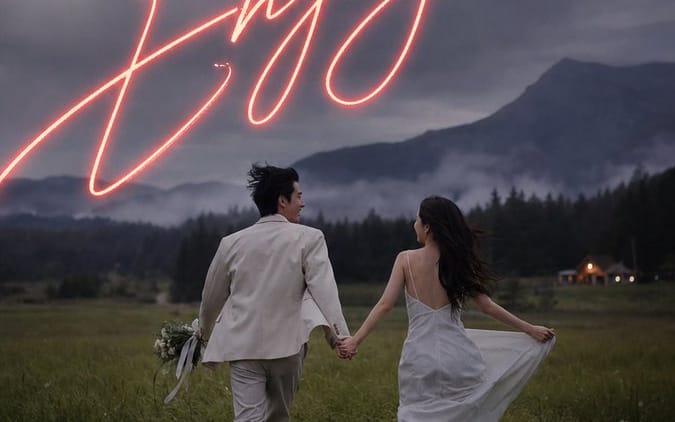
A cinematic wedding invitation design featuring a couple running through a dusk meadow beneath glowing handwritten engagement text.
Prompt
Crie um cartaz de convite de festa de noivado cinematográfico vertical, usando um estilo fotográfico realista e sombrio ao ar livre. A cena mostra um casal noivo visto de trás, de mãos dadas, correndo por um prado verde-escuro ao entardecer em direção a montanhas florestais enevoadas sob um céu dramático nublado azul-acinzentado. O noivo usa um fato creme claro e carrega um pequeno buquê com fitas a arrastar na mão esquerda; a noiva usa um vestido branco fluido estilo slip com costas abertas, segurando a saia ligeiramente para o lado enquanto o seu cabelo escuro e comprido esvoaça ao vento. Adicione uma pequena cabine ou local iluminado e acolhedor no extremo direito do fundo, nevoeiro suave no vale, grão de filme natural, sombras de baixo contraste, fotografia de casamento editorial romântica, atmosférica e ligeiramente subexposta. Sobreponha tipografia de convite elegante: no topo, pequeno texto serifado em maiúsculas, bem espaçado, a ler “PLEASE JOIN US FOR AN”, abaixo dele, texto serifado em maiúsculas, maior e espaçado, a ler “ENGAGEMENT PARTY”. Através do céu do meio-superior, coloque uma enorme escrita manual neon brilhante em cor-de-rosa coral quente a ler “{argument name="main script text" default="We're Engaged"}”, com brilho neon realista e traços longos e amplos que se estendem parcialmente para fora dos lados. Perto do centro inferior, adicione pequenos detalhes do evento em serifado branco centrado, em quatro grupos empilhados: “{argument name="date" default="06.21.2025"}”, “AT {argument name="time" default="6:00 PM"}”, depois maiúsculas maiores e espaçadas “{argument name="venue name" default="GREENFIELD ESTATE"}”, depois maiúsculas pequenas e espaçadas “123 MEADOW LANE” e “WILLOWBROOK, OR”, e finalmente “RECEPTION TO FOLLOW”. Use um layout de convite vertical 9:16, estética de casamento luxuosa e refinada, todo o texto centrado, espaçamento entre letras branco nítido, sem borda, sem marca de água, mantenha o casal na metade inferior e a escrita brilhante dominante no céu.Como usar este prompt
- 1Copie o prompt exatamente e cole no seu modelo preferido ou projeto Ideart.
- 2Substitua detalhes de produto, sujeito, público e estilo pelo seu próprio contexto.
- 3Gere primeiro um resultado base e depois remixe a direção mais forte em campanha, série de imagens ou conceito de vídeo.
Criar a partir deste prompt
Transforme um prompt de imagem em um projeto criativo finalizado.
Guarde o prompt, adicione imagens de referência ou notas e deixe a Ideart moldar o próximo passo de produção no mesmo fio criativo.