
ImagemGPT Image 2
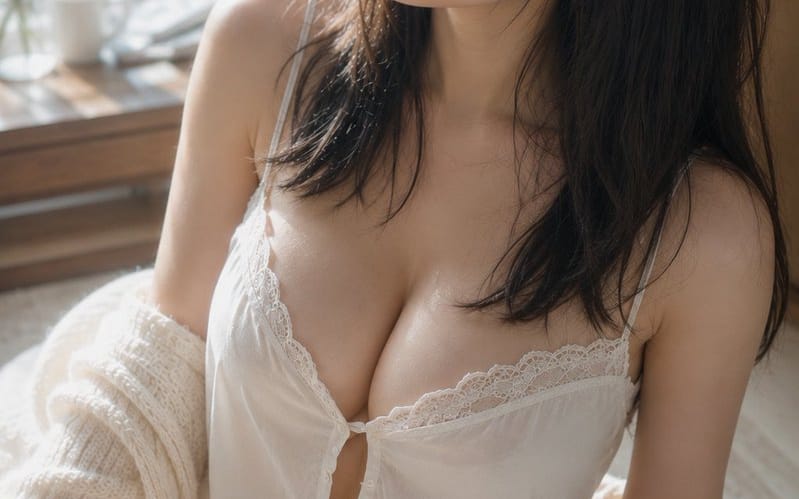
Morning Sunlight Roomwear Portrait
A detailed cinematic portrait prompt capturing a calm morning scene of a woman in roomwear by a sunlit window with soft, realistic lighting and textures.
Prompt
Assunto: {argument name="theme" default="Morning light on damp hair"}

Assunto: Um retrato vertical de uma {argument name="person" default="adult woman in white roomwear"} sentada num tapete junto a uma janela luminosa. A figura está posicionada sobretudo do centro para a direita do ecrã, mostrando do topo da cabeça até às coxas. A parte superior do corpo ocupa cerca de dois terços do ecrã, deixando uma margem suave de fundo e a janela à esquerda.

Personagem/Expressão: Cabelo preto natural semilongo. Fios finos de cabelo, ligeiramente húmidos como se acabassem de sair do banho, caem ao longo das faces e do pescoço, com franja fina a cair sobre a testa. A cabeça está ligeiramente inclinada para a parte superior esquerda do ecrã, com um olhar tranquilo dirigido para fora da janela. Olhos relaxados, lábios ligeiramente entreabertos e uma expressão calma com um toque de sonolência ainda presente. Maquilhagem minimalista centrada em bege pálido e rosa, mostrando pele natural com poros e pelos finos.

Vestuário/Pose: Uma camisola branca de alças finas com renda delicada, e calções a condizer. Pequenos botões e franzidos suaves no peito, com o tecido leve a cair naturalmente com a gravidade. Um casaco de malha grossa cor creme está caído dos ombros, pendendo solto sobre os cotovelos e antebraços. O corpo está ligeiramente torcido para a esquerda, sentada com uma perna dobrada para a frente numa postura natural, com a altura dos ombros ligeiramente desnivelada.

Fundo/Luz: Uma grande janela à esquerda. Fora da janela, folhas verdes banhadas pelo sol da manhã espalham-se num bokeh suave. Uma chávena branca, um pequeno vaso de vidro e ramos finos estão dispostos de forma discreta sobre uma mesa de madeira junto à janela. A luz principal é a luz natural quente que entra pela janela no canto superior esquerdo. Cria realces suaves nas faces, na ponte do nariz, na clavícula, nos ombros, nos braços e nas coxas, enquanto o lado direito do cabelo e a parte de trás da sala mergulham em sombras suaves. Uma luz refletida pálida ressalta do tecido branco e do chão.

Composição/Câmara: Vertical 2:3. Plano de close-up inclinado para baixo a partir de uma posição ligeiramente elevada. Uma composição triangular com o rosto no centro superior, o peito no centro e a perna dobrada na parte inferior esquerda. A margem do lado da janela enfatiza a direção do olhar, e o fundo está fortemente desfocado. Equivalente a 50mm, profundidade de campo reduzida perto de abertura máxima. O foco está nos olhos e no rosto, com a perna em primeiro plano e a janela em segundo plano suavemente desfocadas.

Textura/Estilo: Um retrato interior fotorrealista captado apenas com luz natural. Baseado em marfim claro e veios de madeira clara, com tons de pele saudáveis e o verde do exterior da janela como cores de destaque subtis. Não excessivamente suavizado, mas representando com precisão a textura da pele, cabelo fino, a sensação de agrupamento do cabelo húmido e as fibras da renda e da malha. Baixo contraste com gradações suaves como numa fotografia em película elegante.

Negativo: Pessoas com aparência de menores de idade, rostos não naturais, olhares não naturais, olhos assimétricos, dedos a mais, dedos em falta, fusão de membros, ombros ou articulações colapsados, roupa a apertar demasiado, transparência não natural do tecido, cabelo ou roupa a desafiar a gravidade, sombras inconsistentes com as fontes de luz, correção excessiva da pele, pele com aspeto plástico, texto, logótipos, marcas de água.Como usar este prompt
- 1Copie o prompt exatamente e cole no seu modelo preferido ou projeto Ideart.
- 2Substitua detalhes de produto, sujeito, público e estilo pelo seu próprio contexto.
- 3Gere primeiro um resultado base e depois remixe a direção mais forte em campanha, série de imagens ou conceito de vídeo.
Criar a partir deste prompt
Transforme um prompt de imagem em um projeto criativo finalizado.
Guarde o prompt, adicione imagens de referência ou notas e deixe a Ideart moldar o próximo passo de produção no mesmo fio criativo.