
Ideart
開啟選單

Layered Paper-Cut Illustration Poster

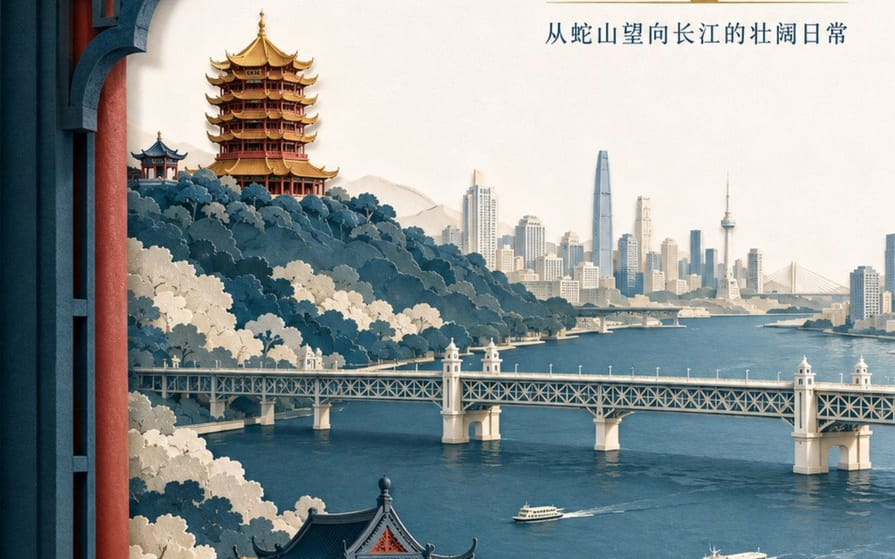
A detailed prompt for creating a sophisticated layered paper-cut illustration poster featuring Wuhan landmarks like the Yellow Crane Tower and the Yangtze River.
Layered Paper-Cut Illustration Poster

迅速的

免費生成圖片
Create a high-end layered paper-cut illustration poster for the tourism brand "{argument name="brand name" default="He Wang Wuhan"}" with the theme "{argument name="theme" default="Looking at the river from the tower, seeing the landscape skeleton of Wuhan at a glance"}" in 3:4 vertical format. The composition uses a foreground window framing, with five to seven layers of thick textured paper forming Snake Hill, the Yellow Crane Tower, the Yangtze River, the Wuhan Yangtze River Bridge, and the city skyline on the opposite bank. The Yellow Crane Tower is located on the ridge in the background, with accurate relationships between layered eaves, golden glazed tiles, and vermilion pillars. The Yangtze River Bridge extends horizontally in the middle ground, with two small ferries on the river in controlled scale. The paper edges are sharp, with uniform soft lighting from the top left and realistic shadows between layers. Colors are indigo, warm off-white, cinnabar red, and a small amount of gilded gold for visual focus. The main title "{argument name="main title" default="Seeing the River City from the Tower"}" is placed in the large white space at the top right in two lines of modern Song typeface. The brand name "He Wang Wuhan" is placed at the bottom left in a paper seal format, keeping it modern rather than imitation antique.

如何使用這個 Prompt

  1. 1完整複製 Prompt,然後貼到你偏好的模型或 Ideart 專案。
  2. 2把產品、主體、受眾和風格細節替換成你自己的上下文。
  3. 3先生成一個基準結果,再把最強方向 remix 成 Campaign、圖片組或影片概念。

基於這個 Prompt 創作

把一條 影像 Prompt 變成完整創意專案。

儲存 Prompt,加入參考圖片或備註,讓 Ideart 從同一條創意執行緒塑造下一個生產步驟。