
Morning Sunlight Roomwear Portrait
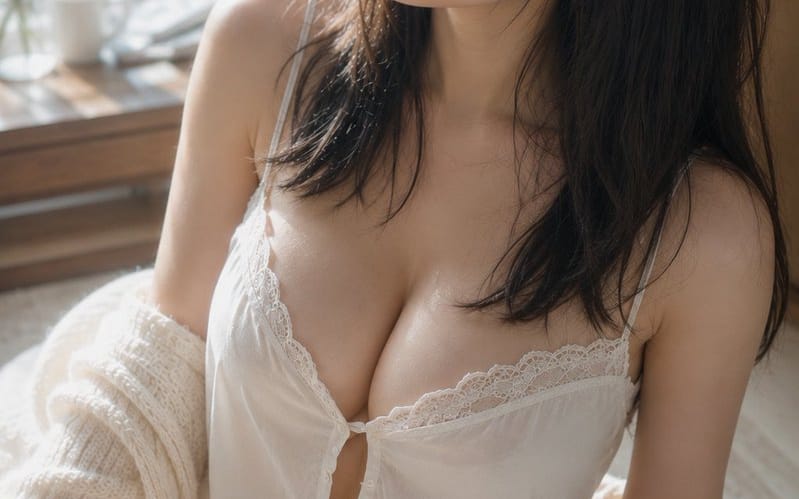
A detailed cinematic portrait prompt capturing a calm morning scene of a woman in roomwear by a sunlit window with soft, realistic lighting and textures.
提示詞
主體:{argument name="theme" default="晨光中的濕髮"}

主體:一位{argument name="person" default="穿著白色家居服的成年女性"}的垂直肖像,她坐在明亮窗邊的地毯上。主體大致位於畫面中央偏右,呈現從頭頂到腿部的範圍。上半身約占畫面三分之二,左側留有柔和的背景空間與窗戶。

角色/表情:自然的黑色中長髮。幾縷略帶濕氣的細髮(彷彿剛沐浴過)沿著臉頰與頸部垂落,額前覆蓋著薄薄的瀏海。頭部微微朝畫面上方左側傾斜,目光靜靜地望向窗外。眼神放鬆,雙唇微啟,神情平靜中帶著一絲未褪的睡意。妝容極淡,以淺米色與粉色為主,展現帶有毛孔與細毛的自然肌膚。

服裝/姿勢:一件白色細肩帶蕾絲小可愛,搭配同色短褲。胸前有細小的鈕扣與柔軟的褶皺,輕薄布料順應重力自然垂墜。一件米白色粗針織開襟外套從肩頭滑落,鬆垮地掛在手肘與前臂處。身體微微向左扭轉,單腿朝前彎曲,呈現自然坐姿,雙肩高度略有錯落。

背景/光線:左側有一扇大窗。窗外,沐浴在晨光中的綠葉以柔和的散景向外延伸。窗邊的木桌上簡約擺放著一只白色馬克杯、一個小玻璃花瓶與幾根細枝。主要光源是從窗戶左上方灑入的溫暖自然光。光線在臉頰、鼻樑、鎖骨、肩膀、手臂與大腿上形成柔和的高光,而頭髮右側與房間深處則沉入溫柔的陰影中。白色布料與地板反射出淡淡的補光。

構圖/相機:垂直 2:3 比例。從略高處俯拍的近景鏡頭。採用三角構圖:臉部位於頂部中央,胸部位於中央,彎曲的腿位於左下角。窗戶一側的留白強調了視線方向,背景則大幅模糊。等效 50mm 焦距,接近最大光圈的淺景深。焦點落在眼睛與臉部,前景的腿與背景的窗戶則柔和地虛化。

質感/風格:僅使用自然光的寫實室內肖像。以明亮的象牙色與淺木紋為基調,搭配健康的膚色與窗外的綠色作為微妙的點綴色。不過度平滑,而是精準描繪肌膚紋理、細毛、濕髮的黏結感,以及蕾絲與針織的纖維質感。對比度低,帶有優雅底片照片般的柔和漸變。

負面提示:未成年樣貌的人物、不自然的臉部、不自然的目光、不對稱的眼睛、多餘的手指、缺少的手指、肢體融合、肩膀或關節塌陷、衣物勒緊、布料不自然的透明感、違反重力的頭髮或衣物、與光源不一致的陰影、過度的皮膚修飾、塑膠般的皮膚、文字、標誌、浮水印。如何使用這個 Prompt
- 1完整複製 Prompt,然後貼到你偏好的模型或 Ideart 專案。
- 2把產品、主體、受眾和風格細節替換成你自己的上下文。
- 3先生成一個基準結果,再把最強方向 remix 成 Campaign、圖片組或影片概念。
基於這個 Prompt 創作
把一條 圖片 Prompt 變成完整創意專案。
儲存 Prompt,加入參考圖片或備註,讓 Ideart 從同一條創意執行緒塑造下一個生產步驟。