
超逼真立體透視模型等距地圖提示
一個結構化的提示,用於生成高度詳細、照片般逼真的城市微縮立體透視地圖。它指定了 45 度俯視角,帶有移軸效果,強調超大尺寸的地標、精緻的微縮建築,並放置在復古紋理紙質地圖底座上。
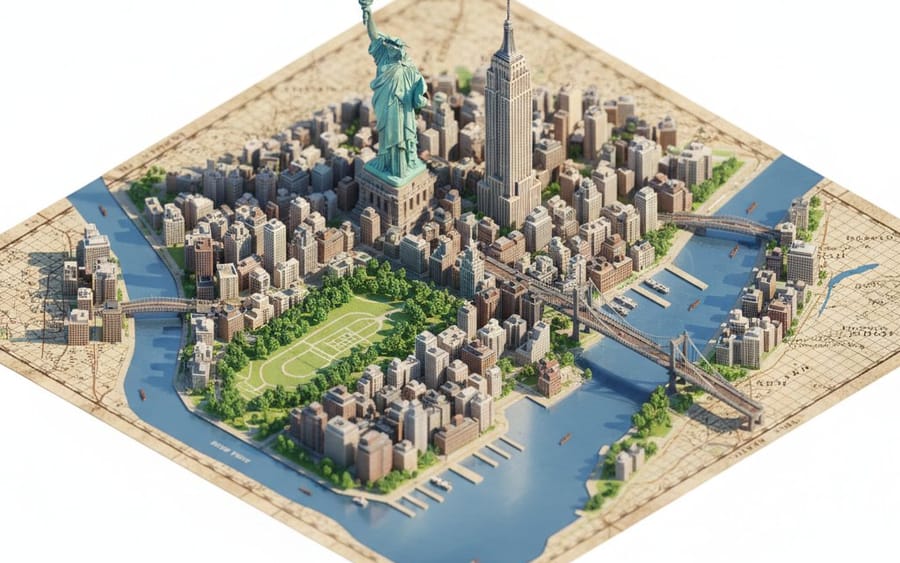
提示詞
```json
{
  "description": "建立一個高度精細、寫實的微縮立體模型風格等距地圖,描繪 {argument name=\"city location\" default=\"CITY/LOCATION\"},並放置在復古紋理紙質地圖上。",
  "perspective": {
    "type": "等距",
    "angle": "45 度俯視",
    "look": "微距攝影,帶移軸微縮效果"
  },
  "geography": {
    "shape": "遵循 {argument name=\"city location\" default=\"CITY/LOCATION\"} 的真實地理形狀",
    "landmarks": {
      "oversized": true,
      "dominant": true,
      "primary_focus": "紀念碑",
      "secondary_elements": "較小且簡化"
    },
    "architecture": "超精細微縮模型",
    "roads": "選擇性",
    "greenery": true,
    "water_bodies": true,
    "terrain": true,
    "materials": ["石頭", "木材", "混凝土", "玻璃", "植物"]
  },
  "lighting": {
    "type": "柔和的電影感日光",
    "effects": ["自然陰影", "溫暖高光", "微妙的大氣深度"]
  },
  "water": {
    "rivers": true,
    "coastlines": true,
    "depth_gradients": "平滑",
    "reflections": "柔和"
  },
  "map_base": {
    "type": "舊世界地圖紙",
    "features": ["可見網格線", "紙張紋理", "印刷地名"]
  },
  "focus": {
    "sharp_on_landmarks": true,
    "edge_falloff": "柔和"
  },
  "quality": {
    "museum_quality": true,
    "handcrafted_diorama_realism": true,
    "ultra_high_resolution": true
  },
  "background": {
    "color": "純淨的白色",
    "restrictions": ["無浮動文字", "無標誌", "無浮水印", "無未來感或卡通元素"]
  },
  "aspect_ratio": "4:5"
}
```如何使用這個 Prompt
- 1完整複製 Prompt,然後貼到你偏好的模型或 Ideart 專案。
- 2把產品、主體、受眾和風格細節替換成你自己的上下文。
- 3先生成一個基準結果,再把最強方向 remix 成 Campaign、圖片組或影片概念。
基於這個 Prompt 創作
把一條 圖片 Prompt 變成完整創意專案。
儲存 Prompt,加入參考圖片或備註,讓 Ideart 從同一條創意執行緒塑造下一個生產步驟。