Retro Wrist Computer Playing Classic Platformer

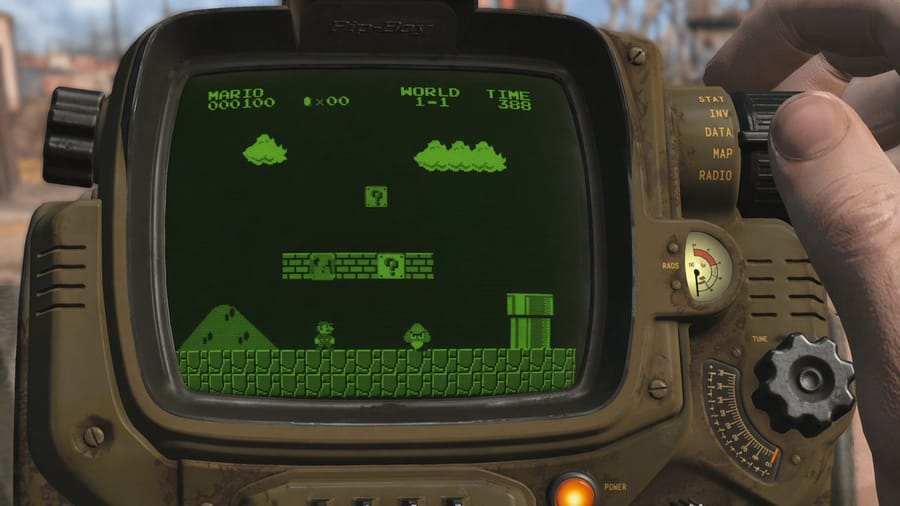
Generates a first-person view of a retro-futuristic wrist device displaying a classic 8-bit video game on a monochrome green screen.

Retro Wrist Computer Playing Classic Platformer

Prompt

A first-person perspective shot of a user looking at a {argument name="device type" default="retro-futuristic wrist-mounted computer resembling a Pip-Boy"}. The device has a weathered olive-drab metal casing, various analog dials, a glowing orange power button, and a radiation gauge. A hand on the right side is adjusting a large black dial. The curved screen of the device is displaying {argument name="screen content" default="the classic video game Super Mario Bros, specifically World 1-1"}. The game is rendered in {argument name="screen style" default="monochrome green CRT pixel art with scanlines"}, showing the player character facing an enemy near a pipe and floating blocks, with text at the top reading "MARIO 000100", a coin icon with "x00", "WORLD 1-1", and "TIME 388". The background is a {argument name="background setting" default="blurred post-apocalyptic wasteland"} in daylight.

How to use this prompt

  1. 1Copy the prompt exactly, then paste it into your preferred model or Ideart project.
  2. 2Replace product, subject, audience, and style details with your own context.
  3. 3Generate one baseline result first, then remix the strongest direction into a campaign, image set, or video concept.

Build from this prompt

Turn a image prompt into a finished creative project.

Save the prompt, add reference images or notes, and let Ideart shape the next production step from the same creative thread.