
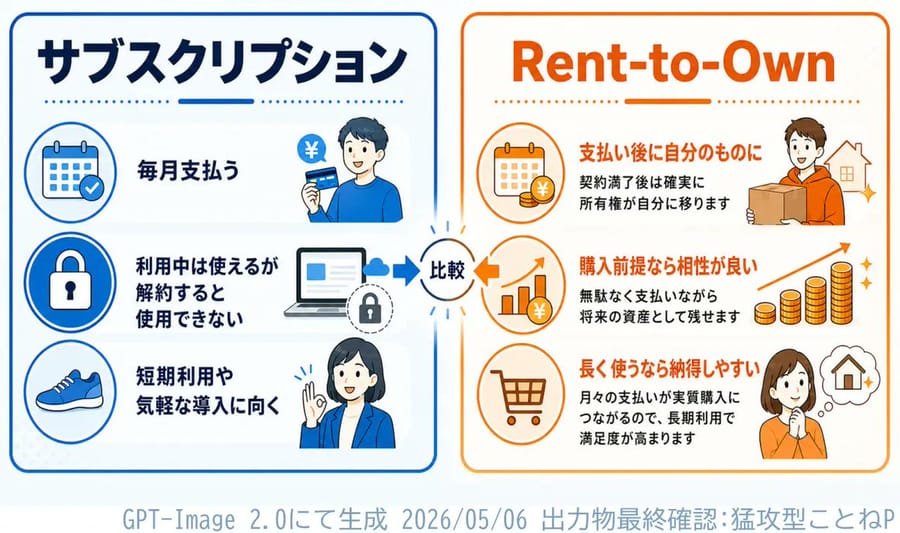
訂閱制與租購制資訊圖表
為軟體或 DAW 相關的文章生成日文對照說明資訊圖表,比較訂閱制與租購制付款模式。
提示詞
{"type":"clean Japanese comparison infographic for a DAW article","style":"flat vector illustration, business explainer, rounded panels, thick outline icons, white background, blue versus orange color coding, crisp readable typography, 16:9 landscape","canvas":{"aspect_ratio":"16:9","background":"white with subtle pale blue tint near bottom"},"layout":{"main_panels_count":2,"center_divider":"small circular badge between panels with radiating ticks, left blue arrow and right orange arrow, text 比較","left_panel":{"title":"{argument name=\"left panel title\" default=\"訂閱制\"}","position":"left half","border":"rounded rectangle blue border","theme_color":"deep navy and bright blue","items_count":3,"items":[{"icon":"calendar with check mark in a blue circle","text":"每月支付費用","illustration":"young man in blue sweater holding a credit card with yen symbol"},{"icon":"padlock in a blue circle","text":"訂閱期間可使用,\n取消後即無法使用","illustration":"laptop screen with arrow pointing to small locked padlock"},{"icon":"blue sneaker in a blue circle","text":"適合短期使用或\n輕鬆入門","illustration":"businesswoman in blue jacket raising one hand as if explaining"}]},"right_panel":{"title":"{argument name=\"right panel title\" default=\"租購制 (Rent-to-Own)\"}","position":"right half","border":"rounded rectangle orange border","theme_color":"orange and brown","items_count":3,"items":[{"icon":"calendar with yen coin in an orange circle","headline":"付清後即為己有","body":"合約期滿後,\n所有權確實歸您所有","illustration":"person in orange hoodie holding a cardboard box beside a house outline and sparkle"},{"icon":"bar chart with yen coin in an orange circle","headline":"適合以購買為前提","body":"在支付費用的同時,\n也能累積未來資產","illustration":"rising arrow above stacks of coins with sparkles"},{"icon":"shopping cart in an orange circle","headline":"長期使用更划算","body":"每月付款等同於分期購買,\n長期使用滿意度更高","illustration":"woman in orange top thinking about a house in a thought bubble"}]}},"footer":{"text":"{argument name=\"footer note\" default=\"由 GPT-Image 2.0 生成 2026 年 5 月 6 日 最終確認:猛攻型ことねP\"}","position":"bottom center","color":"pale gray-blue monospaced style"},"text_rendering":"preserve Japanese text accurately, large bold headings, smaller explanatory lines aligned beside icons","notes":"Use exactly 2 large comparison panels, 3 subscription points on the left, 3 rent-to-own points on the right, and the central 比較 badge."}如何使用這個 Prompt
- 1完整複製 Prompt,然後貼到你偏好的模型或 Ideart 專案。
- 2把產品、主體、受眾和風格細節替換成你自己的上下文。
- 3先生成一個基準結果,再把最強方向 remix 成 Campaign、圖片組或影片概念。
基於這個 Prompt 創作
把一條 圖片 Prompt 變成完整創意專案。
儲存 Prompt,加入參考圖片或備註,讓 Ideart 從同一條創意執行緒塑造下一個生產步驟。