
影片串流平台首頁 UI
產生一個詳細的影片串流網站首頁模型,包含側邊欄、類別標籤,以及帶有標題和元數據的影片縮圖網格。
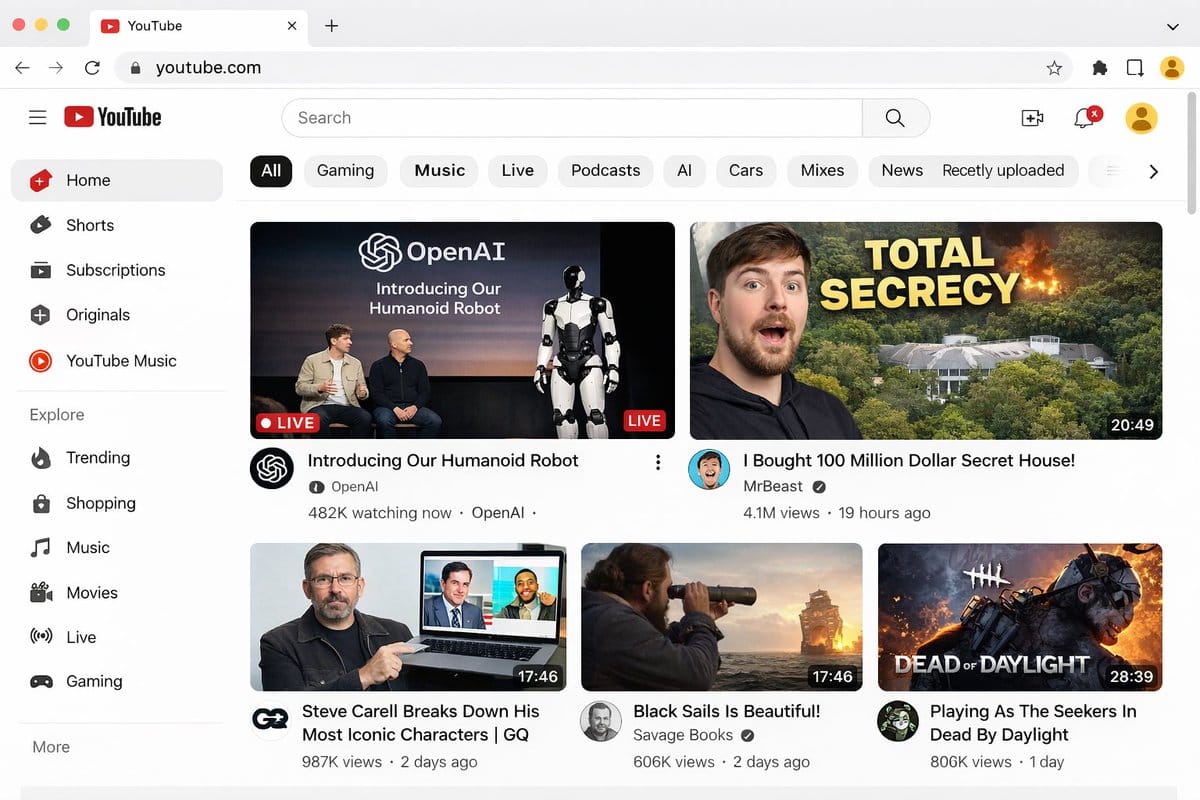
提示詞
{
  "type": "網頁瀏覽器 UI 模型",
  "platform": "{argument name=\"platform name\" default=\"YouTube\"}",
  "browser_window": {
    "style": "macOS 淺色模式",
    "tab": "YouTube",
    "url_bar": "youtube.com"
  },
  "layout": {
    "header": {
      "components": ["漢堡選單", "平台 Logo", "搜尋列", "建立影片圖示", "通知鈴鐺", "使用者頭像"]
    },
    "sidebar": {
      "position": "左側",
      "item_count": 11,
      "sections": [
        {
          "name": "主要",
          "items": ["首頁", "Shorts", "訂閱內容", "Originals", "YouTube Music"]
        },
        {
          "name": "探索",
          "items": ["發燒影片", "購物", "音樂", "電影", "直播", "遊戲"]
        }
      ]
    },
    "main_content": {
      "category_tags": {
        "count": 10,
        "labels": ["全部", "遊戲", "音樂", "直播", "Podcast", "AI", "汽車", "合輯", "新聞", "最新上傳"]
      },
      "video_grid": {
        "card_count": 5,
        "cards": [
          {
            "position": "左上",
            "size": "大型",
            "thumbnail_description": "Sam Altman 和 Greg Brockman 坐在舞台上,旁邊是一台站立的人形機器人,文字疊加『OpenAI Introducing Our Humanoid Robot』,帶有 LIVE 標籤",
            "video_title": "{argument name=\"featured live stream title\" default=\"Introducing Our Humanoid Robot\"}",
            "channel_name": "{argument name=\"featured live stream channel\" default=\"OpenAI\"}",
            "metadata": "48.2 萬人正在觀看"
          },
          {
            "position": "右上",
            "size": "大型",
            "thumbnail_description": "左側是驚訝男子的臉,右側是隱藏在森林中並發生爆炸的巨大豪宅,粗體黃色文字疊加『{argument name=\"top right thumbnail text\" default=\"TOTAL SECRECY\"}』",
            "video_title": "{argument name=\"top right video title\" default=\"I Bought 100 Million Dollar Secret House!\"}",
            "channel_name": "MrBeast",
            "metadata": "410 萬次觀看,19 小時前,片長 20:49"
          },
          {
            "position": "左下",
            "size": "小型",
            "thumbnail_description": "Steve Carell 手持筆記型電腦,螢幕顯示《The Office》的場景",
            "video_title": "Steve Carell Breaks Down His Most Iconic Characters | GQ",
            "channel_name": "GQ",
            "metadata": "98.7 萬次觀看,2 天前,片長 17:46"
          },
          {
            "position": "中下",
            "size": "小型",
            "thumbnail_description": "男子在日落時分透過望遠鏡觀察海上的帆船",
            "video_title": "Black Sails Is Beautiful!",
            "channel_name": "Savage Books",
            "metadata": "60.6 萬次觀看,2 天前,片長 17:46"
          },
          {
            "position": "右下",
            "size": "小型",
            "thumbnail_description": "來自電子遊戲的恐怖面具殺手角色,文字疊加『DEAD OF DAYLIGHT』",
            "video_title": "Playing As The Seekers In Dead By Daylight",
            "channel_name": "Unknown",
            "metadata": "80.6 萬次觀看,1 天前,片長 28:39"
          }
        ]
      }
    }
  }
}如何使用這個 Prompt
- 1完整複製 Prompt,然後貼到你偏好的模型或 Ideart 專案。
- 2把產品、主體、受眾和風格細節替換成你自己的上下文。
- 3先生成一個基準結果,再把最強方向 remix 成 Campaign、圖片組或影片概念。
基於這個 Prompt 創作
把一條 圖片 Prompt 變成完整創意專案。
儲存 Prompt,加入參考圖片或備註,讓 Ideart 從同一條創意執行緒塑造下一個生產步驟。