
YouTube 直播介面模型
生成逼真的 YouTube 直播 UI,包含帶有聊天疊加層、頻道詳情以及可自訂文字欄位的影片播放器。
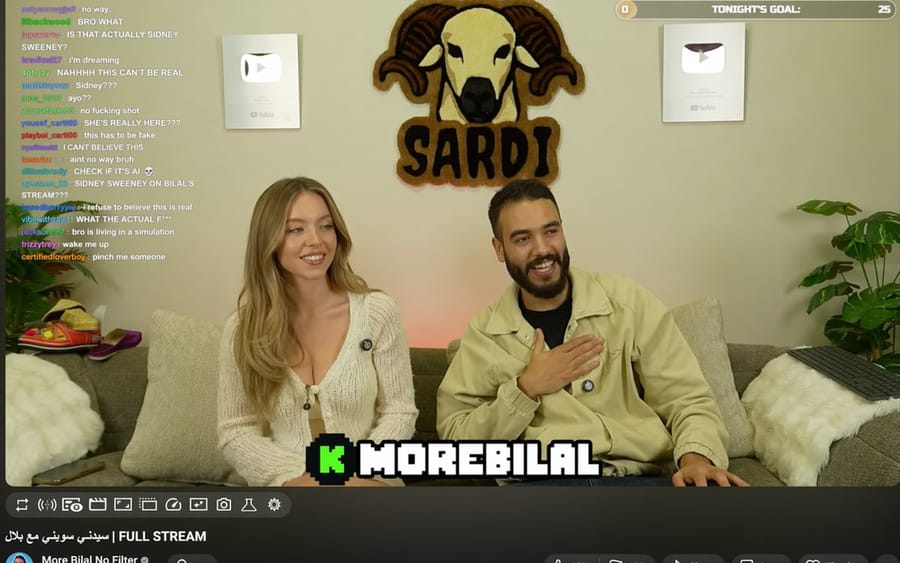
提示詞
{
  "type": "YouTube 直播 UI",
  "top_nav": {
    "logo": "YouTube Premium",
    "search": "{argument name=\"search query\" default=\"bilal fraiha\"}",
    "icons": 3
  },
  "player": {
    "subjects": [
      "{argument name=\"female guest\" default=\"Sydney Sweeney\"} 穿著白色針織衫",
      "留著鬍鬚的男子穿著米色夾克正在大笑"
    ],
    "bg": "沙發,2 個銀色播放按鈕,RAM 標誌 'SARDI'",
    "overlays": {
      "chat": {"pos": "左側", "count": 15, "desc": "彩色使用者名稱,白色文字"},
      "goal": {"pos": "右上角", "text": "今晚目標:0 到 25"},
      "banner": {"pos": "底部中央", "text": "K {argument name=\"streamer name\" default=\"MOREBILAL\"}"}
    },
    "controls": {"count": 10}
  },
  "details": {
    "title": "{argument name=\"video title\" default=\"FULL STREAM | سيدني سويني مع بلال\"}",
    "channel": "{argument name=\"channel name\" default=\"More Bilal No Filter\"}",
    "buttons": 5
  }
}如何使用這個 Prompt
- 1完整複製 Prompt,然後貼到你偏好的模型或 Ideart 專案。
- 2把產品、主體、受眾和風格細節替換成你自己的上下文。
- 3先生成一個基準結果,再把最強方向 remix 成 Campaign、圖片組或影片概念。
基於這個 Prompt 創作
把一條 圖片 Prompt 變成完整創意專案。
儲存 Prompt,加入參考圖片或備註,讓 Ideart 從同一條創意執行緒塑造下一個生產步驟。