
图片AI
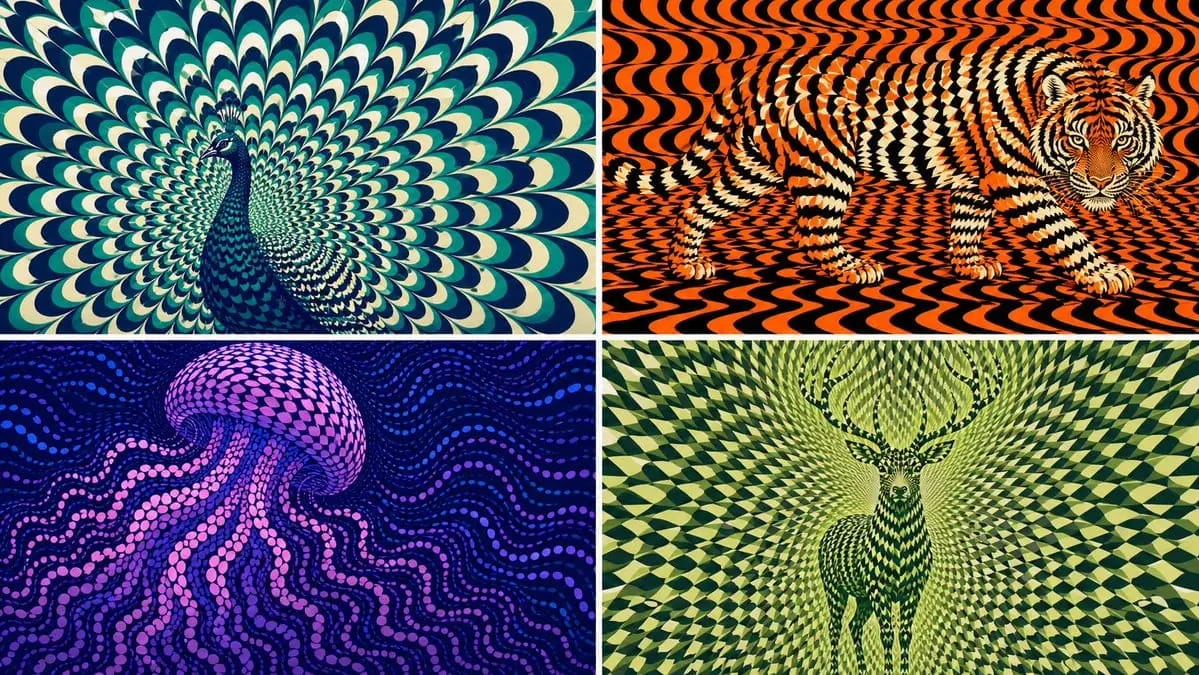
2x2 grid, 16:9 AI picks subjects class OpArtSubjectField
2x2 grid, 16:9 AI picks subjects class OpArtSubjectField: def __init__(self, subject="[Subject]", palette="[Palette]"): self. style = "high-contrast optical art, kinetic poster, graphic abstraction" self.canvas = "full-bleed pattern...
提示词
2x2 grid, 16:9 AI picks subjects class OpArtSubjectField: def __init__(self, subject="[Subject]", palette="[Palette]"): self. style = "high-contrast optical art, kinetic poster, graphic abstraction" self.canvas = "full-bleed pattern field" self.subject = subject self.palette = AI_INFER("3-5 colors that match SUBJECT mood, habitat, symbolism, or brand energy") def infer_subject_silhouette(self): return AI_INFER( "the most recognizable silhouette, posture, outline, or profile of SUBJECT" ) def build_pattern_field(self): return """ Fill the entire canvas with hundreds or thousands of repeated units. Units may be petals, scales, tiles, crescents, stripes, waves, discs, feathers, blades, shards, or glyph-like marks. The subject is not outlined directly. The subject emerges because the repeated units change scale, direction, spacing, brightness, and color inside the subject zone. Background units continue the same visual language but flow differently. """ def illusion_rules(self): return """ From far away: SUBJECT must be readable. From close up: only repeated abstract units are visible. No hard outline, no direct drawing, no pasted silhouette. The pattern itself carries the shape. """ # EXECUTE: # Render SUBJECT as a kinetic Op Art field where repeated units form the hidden figure.如何使用这个 Prompt
- 1完整复制 Prompt,然后粘贴到你常用的模型或 Ideart 项目中。
- 2把产品、主体、受众和风格细节替换成你的真实上下文。
- 3先生成一个基准版本,再把最强方向 remix 成 Campaign、图片组或视频概念。
从这个 Prompt 开始
把一个图片 Prompt 变成完整创作项目。
保存 Prompt,加入参考图片或笔记,让 Ideart 沿着同一条创作线程推进下一步生产。