
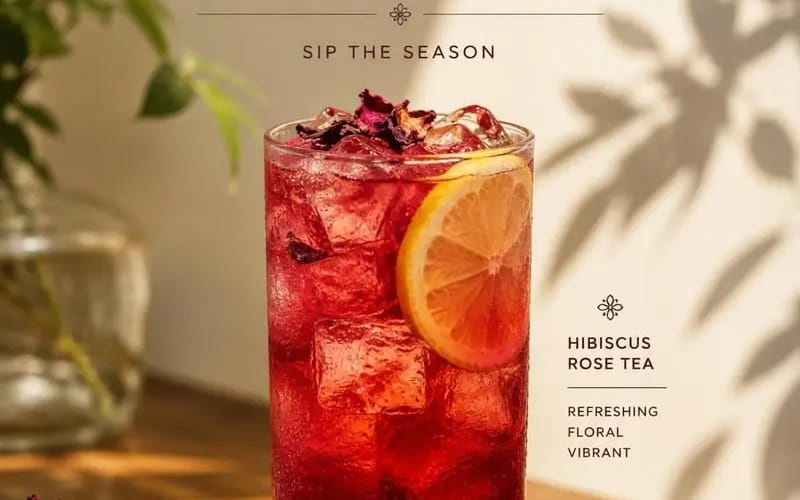
Create a premium cafe advertisement poster featuring Product
{ "PRODUCT_NAME": "", "SUBTITLE": "", "DESCRIPTION": "", "PRICE": "", "prompt": "Create a premium cafe advertisement poster featuring [Product Name] as the main subject. The composition should follow a clean, minimalist, editorial...
提示词
{
  "PRODUCT_NAME": "",
  "SUBTITLE": "",
  "DESCRIPTION": "",
  "PRICE": "",

  "prompt": "Create a premium cafe advertisement poster featuring [Product Name] as the main subject. The composition should follow a clean, minimalist, editorial style with warm natural sunlight, soft plant shadows, elegant typography, and a sophisticated luxury aesthetic.\n\nPlace a beautifully styled drink at the center of the composition inside a transparent glass with realistic textures, reflections, condensation, and garnish details appropriate for the beverage.\n\nThe scene should include a wooden table, subtle decorative elements, blurred greenery, and soft beige backgrounds to create a warm and inviting atmosphere.\n\nDisplay the text in the following structure:\n\nTop section:\n• 'NEW MENU' headline\n• [Subtitle]\n\nMiddle section:\n• [Product Name]\n\nBottom section:\n• [Description]\n• [Price]\n\nStyle requirements:\n• Editorial food photography\n• Soft natural lighting\n• Cinematic composition\n• Luxury cafe branding\n• Elegant serif typography\n• Realistic shadows and highlights\n• Minimalist layout\n• High-detail product photography\n\nAspect ratio: 4:5."
}如何使用这个 Prompt
- 1完整复制 Prompt,然后粘贴到你常用的模型或 Ideart 项目中。
- 2把产品、主体、受众和风格细节替换成你的真实上下文。
- 3先生成一个基准版本,再把最强方向 remix 成 Campaign、图片组或视频概念。
从这个 Prompt 开始
把一个图片 Prompt 变成完整创作项目。
保存 Prompt,加入参考图片或笔记,让 Ideart 沿着同一条创作线程推进下一步生产。