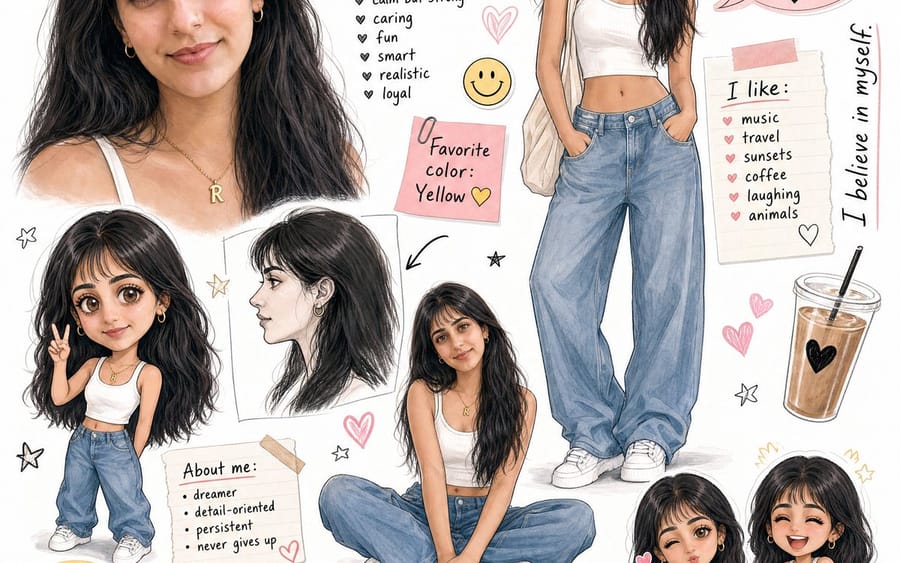
Ruzaina Character Design Sheet

A comprehensive prompt for a character design sheet featuring multiple poses, chibi versions, and scrapbook-style decorative elements.

Ruzaina Character Design Sheet

Prompt

A stylized character design sheet / storyboard for a {argument name="character name" default="fictional girl character named \"Ruzaina\""}, featuring multiple poses and expressions on a white background. The character has {argument name="features" default="long black hair with bangs, tan/warm skin tone"}, wearing a white crop tank top, loose baggy blue jeans, and white sneakers with a gold initial necklace.
Layout includes:
Large close-up face portrait (top left)
Full body standing pose (top right)
Chibi/cute mini version (small, bottom left area)
Side profile sketch
Dreamy close-up face with hand on cheek
Sitting cross-legged pose
Two small chibi face expressions (bottom right)
Decorative elements: hand-drawn hearts, stars, smiley face sticker, pink speech bubbles, sticky notes, color palette swatches (peach, black, grey, yellow, pink), an iced coffee cup drawing.
Text elements (handwritten style fonts):
Name "{argument name="display name" default="Ruzaina"}" at top in bold stylish font
"Personality:" list: calm but strong, caring, fun, smart, realistic, loyal
Pink sticky note: "Favorite color: Yellow 💛"
Speech bubble: "I'm not perfect, but I'm ME."
Side text: "I believe in myself."
"I like:" music, travel, sunsets, coffee, laughing, animals
"About me:" dreamer, detail-oriented, persistent, never gives up
Bottom note: "Mental note: Enjoy the present. Be grateful. Keep shining ✨"
"Good Vibes Only" badge
"...in process mode" with loading bar
Art style: Semi-realistic + chibi mix, soft sketch lines, warm tones, aesthetic journal/scrapbook feel, similar to Korean webtoon character sheets.3c:T

How to use this prompt

  1. 1Copy the prompt exactly, then paste it into your preferred model or Ideart project.
  2. 2Replace product, subject, audience, and style details with your own context.
  3. 3Generate one baseline result first, then remix the strongest direction into a campaign, image set, or video concept.

Build from this prompt

Turn a image prompt into a finished creative project.

Save the prompt, add reference images or notes, and let Ideart shape the next production step from the same creative thread.