
ImageNano Banana Pro
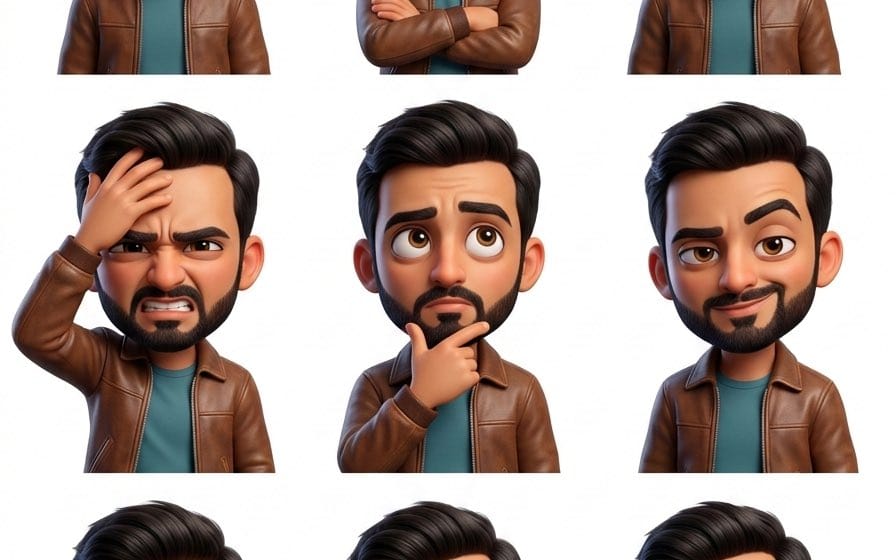
Pixar Sticker Set 3x3 Grid of Emotions
A detailed JSON prompt for generating a 3x3 grid collage of Pixar-style 3D caricature stickers. The prompt specifies global character assets (based on a reference identity) and defines nine different emotions and poses for each cell, all rendered against a solid white background using Unreal Engine 5/Octane Render style.
Prompt
{"project_metadata": {
"title": " Pixar Sticker Set",
"output_format": "3x3 Grid Collage",
"total_cells": 9,
"target_aspect_ratio": "3:4",
"rendering_engine": "Unreal Engine 5 / Octane Render Style"
},
"global_character_assets": {
"identity": " (Pixar-Style 3D Caricature)",
"facial_base": "Reference based on  facial structure and likeness",
"hair_definition": " style, soft natural shine",
"wardrobe": {
"jacket": "Casual retro-inspired jacket",
"details": "Soft fabric texture, slightly worn vintage feel",
"undershirt": "Simple solid-color t-shirt"
},
"anatomical_proportions": {
"head_to_body_ratio": "1:3 (Chibi-influenced Pixar scale)",
"eye_scale": "Exaggerated/Large for high readability",
"skin_shader": "Subsurface scattering, warm light skin tone, smooth polished finish"
}
},
"grid_layout_definition": {
"row_1": {
"cell_1": { "emotion": "Surprised", "pose": "Raised eyebrows, eyes wide, mouth slightly open" },
"cell_2": { "emotion": "Annoyed", "pose": "Arms crossed, unimpressed stare" },
"cell_3": { "emotion": "Confused", "pose": "Head tilted, brows furrowed, puzzled look" }
},
"row_2": {
"cell_4": { "emotion": "Frustrated", "pose": "One hand rubbing forehead, tense expression" },
"cell_5": { "emotion": "Thoughtful", "pose": "Hand on chin, eyes looking upward" },
"cell_6": { "emotion": "Sarcastic", "pose": "Smirk with raised eyebrow, playful attitude" }
},
"row_3": {
"cell_7": { "emotion": "Worried", "pose": "Tense shoulders, concerned eyes" },
"cell_8": { "emotion": "Bored", "pose": "Chin resting on palm, half-lidded eyes" },
"cell_9": { "emotion": "Curious", "pose": "Leaning forward slightly, interested expression" }
]
},
"environment_and_lighting": {
"background": "Solid pure white, zero shadows, isolated for PNG extraction",
"lighting_setup": "Three-point studio lighting, soft key light, subtle rim light",
"negative_constraints": [
"No text", "No logos", "No background elements", "No speech bubbles", "No UI"}How to use this prompt
- 1Copy the prompt exactly, then paste it into your preferred model or Ideart project.
- 2Replace product, subject, audience, and style details with your own context.
- 3Generate one baseline result first, then remix the strongest direction into a campaign, image set, or video concept.
Explore nearby prompt paths
Model
Build from this prompt
Turn a image prompt into a finished creative project.
Save the prompt, add reference images or notes, and let Ideart shape the next production step from the same creative thread.