
画像AI
16:9 widescreen
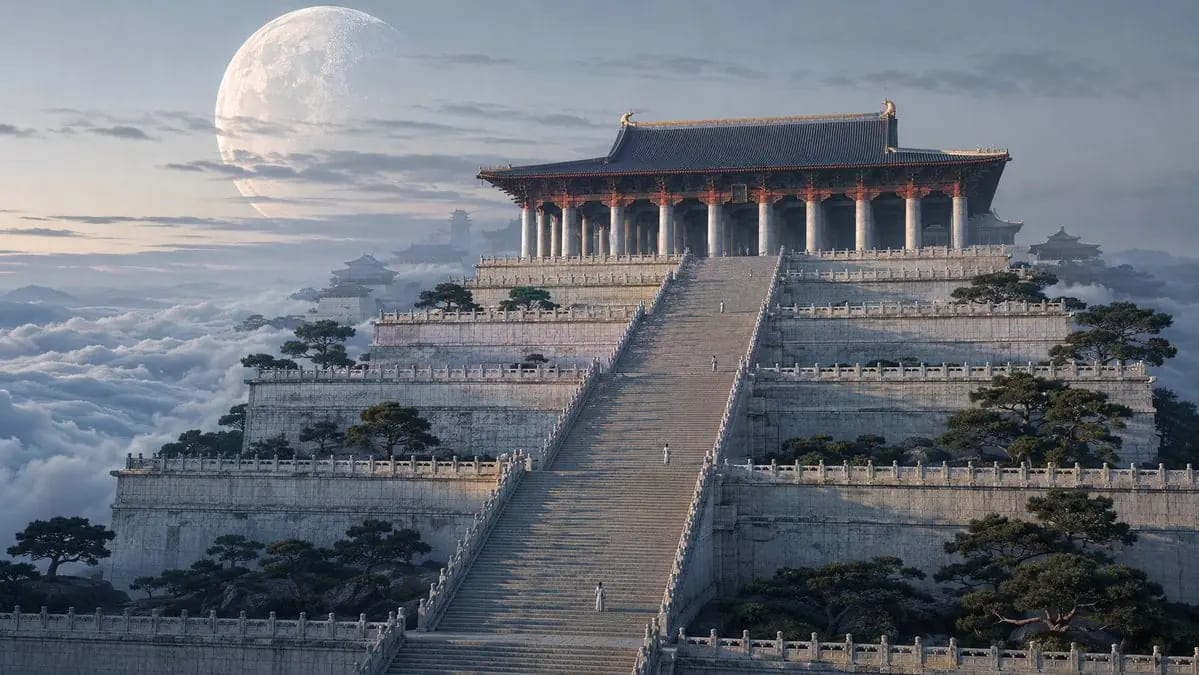
16:9 widescreen. High-end cinematic 3D render with feature-animation polish, extreme architectural detail, no plastic sheen. Cool early dawn. [SCALE RULE — the whole point] The architecture is the subject. Each human figure stands no...
プロンプト
16:9 widescreen. High-end cinematic 3D render with feature-animation polish, extreme
architectural detail, no plastic sheen. Cool early dawn.

[SCALE RULE — the whole point] The architecture is the subject. Each human figure stands
no taller than a single balustrade post beside them, roughly one fortieth the height of
the hall behind them, and occupies about 3% of the frame height — a few dozen pixels
tall. A viewer should scan the image for a moment before noticing that anyone is there
at all. Never enlarge them for legibility.

[VANTAGE] Camera positioned far back and slightly elevated, a long-lens read at 29
degrees (75mm) that compresses the tiers into stacked planes.

[THE ARCHITECTURE] A colossal ceremonial hall crowns the upper center of the frame,
seated on nine receding tiers of white jade platform. Its roof ridge stands two hundred
meters above the base. Across its front runs a colonnade of monolithic ivory stone
columns, each over three meters thick and tens of meters tall, carrying dark vermillion
matte-lacquered timber brackets and deep blue-grey tiled eaves. Below, a single vast
stairway of more than three hundred treads descends toward camera, flanked the whole way
by low carved balustrades with posts at even intervals. Form follows Tang-Song official
building canon scaled up rigorously — symmetrical, structurally sound, restrained, no
fantasy ornament.

[THE FIGURES] Four people are distributed along the stairway at widely separated heights,
each alone, each seen from behind as a pale vertical mark in white and celadon robes.
The nearest stands at the lower third; the farthest is barely a light speck near the
colonnade. Their scale against the stair and the columns is the only information the
image gives about how large any of this is. No group, no crowd, no gesture.

[SURROUNDINGS] The platform's edges fall away into an unbroken cloud sea that rolls
slowly at both sides and behind, its upper surface catching the first light. Dark green
gnarled pines cling to the terrace edges at intervals, small against the stonework.
Distant subsidiary halls and a far gate-tower recede along the same axis, dissolving
into haze.

[SKY] Pale blue-grey washing to cool ivory near the horizon. A very large pale moon sits
low behind the hall, its diameter about one third of frame height, craters visible,
integrated into the air — thin cloud crossing in front of it, a soft glow at its limb,
its lower edge softened by haze.

[LIGHT] Low cold dawn light from behind camera-left rakes across the stair, throwing long
crisp shadows down the treads from every balustrade post — those repeating shadows are
the second scale device and must read clearly. Roof ridges and column tops catch a thin
warm gold edge; the masses stay in cool blue-grey diffuse light. No god rays, no flare.

[ATMOSPHERE] Haze at 40%, building layer by layer with distance so the near stair reads
crisp, the colonnade softer, the far gate-tower nearly dissolved. Eight or more depth
layers.

[COLOR] Ivory white weathered stone, dark vermillion matte lacquer, deep blue-grey tile,
dark green pine, pale cool sky. Warm gold only as a thin rim on ridges and column tops,
under 5% of the frame. Clean and cool, never muddy, never orange.

[RENDER] Physically real materials — mottled weathering on stone, fine crazing in the
lacquer, individual roof tiles readable on the near eaves. Low-contrast curve, shadows
lifted holding texture, highlights rolled off. Mood: monumental, silent, humbling.

[AVOID] Figures rendered larger than a balustrade post, figures near the camera, crowds,
faces, birds or cranes, golden-orange grade, plastic surfaces, atmospheric haze so heavy
the architecture loses detail, symmetrical dead-center framing without depth cues.
このプロンプトの使い方
- 1プロンプトをそのままコピーし、好みのモデルまたは Ideart プロジェクトに貼り付けます。
- 2商品、被写体、対象者、スタイルの詳細を自分のコンテキストに置き換えます。
- 3まず基準結果を生成し、最も強い方向性をキャンペーン、画像セット、動画コンセプトへリミックスします。
このプロンプトから作成
画像 プロンプトを完成したクリエイティブプロジェクトに変換します。
プロンプトを保存し、参照画像やメモを追加して、Ideart に同じクリエイティブスレッドから次の制作ステップを形にさせます。