
画像AI
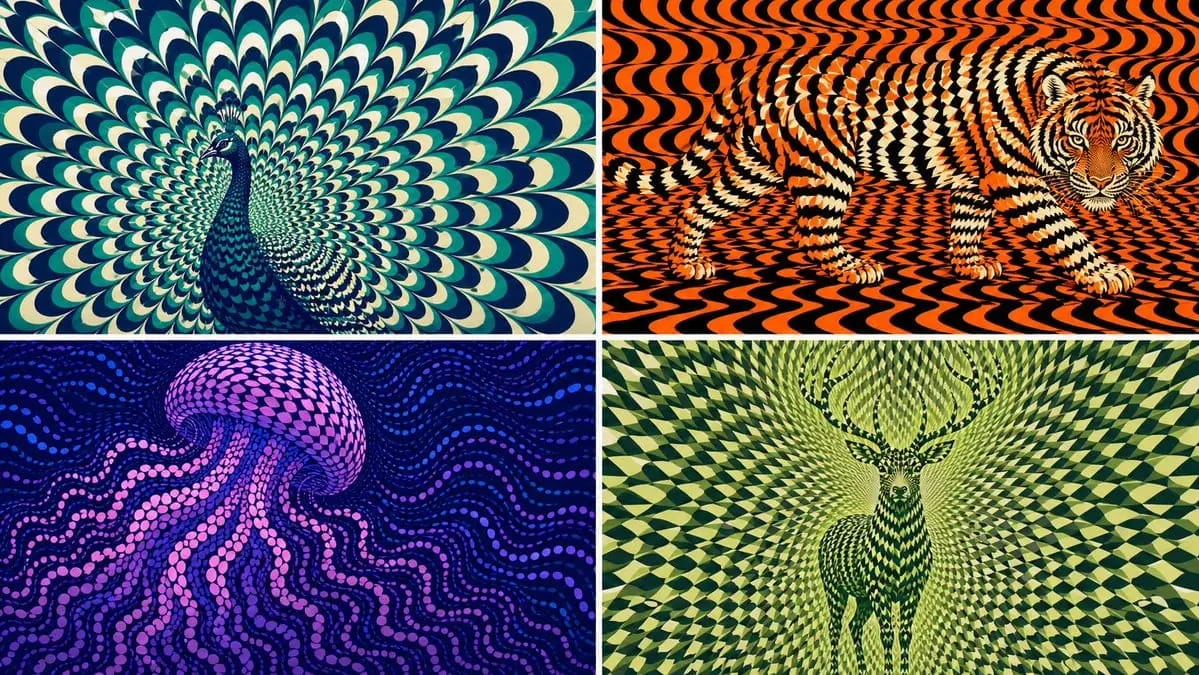
2x2 grid, 16:9 AI picks subjects class OpArtSubjectField
2x2 grid, 16:9 AI picks subjects class OpArtSubjectField: def __init__(self, subject="[Subject]", palette="[Palette]"): self. style = "high-contrast optical art, kinetic poster, graphic abstraction" self.canvas = "full-bleed pattern...
プロンプト
2x2 grid, 16:9 AI picks subjects class OpArtSubjectField: def __init__(self, subject="[Subject]", palette="[Palette]"): self. style = "high-contrast optical art, kinetic poster, graphic abstraction" self.canvas = "full-bleed pattern field" self.subject = subject self.palette = AI_INFER("3-5 colors that match SUBJECT mood, habitat, symbolism, or brand energy") def infer_subject_silhouette(self): return AI_INFER( "the most recognizable silhouette, posture, outline, or profile of SUBJECT" ) def build_pattern_field(self): return """ Fill the entire canvas with hundreds or thousands of repeated units. Units may be petals, scales, tiles, crescents, stripes, waves, discs, feathers, blades, shards, or glyph-like marks. The subject is not outlined directly. The subject emerges because the repeated units change scale, direction, spacing, brightness, and color inside the subject zone. Background units continue the same visual language but flow differently. """ def illusion_rules(self): return """ From far away: SUBJECT must be readable. From close up: only repeated abstract units are visible. No hard outline, no direct drawing, no pasted silhouette. The pattern itself carries the shape. """ # EXECUTE: # Render SUBJECT as a kinetic Op Art field where repeated units form the hidden figure.このプロンプトの使い方
- 1プロンプトをそのままコピーし、好みのモデルまたは Ideart プロジェクトに貼り付けます。
- 2商品、被写体、対象者、スタイルの詳細を自分のコンテキストに置き換えます。
- 3まず基準結果を生成し、最も強い方向性をキャンペーン、画像セット、動画コンセプトへリミックスします。
このプロンプトから作成
画像 プロンプトを完成したクリエイティブプロジェクトに変換します。
プロンプトを保存し、参照画像やメモを追加して、Ideart に同じクリエイティブスレッドから次の制作ステップを形にさせます。