
画像AI
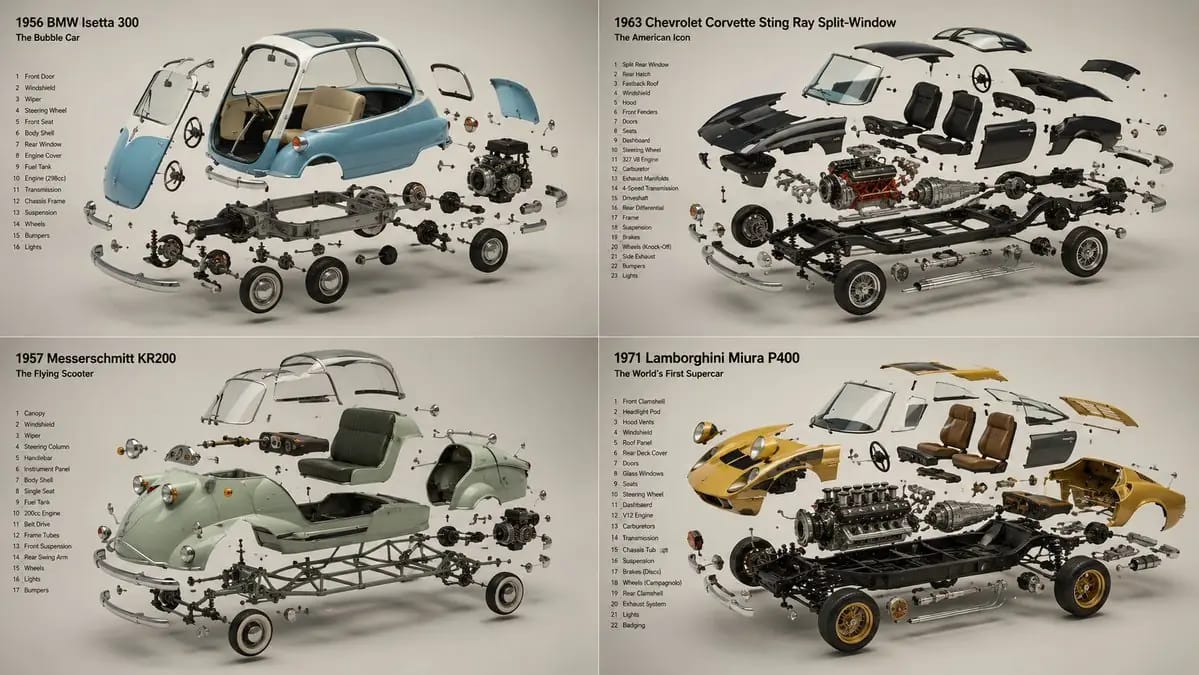
2x2 grid, 16:9, do this for 4 unusual classic cars that were
2x2 grid, 16:9, do this for 4 unusual classic cars that were real: INPUT ::= [Product] STEP_1 :: infer the components - every part or ingredient, separated and identified - the assembly order — components arrayed the way they combine -...
プロンプト
2x2 grid, 16:9, do this for 4 unusual classic cars that were real: INPUT ::= [Product] STEP_1 :: infer the components - every part or ingredient, separated and identified - the assembly order — components arrayed the way they combine - what is structural, what is active, what is the secret inside - the single element that reveals how it works STEP_2 :: infer the suspension - each component floating in its own plane, held in zero gravity - the constellation logic: exploded along one clean axis, or orbiting a centre - spacing that reads as deliberate, never scattered - the hero element largest and forward, the rest receding STEP_3 :: infer the reveal story - what's inside / how it's made / what it's made of - the cutaway or cross-sectioned component that proves the claim - raw ingredients rendered as beautifully as the finished product STEP_4 :: infer ground and air - seamless background, one hue, the components as the only subjects - soft directional light unifying every floating element - each piece casting an honest soft shadow despite hanging in air STEP_5 :: render spec - focus-stacked so every suspended element is sharp - studio product lighting, controlled reflections on each part - forbidden: visible wires, inconsistent scale, parts lit differently - material honesty on every component, raw and finished alike
このプロンプトの使い方
- 1プロンプトをそのままコピーし、好みのモデルまたは Ideart プロジェクトに貼り付けます。
- 2商品、被写体、対象者、スタイルの詳細を自分のコンテキストに置き換えます。
- 3まず基準結果を生成し、最も強い方向性をキャンペーン、画像セット、動画コンセプトへリミックスします。
このプロンプトから作成
画像 プロンプトを完成したクリエイティブプロジェクトに変換します。
プロンプトを保存し、参照画像やメモを追加して、Ideart に同じクリエイティブスレッドから次の制作ステップを形にさせます。