
Three-Panel AI Billboard Comparison
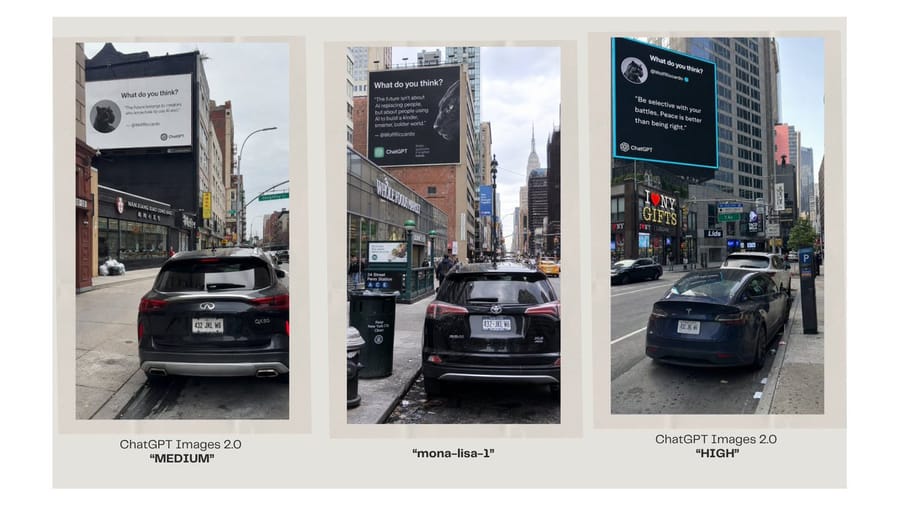
A wide comparison slide showing three photorealistic NYC billboard street scenes labeled as different image model outputs.
プロンプト
目的: 3つのAI生成された都市のビルボード写真を並べて、画像モデルの出力を比較しているかのように見せる、クリーンな比較グラフィックを作成する。

キャンバス: 温かみのあるオフホワイトの背景と十分な余白を備えた、横長16:9のプレゼンテーションスライド。キャンバス全体に、背の高い縦長の写真パネルを3つ均等に配置し、それぞれを淡いベージュのマット/枠で囲む。各パネルの下に、中央揃えのキャプションを追加する。

レイアウト: 縦長のストリート写真パネルをちょうど3つ、1列に配置する。パネル1を左、パネル2を中央、パネル3を右に置く。各パネルには、手前に駐車中の車、高い建物、歩道、交通標識、建物の高い位置に取り付けられた大きな正方形のビルボードがある、リアルなニューヨーク市の街並みを表示する。各パネルで街路の角度と照明を少しずつ変え、同じコンセプトに対する3つの別々のモデル出力のようにする。

パネルの詳細: 左パネル: 都市の通りに駐車された黒いSUVの後方からの眺めで、店舗や建物の方向を向いている。通りの上にある大きな白いビルボードには、小さな円形の動物アバター、見出し“What do you think?”、短い引用、小さなChatGPTブランディングを備えた、SNSの引用カードのような表示がある。中央パネル: 狭いマンハッタンの通りに駐車された黒いSUVで、遠くにEmpire State Buildingが見える。大きな暗いビルボードに白いテキスト、円形の動物アバター、ChatGPTブランディングがある。右パネル: より交通量の多い大通り沿いに駐車された黒いセダンで、“I ♥ NY GIFTS”などの店舗看板がある。明るいシアンの枠を持つ大きな黒いビルボードに、白い引用テキスト、円形の動物アバター、ChatGPTブランディングがある。

キャプションテキスト: パネルの下にちょうど3つのキャプションを使用する。左キャプション: 1行目に“ChatGPT Images 2.0”、2行目に太字の引用符で囲んだ“MEDIUM”。中央キャプション: 太字の引用符で囲んだ“mona-lisa-1”。右キャプション: 1行目に“ChatGPT Images 2.0”、2行目に太字の引用符で囲んだ“HIGH”。

カスタマイズ可能なテキストスロット: 比較ラベルは {argument name="left model label" default="ChatGPT Images 2.0"}、{argument name="center model label" default="mona-lisa-1"}、{argument name="right model label" default="ChatGPT Images 2.0"} と表示されるべきです。左の品質タグは {argument name="left quality tag" default="MEDIUM"}、右の品質タグは {argument name="right quality tag" default="HIGH"} とします。

ビジュアルスタイル: 各パネル内はフォトリアリスティックなスマートフォンによるストリート写真だが、洗練されたSNS比較スライドとして配置する。スライド全体はミニマルに保ち、3つの額入り画像とそのキャプション以外に装飾的なグラフィックを入れない。写真内のビルボードテキストは小さく、部分的に不完全でもよいが、ChatGPTロゴ付きのAI引用カード広告に明らかに似ている必要がある。このプロンプトの使い方
- 1プロンプトをそのままコピーし、好みのモデルまたは Ideart プロジェクトに貼り付けます。
- 2商品、被写体、対象者、スタイルの詳細を自分のコンテキストに置き換えます。
- 3まず基準結果を生成し、最も強い方向性をキャンペーン、画像セット、動画コンセプトへリミックスします。
このプロンプトから作成
画像 プロンプトを完成したクリエイティブプロジェクトに変換します。
プロンプトを保存し、参照画像やメモを追加して、Ideart に同じクリエイティブスレッドから次の制作ステップを形にさせます。