
AI Model Portrait Comparison
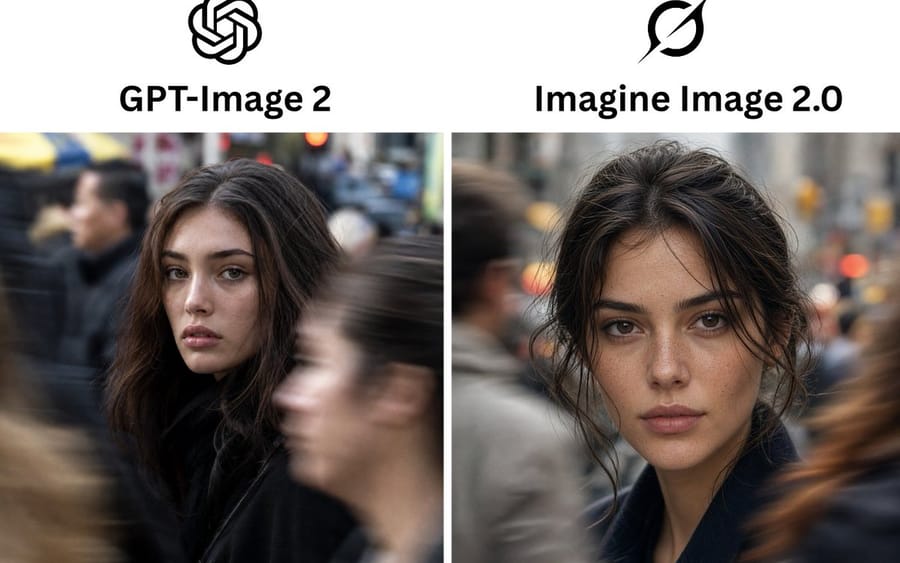
Creates a side-by-side social media comparison graphic of two AI image models using realistic urban portrait outputs.
プロンプト
目標: 2つのAI画像モデルの出力をリアルなストリートポートレートとして並べて比較する、クリーンな比較グラフィックを作成する。

キャンバス: 横長3:2のソーシャルメディア比較画像、白背景、高解像度。シンプルな2カラムレイアウトで、画像パネルの間に細い垂直の白い仕切りを配置する。

レイアウト: 上部ヘッダーエリアには、中央に配置された正確に2つの黒いロゴと、その下に正確に2つの太字のモデル名を配置する。左カラム: 見出し「{argument name="left model name" default="GPT-Image 2"}」の上にOpenAIの結び目ロゴ。右カラム: 見出し「{argument name="right model name" default="Imagine Image 2.0"}」の上にGrokスタイルの黒い円形スラッシュロゴ。ヘッダーの下には、左と右に正確に2つの等サイズの長方形の写真パネルを配置する。

写真内容: 両方のパネルは、混雑した街中の同じ若い女性の、映画的でフォトリアリスティックなアーバンストリートポートレートを表示する。彼女は{argument name="hair color" default="dark brown"}の髪、ナチュラルメイク、ふっくらとした眉、柔らかな唇、落ち着いたまっすぐな視線を持つ。暗いコートを着ている。背景は、動きにぼやけた歩行者がいる賑やかな街の歩道、浅い被写界深度、落ち着いたグレーの都会的なトーン、暖かいボケ味の信号機の光。

左の写真パネル: 女性は中央よりやや左に位置し、カメラに部分的に向きを変え、顔の周りにゆるやかなボリュームのある髪をまとっている。右側の前景を大きなぼやけた歩行者が横切り、下半身/体の一部を部分的に隠している。左側にも別のぼやけた人物が現れる。画像は、自然な不完全さとドキュメンタリー的なリアリズムを備えた、率直な実写カメラのストリート写真のように感じられるべきである。

右の写真パネル: 女性はカメラに近い中央に位置し、やや乱れた髪をゆるく後ろにまとめ、顔を縁取る毛束がある。顔のディテールはよりシャープで洗練されており、目に見える肌の質感とそばかすがある。ぼやけた歩行者が両側を通り過ぎ、左側にはグレーの人物、右側には暖かい茶色のモーションブラーがある。

ビジュアルスタイル: フォトリアリスティックなDSLRストリート写真、自然光、浅い被写界深度、50mmレンズの雰囲気、リアルな肌の質感、微妙なフィルム調のカラーグレーディング、顔の高いディテール、通り過ぎる歩行者の強いモーションブラー、イラストスタイルは避ける。

テキストと要素の数: 正確に2つのロゴ、正確に2つの見出し、正確に2つの写真パネル、正確に2つの主要な女性ポートレートを含める。追加のキャプション、スコア、ラベル、境界線、透かし、インターフェース要素を追加しない。このプロンプトの使い方
- 1プロンプトをそのままコピーし、好みのモデルまたは Ideart プロジェクトに貼り付けます。
- 2商品、被写体、対象者、スタイルの詳細を自分のコンテキストに置き換えます。
- 3まず基準結果を生成し、最も強い方向性をキャンペーン、画像セット、動画コンセプトへリミックスします。
このプロンプトから作成
画像 プロンプトを完成したクリエイティブプロジェクトに変換します。
プロンプトを保存し、参照画像やメモを追加して、Ideart に同じクリエイティブスレッドから次の制作ステップを形にさせます。