
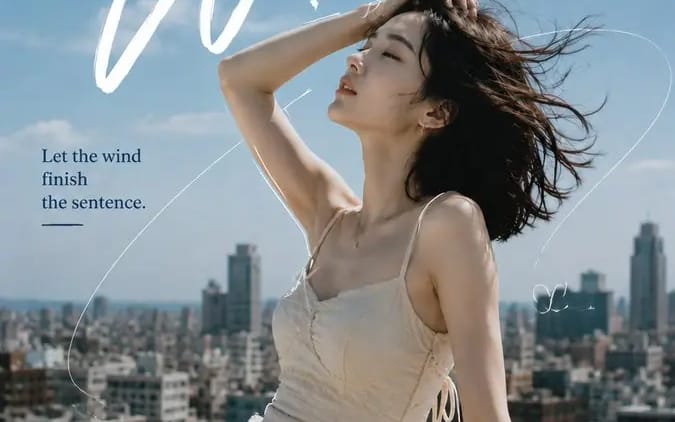
Create a 9:16 editorial portrait poster combining realistic
Create a 9:16 editorial portrait poster combining realistic photography, expressive typography, and minimal hand-drawn linework. Subject: [Person Outfit Pose] Scene: [Location] Mood: [Mood] Main title: [Headline] Secondary text: [Short...
プロンプト
Create a 9:16 editorial portrait poster combining realistic photography, expressive typography, and minimal hand-drawn linework.

Subject: [Person Outfit Pose]
Scene: [Location]
Mood: [Mood]
Main title: [Headline]
Secondary text: [Short Phrase]
Palette: [Colors]

Use a realistic portrait as the main visual, with natural skin texture, expressive eyes, and believable lighting.

Let the typography respond to the subject’s pose, body direction, hair movement, and negative space instead of using a fixed layout.

Add 1 strong headline, 1 secondary handwritten element, and 1 short supporting sentence.

Use only a few hand-drawn lines:
1 main flowing line connecting the composition
1–2 short lines partially following the subject’s silhouette
a few minimal doodles or symbols

Do not fully outline the person. Keep plenty of clean breathing space.

The drawn lines should feel connected to the scene:
wind trails, city routes, circular motion, light paths, etc.

Keep the overall balance around 70% photography / 30% graphic design.

Style: fashion editorial, independent magazine, cinematic portrait photography, refined typography, subtle film texture, clean composition, no dates, numbers, page codes, or excessive decorative text.
このプロンプトの使い方
- 1プロンプトをそのままコピーし、好みのモデルまたは Ideart プロジェクトに貼り付けます。
- 2商品、被写体、対象者、スタイルの詳細を自分のコンテキストに置き換えます。
- 3まず基準結果を生成し、最も強い方向性をキャンペーン、画像セット、動画コンセプトへリミックスします。
このプロンプトから作成
画像 プロンプトを完成したクリエイティブプロジェクトに変換します。
プロンプトを保存し、参照画像やメモを追加して、Ideart に同じクリエイティブスレッドから次の制作ステップを形にさせます。