
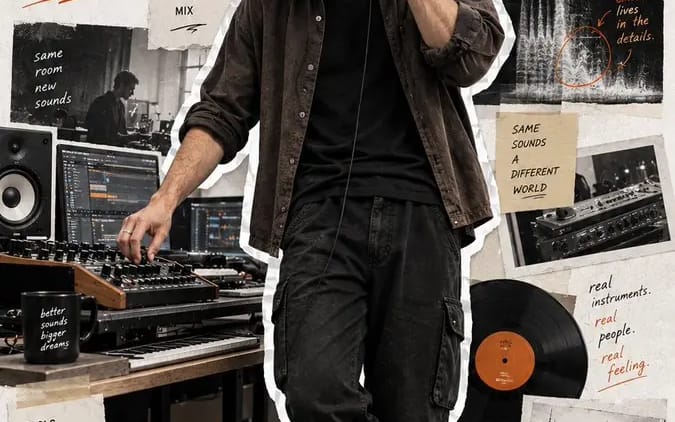
Create a 9:16 full-body editorial portrait poster
Create a 9:16 full-body editorial portrait poster for a modern [Profession]. Subject: [Subject] Outfit: [Outfit] Working action: [Working Action] Workflow: [Workflow] Tools: [Tools] Final output: [Final Output] Headline: [Headline]...
プロンプト
Create a 9:16 full-body editorial portrait poster for a modern [Profession].

Subject: [Subject]
Outfit: [Outfit]
Working action: [Working Action]
Workflow: [Workflow]
Tools: [Tools]
Final output: [Final Output]
Headline: [Headline]
Accent color: [Accent Color]

Make the realistic full-body portrait the dominant visual, occupying 75–85% of the poster height. Use natural body proportions, realistic skin and hair, authentic clothing materials, and believable workplace lighting. Show the subject naturally working, not posing or looking at the camera.

Cut out the full person with a clearly visible, slightly irregular white paper/sticker border.

Use a clean off-white textured paper background and surround the subject with restrained editorial collage elements showing:
1. their workflow,
2. tools and process,
3. the finished result.

Use torn-paper photos, tape, sketches, UI fragments, diagrams, handwritten notes, arrows, and short process phrases. Keep all supporting elements relevant to the profession and visually secondary to the portrait.

Add the large headline “[Headline]” and use [Accent Color] for typography and small graphic annotations.

Keep the overall result modern, realistic, stylish, and human—like a creator portrait, workflow story, and editorial scrapbook poster in one.

No numbering, page numbers, archive numbers, yellow vintage filter, cyberpunk effects, stiff corporate posing, CGI skin, cropped shoes, distorted hands, or overcrowded collage.
このプロンプトの使い方
- 1プロンプトをそのままコピーし、好みのモデルまたは Ideart プロジェクトに貼り付けます。
- 2商品、被写体、対象者、スタイルの詳細を自分のコンテキストに置き換えます。
- 3まず基準結果を生成し、最も強い方向性をキャンペーン、画像セット、動画コンセプトへリミックスします。
このプロンプトから作成
画像 プロンプトを完成したクリエイティブプロジェクトに変換します。
プロンプトを保存し、参照画像やメモを追加して、Ideart に同じクリエイティブスレッドから次の制作ステップを形にさせます。