
画像AI
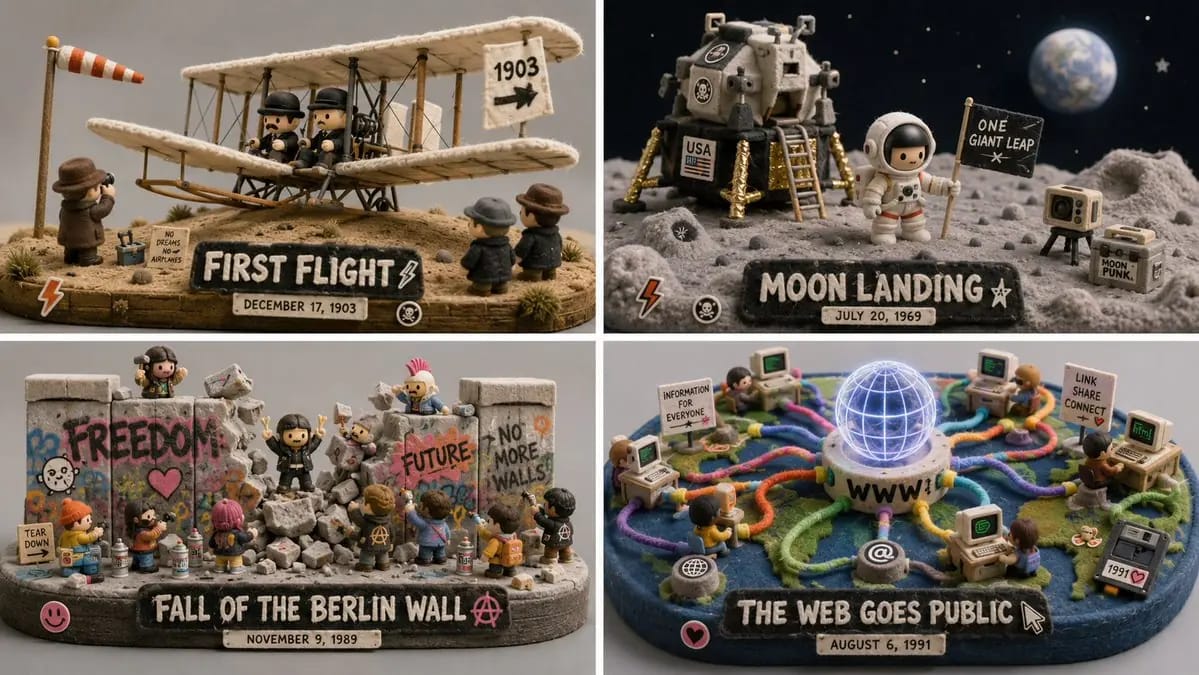
Do this for 4 unforgettable days in human history 16:9
do this for 4 unforgettable days in human history 16:9, 2x2 grid: CONCEPT ANCHOR 1: "Stylized 3D animated rebel character — expressive oversized eyes, strong attitude pose, streetwear details, colorful hair, soft cinematic toy-like...
プロンプト
do this for 4 unforgettable days in human history 16:9, 2x2 grid: CONCEPT ANCHOR 1: "Stylized 3D animated rebel character — expressive oversized eyes, strong attitude pose, streetwear details, colorful hair, soft cinematic toy-like rendering" :: CONCEPT ANCHOR 2: "Fuzzy green minimalist toy-world — mossy texture, rounded trees, soft felt surfaces, tiny houses, gentle surreal creatures, quiet gray background" :: CONCEPT ANCHOR 3: "Isometric miniature scene — small props, tiny environmental storytelling, dollhouse-scale staging, clean studio lighting" INSTRUCTION: Find the exact visual center of these three concepts. Ignore the literal character, trash can, animals, and room references. Extract only the style and material logic. Render [Subject] as a soft but rebellious designer-toy diorama. STYLE RULES: - Convert the subject into a stylized 3D character, object, creature, or environment with clear attitude and expressive shape language. - Use soft felt, moss, knitted fiber, fuzzy flocking, matte clay, and vinyl-like surfaces. - Add small street or everyday details: stickers, scuffs, props, miniature objects, signs, containers, tools, or personal items inferred from the subject. - Keep the world minimal and gallery-like, with calm gray or muted pastel background. - Use bright accent colors only where they matter: hair-like forms, graffiti-like marks, symbols, accessories, tiny props. - Blend softness with rebellion: cute surface texture, but confident pose and graphic edge. - Use shallow studio lighting and clean product-shot presentation. OUTPUT: A collectible fuzzy designer-toy scene where [Subject] becomes soft, expressive, slightly punk, and highly tactile.
このプロンプトの使い方
- 1プロンプトをそのままコピーし、好みのモデルまたは Ideart プロジェクトに貼り付けます。
- 2商品、被写体、対象者、スタイルの詳細を自分のコンテキストに置き換えます。
- 3まず基準結果を生成し、最も強い方向性をキャンペーン、画像セット、動画コンセプトへリミックスします。
このプロンプトから作成
画像 プロンプトを完成したクリエイティブプロジェクトに変換します。
プロンプトを保存し、参照画像やメモを追加して、Ideart に同じクリエイティブスレッドから次の制作ステップを形にさせます。