
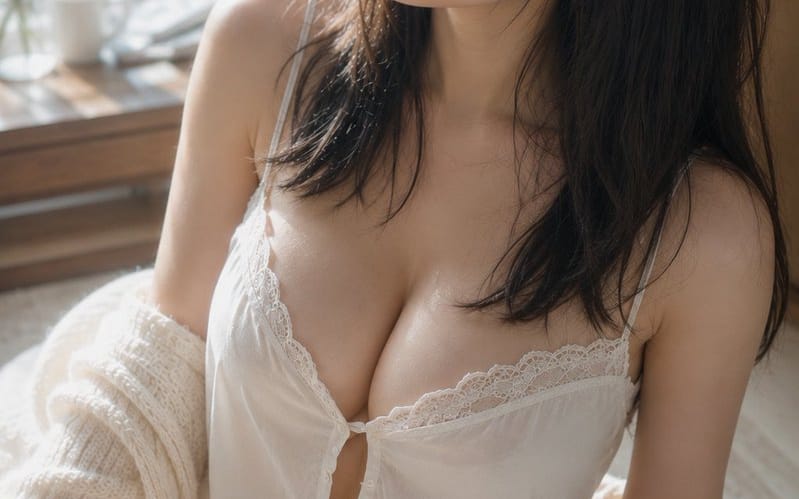
朝の日差しの中のルームウェアポートレート
窓辺の柔らかな自然光の中、ルームウェアを着た女性の静かな朝のシーンを捉える、詳細なシネマティックなポートレートプロンプト。リアルな照明と質感を表現します。
プロンプト
Subject: {argument name="theme" default="濡れた髪に差す朝の光"}

Subject: 明るい窓辺のラグに座った{argument name="person" default="白いルームウェアを着た成人女性"}の縦長ポートレート。被写体は画面中央から右側に大きく配置され、頭頂から太ももまで映る。上半身が画面の約3分の2を占め、背景のソフトな余白と左側の窓が残る。

Character/Expression: 自然な黒のセミロングヘア。入浴後のように少し湿った細い毛束が頬や首に沿い、前髪が額にかかる。頭は画面左上にわずかに傾け、窓の外を見つめる静かな視線。リラックスした目元、わずかに開いた唇、眠気の残る落ち着いた表情。メイクは淡いベージュとピンクを基調とした最小限で、毛穴や産毛のある自然な肌を見せる。

Clothing/Pose: 細い肩紐と繊細なレースの白いキャミソールとショートパンツ。胸元に小さなボタンと柔らかなギャザーがあり、軽い素材が重力に従って自然に落ちる。クリーム色の太めのニットカーディガンが肩からずり落ち、肘や前腕にゆるく掛かる。体は左にわずかにひねり、片足を前に曲げて座り、肩の高さがわずかにずれた自然な姿勢。

Background/Light: 左側に大きな窓。窓の外には朝日に照らされた緑の葉が柔らかなボケとなって広がる。窓辺の木製テーブルには白いカップ、小さなガラスの花瓶、細い枝が控えめに置かれている。主光源は左上の窓から差し込む暖かい自然光。頬、鼻筋、鎖骨、肩、腕、太ももにソフトなハイライトを作り、髪の右側や部屋の奥は優しい影に沈む。白い布や床からの淡い反射光が跳ね返る。

Composition/Camera: 縦2:3。やや高い位置から見下ろすクローズアップ。顔を上部中央、胸を中央、曲げた脚を左下に配置した三角形構図。窓側の余白は視線の方向を強調し、背景は強くぼかす。50mm相当、ほぼ開放に近い浅い深度。焦点は目と顔にあり、前景の脚や背景の窓はソフトにぼける。

Texture/Style: 自然光のみで撮影したフォトリアルな室内ポートレート。明るいアイボリーと淡い木目を基調とし、健康的な肌色と窓の外の緑を微妙なアクセントカラーに。過度に平滑化せず、肌の質感、産毛、濡れた髪の束感、レースやニットの繊維を精密に描写。優雅なフィルム写真のように低コントラストでソフトな階調。

Negative: 未成年に見える人物、不自然な顔、不自然な視線、非対称な目、余分な指、指の欠損、四肢の融合、崩れた肩や関節、食い込む衣服、不自然な布の透過、重力に逆らう髪や衣服、光源と矛盾する影、過度な肌補正、プラスチックのような肌、テキスト、ロゴ、透かし。このプロンプトの使い方
- 1プロンプトをそのままコピーし、好みのモデルまたは Ideart プロジェクトに貼り付けます。
- 2商品、被写体、対象者、スタイルの詳細を自分のコンテキストに置き換えます。
- 3まず基準結果を生成し、最も強い方向性をキャンペーン、画像セット、動画コンセプトへリミックスします。
このプロンプトから作成
画像 プロンプトを完成したクリエイティブプロジェクトに変換します。
プロンプトを保存し、参照画像やメモを追加して、Ideart に同じクリエイティブスレッドから次の制作ステップを形にさせます。